
Zobirez 420W 10-Port Fast USB Charging Station for Multiple Devices
4.5Editor score
Ten charging ports
GaN fast technology
Includes cables
This guide compares the top charging stations for Chromebooks designed for classrooms and offices, evaluating port count, build quality, and organization
Finding the right charging station for Chromebooks is essential for schools and offices managing multiple devices daily. A good station keeps devices organized, prevents cable clutter, and ensures safe power delivery without overheating issues.
We compared ten leading charging stations based on slot capacity, power strip integration, build durability, and ease of use. Our analysis focuses on models that handle various Chromebook sizes while maintaining a tidy workspace environment.
Each pick highlights specific strengths like mobile design, open access, or heavy-duty construction to suit different needs. Remember that product availability and specific features may change, so verify details before making your final purchase decision.
4.5Editor score

4.7Editor score
The following table provides a side-by-side overview of key specifications for each charging station to help you quickly identify the best fit for your specific classroom or office setup requirements.


The POCHAR 8-Device Universal AC Laptop Charging Station holds a strong 4.7 rating from users who need reliable device storage for classrooms. It stands out for its ability to handle larger laptops up to 14 inches while offering immediate usability with no assembly required.
We may earn a commission when you buy through this link, at no additional cost to you.
Its wide-angle slots are designed specifically for Chromebooks and tablets up to 1.4 inches thick ensuring devices fit securely without wobbling. The integrated power strip includes surge protection which is vital for schools to prevent damage from voltage spikes during charging cycles.
While the unit is bulkier than smaller options it provides excellent organization for shared spaces like libraries or teacher workstations. The trade-off in space is acceptable given the convenience of having a fully functional station ready straight from the packaging.
We recommend this for educators needing a durable setup that minimizes setup time. It is ideal for offices or schools where multiple students need quick access to powered devices during class transitions.
The no assembly design saves valuable time for IT staff setting up new classrooms.
Built-in surge protection safeguards expensive laptops and tablets from electrical damage.
We may earn a commission when you buy through this link, at no additional cost to you.
This charging station offers a mix of AC and USB ports allowing flexibility for different device types. It holds up to 10 devices and includes surge protection making it a robust choice for busy educational environments.
We may earn a commission when you buy through this link, at no additional cost to you.
The integrated cable routing system helps reduce clutter on desks which is crucial for keeping workspaces safe. Users appreciate the open rack design which allows quick access without needing to open cabinet doors or doors.
However managing multiple cables can be tricky initially requiring careful planning for optimal setup. The weight of the unit means it is best placed in a fixed location rather than moved frequently between rooms.
Buyers should choose this if they need mixed power options for phones and laptops. It works well for reception areas or training rooms where diverse devices need simultaneous charging.
Six AC and four USB ports accommodate various chargers and devices.
Routing channels keep cords organized and reduce tripping hazards.
We may earn a commission when you buy through this link, at no additional cost to you.
This open rack supports 14 devices simultaneously with a design that prioritizes heat dissipation. It features adjustable leveling feet making it suitable for uneven floors in older classrooms or conference rooms.
We may earn a commission when you buy through this link, at no additional cost to you.
The sturdy steel construction ensures stability even when fully loaded which is essential for high-traffic settings. Users report that the open frame prevents overheating significantly better than enclosed units.
It does not include a power strip so you must provide your own adapters for each slot. This extra step might deter some buyers but the flexibility allows you to choose your own power distribution.
Select this for large labs needing maximum slots in minimal space. It is an economical choice for schools that already have power strips and need storage.
Open frame allows natural ventilation preventing overheating during long charging.
Adjustable feet ensure stability on uneven classroom floors.
We may earn a commission when you buy through this link, at no additional cost to you.
This model balances cost with functionality by including a power strip and soft padding to protect devices. It is designed for desktop use in schools where space on the desk is limited.
We may earn a commission when you buy through this link, at no additional cost to you.
The removable dividers allow customization for different device sizes which is helpful for mixed fleets of Chromebooks and tablets. Padded shelves prevent scratches ensuring your devices remain in good condition.
Assembly is required which may add setup time compared to ready-to-use options. However the included safety certifications and protective features make it a practical choice for budget-conscious buyers.
Ideal for small classrooms needing eight secure slots. It works well for computer labs or study halls where devices stay in place.
Soft pads and dividers prevent accidental scratches during storage.
Removable dividers adapt the station to different device dimensions.
We may earn a commission when you buy through this link, at no additional cost to you.
This unit offers an impressive 20 ports with a mix of USB-A and USB-C to charge many devices. The inclusion of ten cables makes it a complete solution for desks or nightstands.
We may earn a commission when you buy through this link, at no additional cost to you.
GaN technology ensures efficient charging with built-in safety checks to prevent overheating. The slots are sturdy enough to hold tablets or phones upright without tipping over easily.
It may not accommodate large laptops so it is better for tablets and phones. The short cables help keep things neat but might limit placement flexibility.
Perfect for families or offices needing many phone and tablet chargers. It saves outlets and money compared to buying individual chargers.
Ten included cables eliminate the need to source separate chargers.
GaN chips and monitoring protect devices from overcharging or short circuits.
We may earn a commission when you buy through this link, at no additional cost to you.
This mobile cart allows moving 20 devices between rooms easily with locking casters for stability. It is built for high-traffic schools requiring flexible storage solutions.
We may earn a commission when you buy through this link, at no additional cost to you.
Adjustable dividers fit various laptop sizes up to 15.6 inches ensuring a snug fit. The rear cable management system keeps cords tidy while the open frame aids cooling.
The price is higher but the mobility and capacity justify the cost for district-wide needs. It fits large devices without scratching thanks to durable dividers.
Ideal for mobile computer labs or large training centers. Use this when devices must be moved securely between different classrooms.
Rolling casters allow easy transport between rooms.
Twenty slots allow bulk storage for large fleets of Chromebooks.
We may earn a commission when you buy through this link, at no additional cost to you.
This station features a steel frame ensuring it withstands daily use in hospitals or offices. It includes a 10-outlet power strip and clips to keep cords organized.
We may earn a commission when you buy through this link, at no additional cost to you.
The open frame design reduces overheating risks while the storage tray holds accessories. It is designed for devices up to 14 inches which covers most standard Chromebooks.
The unit is heavy which provides stability but makes relocation difficult. The fixed width may limit very wide devices but works well for most laptops.
Choose this for office workstations needing a secure rack. It is durable enough for shared environments where devices are used daily.
Heavy-duty steel ensures long life in busy areas.
Integrated clips and tray reduce clutter on desks.
We may earn a commission when you buy through this link, at no additional cost to you.
Belkin is known for reliable power solutions and this station fits 10 devices with surge protection. It can be mounted to carts which saves floor space in tight classrooms.
We may earn a commission when you buy through this link, at no additional cost to you.
It fits devices in cases up to 1.18 inches thick which is useful for protective gear. The label space allows easy identification of student devices.
The price is higher than generic options and the design is older. But the warranty gives confidence in long-term reliability for schools.
Best for schools needing branded reliability. Use this for K-12 classrooms requiring secure and safe device storage.
Secure to AV carts to save floor space.
Label space helps organize student device assignments.
We may earn a commission when you buy through this link, at no additional cost to you.
This station uses GaN technology for fast 65W charging on laptops and other devices. It includes a pack of mixed cables so you can start using it right away.
We may earn a commission when you buy through this link, at no additional cost to you.
The one-piece slots are robust preventing breakage of dividers over time. Rubber pads protect your desk and keep the unit steady during use.
Cables are short which reduces mess but limits placement. Larger Chromebooks may not fit but it works well for tablets.
Great for home offices or small workspaces. Buy this if you need fast charging for multiple smaller devices.
Sturdy slots prevent breakage unlike removable divider models.
High-speed ports allow quick top-ups for phones and laptops.
We may earn a commission when you buy through this link, at no additional cost to you.
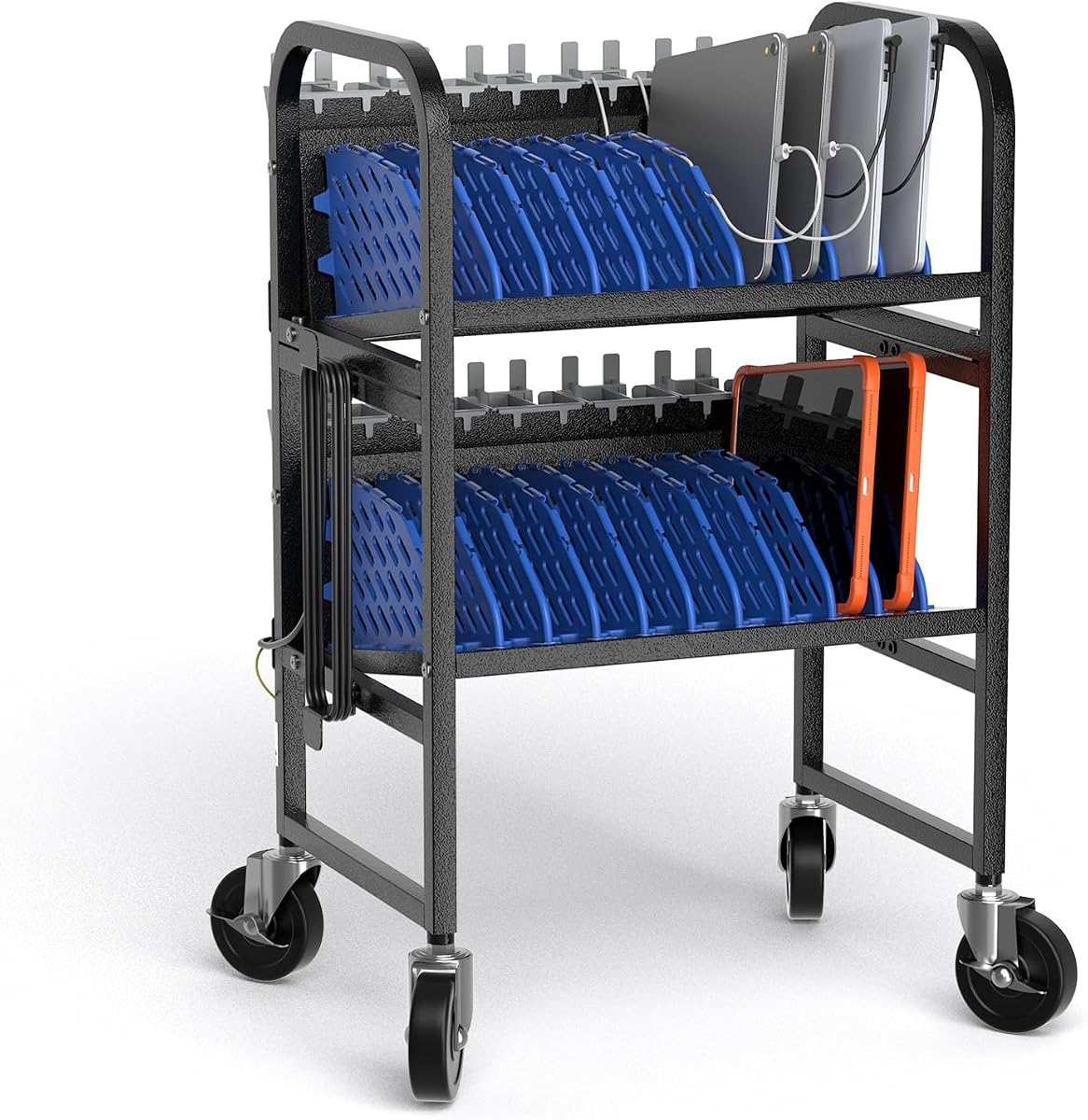
This cart offers a budget-friendly way to move ten devices around your office or school. It includes locking wheels to keep the cart steady during charging.
We may earn a commission when you buy through this link, at no additional cost to you.
Tool-free assembly makes setup quick and the steel build withstands daily use. The open design helps airflow to keep devices cool while charging.
The finish is basic but functional for school environments. It is slightly narrower so measure your laptops before purchase.
Ideal for teachers needing a mobile charging solution. Use this for computer labs or libraries to transport devices easily.
Low price allows easy mobility without high costs.
Tool-free assembly gets you started faster.
We may earn a commission when you buy through this link, at no additional cost to you.
Selecting the right charging station depends on your space capacity and security needs. Consider these key factors to match a station to your specific environment.
The number of slots determines how many devices you can charge at once. If you manage a classroom fleet ensure the station supports the total number of Chromebooks plus extras. For smaller offices ten slots may suffice but labs may need twenty or more.
Choose a station with enough slots to handle your daily load without crowding.
Many stations include a built-in power strip which reduces the need for extra cords. Surge protection is vital for schools to protect expensive devices from electrical spikes. Verify the outlet count matches your device count to avoid needing extra power strips.
Look for units with built-in strips to simplify setup and ensure safety.
Chromebooks vary in size so check the maximum width and thickness supported. Some units accommodate cases which is useful if students use protective covers. Adjustable dividers provide flexibility for mixed fleets of tablets and laptops.
Ensure the slots fit your devices including any cases to avoid damage.
High-traffic environments require steel or heavy-duty plastic to withstand daily use. Look for reinforced corners and robust frames to prevent tipping. Units with leveling feet are better for uneven classroom floors.
Prioritize durable materials to ensure long-term reliability in busy spaces.
Tangled cables create safety hazards and clutter. Stations with clips or channels keep cords organized and tidy. Integrated power outlets near the slots reduce the need for long extension cords.
Select a model with organized cable routing to maintain a safe workspace.
If you move devices between rooms a mobile cart with casters is ideal. Locking wheels provide stability during charging to prevent movement. Fixed stations are better for permanent locations where space is not an issue.
Decide on mobility based on whether you move devices daily.
Overheating can damage batteries so open-frame designs help airflow. Stations with GaN technology or cooling features offer better safety. Always look for certifications like UL to ensure safe power delivery.
Pick units with good ventilation to prevent overheating during long sessions.
Some stations require assembly while others come ready to use. If you need immediate deployment choose no-assembly models. Easy-to-use dividers help customize the layout quickly.
Consider setup time when choosing between ready-to-use and assembly models.
Place the station on a flat stable surface with enough clearance for ventilation. Plug the power strip into a dedicated outlet to ensure adequate power flow. Organize cables using the provided clips before connecting devices to keep the area tidy.
Insert Chromebooks gently into the slots ensuring they sit securely. Check that the charging indicators show the devices are receiving power. If the station has dividers adjust them to fit the devices snugly without forcing them.
Regularly dust the station with a soft cloth to prevent buildup. Inspect cables for wear and replace them if fraying occurs. Clean the slots occasionally to remove debris that might scratch devices.
Not all models include power strips. Some are designed as racks where you connect your own adapters to outlets. Always check the product details to confirm if a power strip is included or if you need to source your own.
Yes many models support devices with cases. Look for units that specify maximum thickness including the case. If you use protective cases verify the slot width allows for them to avoid tight fitting.
Mobile carts typically have locking casters that keep them stable when parked. Always lock the wheels before charging to prevent movement. This ensures the devices remain secure and prevents cable tugging.
Use the integrated cable clips or channels provided by the station. Route cords neatly along the back or sides to minimize tangles. Shorter cables help reduce clutter and improve safety on desks.
Choose a station with an open frame for better airflow. Do not stack devices on top of each other. Ensure the room is well-ventilated and avoid placing the unit in direct sunlight.
Yes many stations are compact enough for home desks. Smaller models with fewer slots work well for personal setups. Choose a unit that fits your available desk space and device count.
Use a soft dry cloth to wipe down the slots. Avoid water or cleaning solutions that could damage electronics. Remove devices before cleaning to prevent accidental spills.
Check the specifications for width and thickness limits. If it does not fit you may need a station with adjustable dividers. Consider measuring your device with case to ensure compatibility.
We recommend the POCHAR 8-Device Universal AC Laptop Charging Station for schools needing a reliable ready-to-use solution. It balances capacity with durability and includes surge protection for safety.
For those with tight budgets the Zobirez 420W 10-Port Fast USB Charging Station offers excellent value with GaN technology and included cables. It works well for smaller offices needing multiple phone and tablet chargers.
Always check current availability and confirm dimensions before buying. These stations make managing fleets easier and ensure your devices are ready when needed.