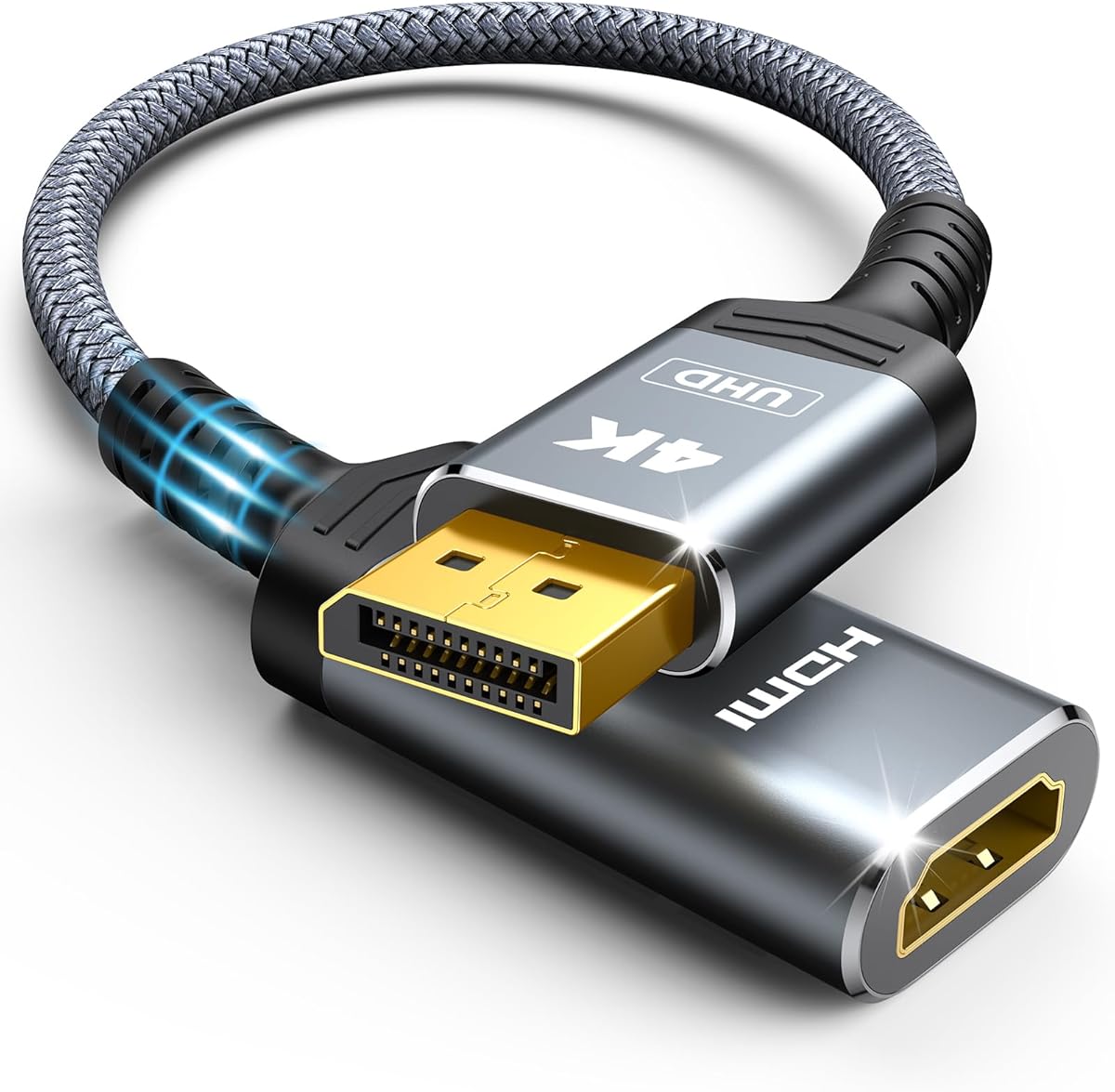
Highwings 4K DisplayPort to HDMI Adapter
4.6Editor score
4K UHD resolution support
Durable nylon braided design
Gold-plated ports for corrosion resistance
Compare the top HDMI to Displayport Converter options for 2026. This guide reviews passive and active adapters for video resolution, compatibility, and signal
Finding the right adapter to connect your HDMI source to a Displayport monitor can be challenging due to signal directionality. This guide explores the best HDMI to Displayport Converter solutions available in November 2026 to ensure seamless video transmission.
We evaluated ten leading models based on resolution support, build quality, and real-world compatibility with gaming consoles and computers. Our analysis focuses on active converters that handle the necessary signal conversion for reliable performance.
Each product pick highlights key features, pros, and cons to help you match the adapter to your specific display needs. Please note that availability and specifications may change over time, so verify details before purchasing.
4.6Editor score

4.4Editor score

5.0Editor score
The following table compares all ten selected HDMI to Displayport Converter models side by side. It highlights critical specifications such as resolution limits, directionality, and specific use cases to help you make an informed decision.



The Highwings 4K DisplayPort to HDMI Adapter offers exceptional value for users needing to connect a DP-enabled computer to an HDMI monitor. With a solid rating of 4.6 stars, it delivers reliable performance for standard office and home entertainment setups.
We may earn a commission when you buy through this link, at no additional cost to you.
Its standout quality lies in the durable design featuring military-grade tensile nylon and 24K gold-plated ports. This construction ensures the adapter withstands repeated flexing and resists corrosion, making it a long-lasting choice for daily use.
The adapter supports 4K UHD resolution at 30Hz, which is sufficient for most streaming and general computing tasks. However, it is strictly a passive DP to HDMI adapter, meaning it cannot convert HDMI signals to DisplayPort for gaming consoles.
If you have a laptop or desktop with a DisplayPort output and need to mirror or extend your screen to a TV, this is an excellent budget pick. It ensures synchronized audio and video for an immersive experience without breaking the bank.
The nylon braided exterior and gold-plated connectors ensure this adapter resists wear and tear over time.
Supports up to 4K@30Hz with backward compatibility for 1440P and 1080P displays.
We may earn a commission when you buy through this link, at no additional cost to you.
The BENFEI 4K DisplayPort to HDMI Adapter is designed for users who prioritize a secure and stable connection. It receives high praise for its compact form factor, making it easy to carry in a laptop bag for presentations on the go.
We may earn a commission when you buy through this link, at no additional cost to you.
Key strengths include the latch-enabled display port connector which prevents accidental disconnection during use. This feature adds a layer of reliability that is often missing in cheaper adapters, ensuring your screen stays connected throughout your meeting.
While it supports 4K at 30Hz, the passive nature of the converter means it relies on your source device to handle the signal processing. Users should ensure their laptop supports DisplayPort Alternate Mode for best results.
This adapter is ideal for business professionals or students connecting to projectors or monitors. The 18-month warranty provides additional peace of mind, and the friendly customer service team is available to resolve any setup issues quickly.
Latches on the DisplayPort connector ensure a tight fit that prevents accidental drops.
The lightweight design allows you to tuck it into a pocket for travel.
We may earn a commission when you buy through this link, at no additional cost to you.
The Cable Matters HDMI to DisplayPort Adapter stands out because it performs the difficult task of converting HDMI signals to DisplayPort. Most adapters work only one way, but this active solution allows you to connect HDMI laptops to DP monitors.
We may earn a commission when you buy through this link, at no additional cost to you.
Its key strength is the included USB power cable, which ensures stable performance even with lower-power HDMI sources. This is critical for higher resolutions like 4K where signal strength must be maintained to prevent flickering or dropout.
Trade-offs include a higher price compared to passive adapters, but this is justified by the active chip required for the conversion. It is not designed for high-refresh gaming, but it is perfect for office workstations and home desktops.
Choose this adapter if you have a laptop with HDMI output and a monitor with only DisplayPort input. It solves a niche but common connectivity problem, enabling you to mirror or extend your screen reliably.
Uses an internal chip to convert HDMI TMDS signals to DisplayPort digital signals.
Includes a USB power cable to ensure the adapter gets enough power to function.
We may earn a commission when you buy through this link, at no additional cost to you.
This HDMI to DisplayPort Adapter from Answin is a premium choice for gamers and power users who need high refresh rates. It boasts a perfect 5.0 rating, reflecting its ability to deliver stable high-resolution video from HDMI sources to DP monitors.
We may earn a commission when you buy through this link, at no additional cost to you.
The standout feature is its support for 4K at 60Hz and 144Hz at 2K, which is rare for HDMI to DP converters. This makes it significantly better for gaming on a PC or console connected to a high-end DisplayPort monitor.
As an active adapter, it requires a USB power connection to maintain this high bandwidth. While this adds a cable to your setup, it ensures the signal remains lag-free and clear during intense gaming sessions or streaming.
If you play on Xbox or PS5 and want to connect to a DP monitor, this is the top recommendation. The clear viewing experience is superior to wireless casting, making it a vital tool for serious gamers.
Supports 4K at 60Hz and 2K at 144Hz for smooth motion in games and video.
Works with devices like Xbox and PS5 to connect to DP displays.
We may earn a commission when you buy through this link, at no additional cost to you.
The Moread 4K DisplayPort to HDMI Adapter is designed for reliability with a five-year warranty that shows the manufacturer stands behind its quality. It is a standard passive adapter, perfect for connecting a PC to a TV or monitor easily.
We may earn a commission when you buy through this link, at no additional cost to you.
Its key strengths are the reinforced ABS housing and strain relief features that protect the adapter from bending and breaking. This durability is great for users who move their computers frequently between home and office.
Users can enjoy uncompressed digital 7.1 surround sound, making it a solid choice for home theater setups. However, it is limited to 4K at 30Hz, which is sufficient for movies but not for high-speed gaming.
This adapter is a safe bet for everyday use where long-term reliability is a priority. The five-year warranty means you can use it for years without worrying about replacement costs or failure.
Strain relief and reinforced housing prevent damage from frequent plugging.
Supports uncompressed 7.1 surround sound for an immersive audio experience.
We may earn a commission when you buy through this link, at no additional cost to you.
This HDMI to DisplayPort Adapter provides high-speed video transmission up to 4K at 60Hz, which is essential for smooth gaming on modern consoles. It uses an active converter to handle the complex signal translation required.
We may earn a commission when you buy through this link, at no additional cost to you.
The aluminum housing is not just for looks; it acts as a heat sink to dissipate heat generated during operation. This design choice improves reliability when streaming high-quality video over long periods.
While it supports high resolutions, users should note that it is not compatible with some VR headsets due to specific signal requirements. It is primarily designed for monitors and projectors rather than specialized VR gear.
If you need to connect a game console to a DP monitor without losing refresh rate, this is a strong candidate. Just ensure you provide the necessary power connection to maintain the 60Hz performance.
Delivers 4K at 60Hz for fluid motion in games and action movies.
The aluminum case helps keep the adapter cool during heavy use.
We may earn a commission when you buy through this link, at no additional cost to you.
The UGREEN 4K DisplayPort to HDMI Adapter 2-Pack offers great value by providing two adapters for the price of one. This is ideal for offices or homes with multiple setups needing DP to HDMI connections.
We may earn a commission when you buy through this link, at no additional cost to you.
Constructed from aluminum, these adapters are lightweight and resist corrosion effectively. The no-buckle design prevents damage to the adapter during removal, ensuring the connector stays intact over time.
Since they are passive, they work best with laptops and desktops that have robust DP ports. They are not suitable for connecting gaming consoles, so choose these only for PC to TV use cases.
With two adapters in the box, you can keep one at your desk and one in your bag for travel. This flexibility makes them a practical choice for remote workers who need reliable video connections everywhere.
Get two adapters to cover multiple workstations or to have a backup ready.
The metal construction ensures these adapters last longer than plastic alternatives.
We may earn a commission when you buy through this link, at no additional cost to you.
This UGREEN DisplayPort to HDMI cable is designed for compact setups where a short connection is preferred. At just 0.66 feet, it keeps your workspace neat and avoids excess cable clutter on your desk.
We may earn a commission when you buy through this link, at no additional cost to you.
The braided sheath and strain relief design ensure the cable can bend without damaging the internal conductors. This makes it durable for frequent plugging and unplugging in tight spaces.
It supports high-quality video up to 4K at 30Hz, providing a clear and sharp image for general use. The aluminum housing aids in heat dissipation, which is vital for maintaining signal stability.
If you need to connect a laptop to a nearby monitor without a long cable, this is perfect. It is a reliable and cost-effective solution for maintaining a clean and organized workspace.
The short design prevents cable clutter and keeps your desk looking tidy.
Braided sheath allows easy bending without risk of internal damage.
We may earn a commission when you buy through this link, at no additional cost to you.
This BENFEI HDMI to DisplayPort Adapter is designed for users who need to connect gaming consoles to DP monitors. It supports high refresh rates like 144Hz at 2K, making it suitable for gaming enthusiasts.
We may earn a commission when you buy through this link, at no additional cost to you.
The aluminum alloy casing provides excellent heat insulation to keep the adapter cool during long gaming sessions. This thermal management is crucial for maintaining stable signal quality under heavy load.
As an active converter, it requires an external power supply to function correctly. This is a small trade-off for the ability to use modern gaming hardware with older DisplayPort monitors.
If you have a PS5 or Xbox One and want to game on a PC monitor, this adapter bridges the gap effectively. It ensures you get the best visual quality your console can provide.
Supports 144Hz and 165Hz refresh rates for smooth gaming experiences.
Aluminum casing helps dissipate heat to prevent overheating during use.
We may earn a commission when you buy through this link, at no additional cost to you.
The BENFEI HDMI to DisplayPort Adapter provides a stable bridge between HDMI sources and DisplayPort monitors. With support for up to 4K at 60Hz, it is a strong choice for high-definition video streaming.
We may earn a commission when you buy through this link, at no additional cost to you.
The built-in advanced IC chip ensures signal stability, which is critical for preventing flickering or black screens. This internal hardware allows it to handle the complex conversion needed for modern displays.
Its compact design makes it easy to carry in a laptop bag for presentations. It is a practical solution for users who need to adapt their connection on the fly.
If you need to connect a laptop to a projector or monitor that only has DisplayPort, this adapter works well. Just ensure you have a power source nearby for the adapter to function correctly.
Advanced IC chip ensures smooth video transmission without signal loss.
Compact design fits easily in bags for mobile presentations and setups.
We may earn a commission when you buy through this link, at no additional cost to you.
Choosing the right HDMI to Displayport Converter depends on your specific hardware and use case. This guide breaks down the essential factors to ensure you buy a compatible adapter.
The most critical factor is the direction of signal flow. HDMI to DisplayPort adapters are active and require extra power to convert HDMI to DP. DP to HDMI adapters are usually passive and do not need power. Always check your source device ports before buying.
Always confirm you need HDMI to DP and not the reverse. Many users buy the wrong direction due to confusion.
Active converters contain a chip to change the signal type, which is needed for HDMI to DP. Passive adapters only change the physical plug and work for DP to HDMI. Active ones usually need USB power for stability.
Active is required for HDMI to DP. Passive works for DP to HDMI but may struggle with high resolutions.
Look for support for 4K resolution if you need high-definition video. Refresh rate is also important for gaming; 60Hz is standard but 144Hz is better for smooth motion. Check the max supported Hz in the product specs.
Prioritize 4K at 60Hz for gaming to avoid screen tearing. Verify the Hz limit before purchasing.
Active adapters often need a USB power cable to function correctly. Without it, you might see flickering or no signal. Ensure you have a USB port available on your device to provide this extra power.
Plan for a USB power source if using an active HDMI to DP adapter to avoid instability.
Look for connectors with gold plating to prevent corrosion. A braided or nylon exterior protects the cable from fraying and damage. Metal housing helps with heat dissipation during long use.
Choose adapters with gold-plated connectors and braided cables for long-term reliability.
Check if the adapter works with your specific devices like PlayStation, Xbox, or laptops. Some adapters do not support gaming consoles due to HDCP restrictions. Ensure compatibility with your source before buying.
Read product notes to ensure your laptop or console is supported by the adapter.
Standard adapters are often short to avoid clutter, but some may be longer. Ensure the length fits your desk setup without stretching. Too much tension can damage the connector over time.
Measure your desk distance to choose an adapter with the right length.
A good warranty shows confidence in the product. Look for at least an 18-month warranty period. Reliable customer support is also key if you face setup issues during installation.
Pick brands that offer clear warranties and accessible support for peace of mind.
Start by connecting the adapter to your source device. If using an HDMI to DisplayPort adapter, plug the HDMI end into your computer or console first. Then connect the DisplayPort end to your monitor using a DP cable.
If your adapter has a USB power cable, connect it to a free USB port on your device or a power adapter. This ensures stable signal transmission especially for higher resolutions like 4K. Without it you might experience flickering.
To maintain longevity, avoid bending the cable near the connector and unplug using the release button if present. Keep the adapter in a cool place when not in use to protect the internal chip from heat damage.
No, you cannot use a passive adapter for HDMI to DisplayPort. HDMI to DP requires an active adapter with a chip to convert the signal. Passive adapters only work for DisplayPort to HDMI connections. Always check the product description for active or passive labels.
HDMI to DisplayPort adapters need USB power to run the internal conversion chip. Without external power, the signal may be too weak to reach the monitor. This power stabilizes the connection and allows for higher resolutions like 4K.
Yes, many active HDMI to DisplayPort adapters work with Xbox and PlayStation. However, some models may have limitations. Ensure the adapter supports HDCP and has the required power source for your console to output video.
4K at 30Hz refreshes the image 30 times per second while 60Hz does it 60 times. Higher Hz results in smoother motion and less blur. For gaming or fast video, 60Hz is preferable over 30Hz.
Flickering usually means the adapter is not getting enough power. Connect the USB power cable to a stable source. Also ensure your resolution settings match the adapter supported limits. A loose cable can also cause this issue.
Most HDMI to DisplayPort adapters do not work with VR headsets. VR requires specific signal protocols. These adapters are designed for monitors and projectors. Check the product specs before buying for VR compatibility.
No, most adapters are plug and play and do not require drivers. They work with standard operating systems like Windows and macOS. Just connect the hardware and your system should detect the new display automatically.
No, adapters do not improve native screen resolution. They simply extend your display to an external monitor. The max resolution depends on your laptop GPU and the adapter limits. You cannot exceed your device capabilities.
We have reviewed ten top options for HDMI to Displayport converters in November 2026. From budget passive adapters to active high-refresh models there is a choice for every need.
When picking one prioritize active converters if you have HDMI sources. Passive ones are cheaper but only work for DisplayPort outputs. Ensure you have USB power ready for stable performance.
Always verify compatibility with your specific devices before buying. Current stock and features may vary so check the product page for the latest details to ensure the right fit.