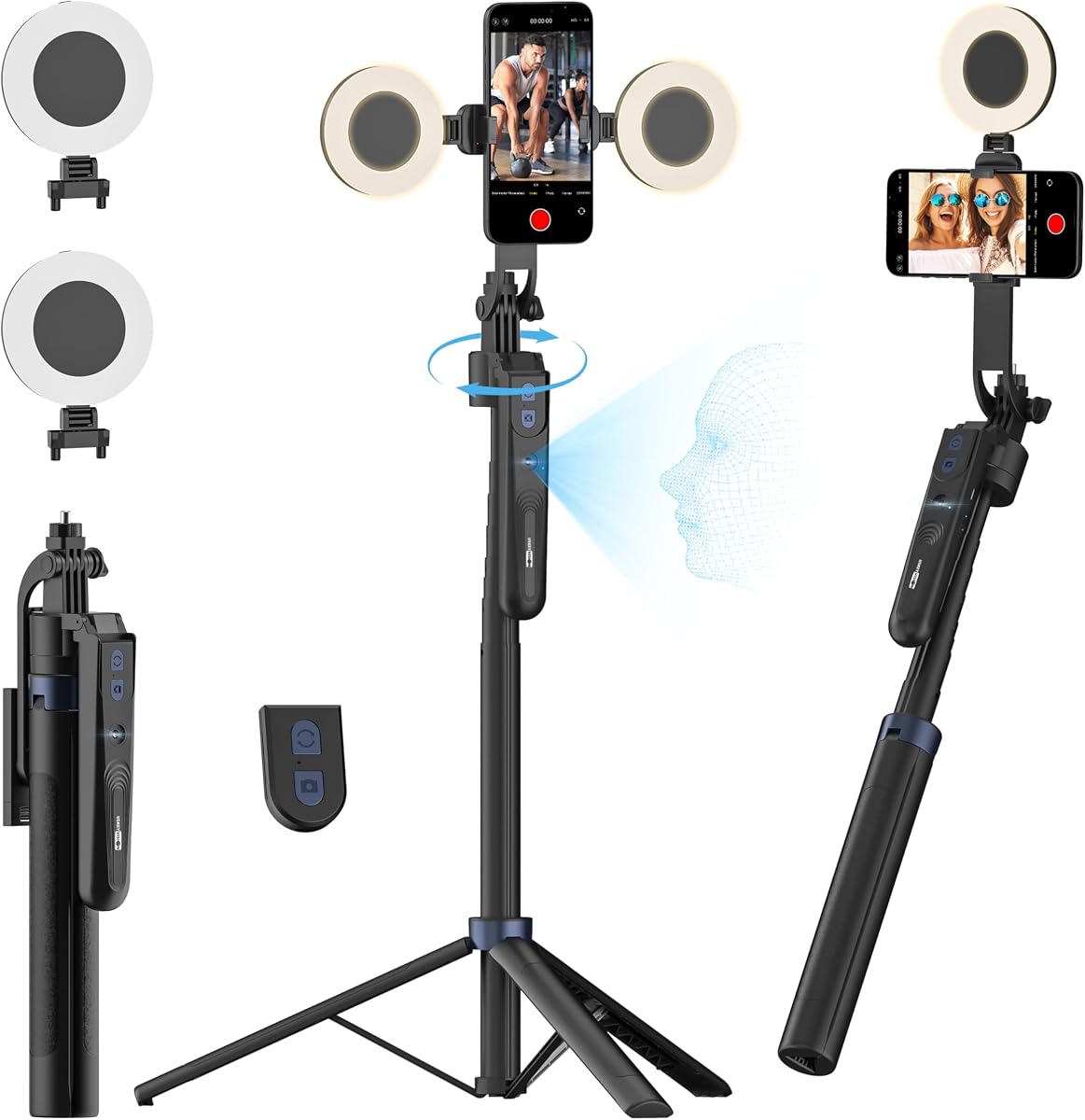
USKEYVISION Auto Tracking Tripod
4.4Editor score
Gesture control operation
Adjustable fill light included
Budget friendly price point
Finding the right AI gimbal with tripod can transform your mobile content creation significantly. These devices combine stabilization with intelligent tracking to keep you centered without manual adjustments. They are essential for vloggers, travelers, and anyone looking to capture smooth, professional-looking footage effortlessly.
This guide compares ten top-rated models featuring advanced AI tracking and built-in tripods. We analyzed stabilization quality, battery life, app compatibility, and portability to rank them effectively. Each product offers unique strengths suited for different content styles and user needs.
Each pick highlights key features, pros, and cons to help you make an informed decision. Prices and availability may change over time, so verify details before purchasing. Our goal is to provide clear insights into the best options available in the market today.
4.4Editor score

4.4Editor score

4.3Editor score
As an Amazon Associate we earn from qualifying purchases.
The table below compares all ten models side by side. It highlights key specifications like stabilization type, tracking capabilities, battery life, and unique features to help you find the best match for your needs.


The Insta360 Flow 2 Pro stands out as the top choice for creators wanting advanced tracking and Apple ecosystem integration. With a strong 4.4 rating, it delivers seamless performance through Apple DockKit compatibility. This ensures that native tracking works across hundreds of apps without extra setup steps.
We may earn a commission when you buy through this link, at no additional cost to you.
Its active zoom tracking is a game-changer, allowing precise focus even at 15x zoom. This is perfect for capturing sports or performances from a distance. The multi-person tracking feature ensures entire groups stay framed, while the free tilt mode offers unique creative angles during movement.
While the active zoom is limited to newer iPhone models, the rest of the features are universally valuable. The built-in spotlight enhances low-light footage significantly. Users should note the higher cost compared to budget options, but the advanced AI capabilities justify the investment for serious content creators.
If you prioritize professional tracking quality and iOS integration, this is the best pick. It combines stabilization, lighting, and tracking in a portable design. The long battery life means you can film all day without interruption, making it ideal for travel and events.
Native integration allows the gimbal to work directly with any compatible iOS app for seamless tracking without extra pairing steps.
This unique mode maintains a consistent angle as the phone moves vertically, enabling dynamic shots without manual adjustments.
We may earn a commission when you buy through this link, at no additional cost to you.
The USKEYVISION Auto Tracking Tripod offers exceptional value for those needing reliable face tracking without spending much. Rated at 4.4 stars, it excels at keeping subjects centered using AI technology. Its high extension capability makes it versatile for various shooting angles and heights.
We may earn a commission when you buy through this link, at no additional cost to you.
Using simple gestures like an OK sign to start tracking, it simplifies operation for solo creators. The included detachable lights provide adjustable brightness and color temperatures, improving video quality in dim environments. Its sturdy aluminum construction ensures stability even when fully extended.
While it lacks a dedicated app for some features, the gesture controls are intuitive and effective. It is not compatible with tablets or foldable phones, which limits some users. However, for standard smartphone users, it offers a robust alternative to pricier models.
If budget is a priority, this model delivers core AI tracking features effectively. The combination of tripod stability and tracking automation makes it great for streaming and vlogging. It is easy to carry and set up anywhere.
Users can start or pause tracking with hand gestures, reducing the need to reach for the phone or remote.
The dual detachable lights offer three color modes and brightness levels to suit any lighting condition.
We may earn a commission when you buy through this link, at no additional cost to you.
The DJI Osmo Mobile 8 is a premium solution for those seeking top-tier stabilization and lighting features. With a solid 4.3 rating, it ensures smooth footage and sharp focus even during movement. Its integrated lighting module keeps subjects well-lit without external accessories.
We may earn a commission when you buy through this link, at no additional cost to you.
Active charging allows you to power your phone while filming, which is ideal for long sessions. The 360-degree rotation provides immersive shots, and the built-in tripod adds versatility for hands-free recording. It is lightweight and portable for travel use.
Some users have reported app compatibility issues with DJI Mimo, requiring manual downloads. Despite this, the hardware features are robust and reliable. It supports tracking without complex setup, making it user-friendly for beginners and pros alike.
If you want premium build quality and all-in-one features, this is an excellent choice. The active charging and lighting make it stand out. While not the cheapest, it offers high value for daily recording and live streaming tasks.
Built-in lights ensure your subject is properly lit in low conditions without extra gear.
The gimbal can charge your phone while you film, preventing battery depletion during long shoots.
We may earn a commission when you buy through this link, at no additional cost to you.
The Insta360 Flow 2 Grey offers robust features for Android users and cross-platform compatibility. Rated at 4.2 stars, it provides reliable tracking and stabilization. The native tracking works seamlessly across major platforms like Instagram and YouTube.
We may earn a commission when you buy through this link, at no additional cost to you.
It features active zoom tracking up to 15x, perfect for sports. The fill light enhances video quality in low-light settings. The built-in tripod and selfie stick make it versatile for various scenarios without extra gear.
While the zoom feature is limited to specific iPhone models, the rest of the features are broadly useful. The premium price may be a barrier, but the quality is high. It is designed for creators who need reliability and advanced tracking.
This model is great for those wanting Android support and professional features. The stabilization and tracking ensure smooth, centered shots. It is a solid choice for vloggers and family recording.
Native tracking works across 200+ third-party apps, ensuring compatibility with your preferred platforms.
A built-in light provides consistent illumination, improving face visibility during indoor filming.
We may earn a commission when you buy through this link, at no additional cost to you.
The Acer Gadget Auto Face Tripod focuses specifically on face tracking with high precision. Rated at 4.6 stars, it keeps your face centered without needing an app. This makes setup quick and effortless for live streaming and vlogging.
We may earn a commission when you buy through this link, at no additional cost to you.
It includes a detachable ring light with multiple color modes to enhance video quality. The remote control allows for hands-free operation. The quadpod design provides stability on various surfaces.
While it is optimized for iPhone, the simplicity of use is a major plus. Some users might find the remote range limited outdoors. However, the high rating indicates strong satisfaction among users.
If face tracking is your primary goal, this model is highly effective. It combines tracking, lighting, and stability in one device. It is ideal for solo creators who want reliable auto-tracking.
The tripod recognizes and tracks your face automatically, requiring no app installation or complex setup.
A detachable light with three color modes improves lighting conditions for better video quality.
We may earn a commission when you buy through this link, at no additional cost to you.
The DJI Osmo Mobile 7P offers robust stabilization and native tracking for iPhone and Android. With a 4.5 rating, it ensures lossless stability for creative bursts. The dual-lens tracking system improves accuracy and focus during movement.
We may earn a commission when you buy through this link, at no additional cost to you.
Active charging supports long shooting sessions. The multifunctional module can act as a mic receiver, adding audio benefits. The built-in extension rod helps capture wider shots easily.
While the module is sometimes sold separately, its features enhance the gimbal's capabilities. Some users face app compatibility issues with DJI Mimo. Despite this, the hardware remains reliable and user-friendly.
This model is great for those needing strong stabilization and audio features. It is versatile for various content types. It is an excellent choice for creators prioritizing video and audio quality.
Using two lenses improves tracking precision, keeping subjects focused even during rapid movement.
Pairing with DJI Mic devices enables better audio capture without separate receivers.
We may earn a commission when you buy through this link, at no additional cost to you.
The AOCHUAN Smart V3 stands out with its tall 70.9-inch extension for unique angles. With a 4.5 rating, it offers stable footage and AI tracking. The gesture controls make operation easy for solo creators.
We may earn a commission when you buy through this link, at no additional cost to you.
It includes a detachable remote for control from a distance. The fill light ensures good visibility in low-light conditions. It supports app-free tracking for basic functions.
While the tall design is great for full-body shots, it might be heavier. The remote allows control up to 32 feet away. It is a practical choice for vloggers needing flexibility.
If height and remote control are priorities, this model is effective. The balance of features and price makes it attractive. It is suitable for travel and outdoor shooting.
The 70.9-inch extension rod allows for high-angle and full-body shots without a separate tripod.
Simple hand gestures allow you to start or pause tracking without touching the device.
We may earn a commission when you buy through this link, at no additional cost to you.
The DJI Osmo Mobile 8 + Mic combines stabilization with dedicated audio support. With a 4.6 rating, it ensures smooth footage and clear sound. The integrated lighting module keeps subjects well-lit without extra accessories.
We may earn a commission when you buy through this link, at no additional cost to you.
Active charging allows you to power your phone while filming. The 360-degree rotation provides immersive shots. It is lightweight and portable for travel use.
While the mic is a great addition for audio quality, the overall price is higher. Some users face app compatibility issues with DJI Mimo. The hardware remains reliable and user-friendly.
This model is great for creators prioritizing audio and video. It is versatile for various content types. It is an excellent choice for live streamers and vloggers.
The included Mic Mini Transmitter enhances audio capture without needing separate devices.
Filming while charging ensures your phone never runs out of power during long sessions.
We may earn a commission when you buy through this link, at no additional cost to you.
The Insta360 Flow 2 Plus provides extensive control and editing features. With a 4.2 rating, it offers reliable tracking and stabilization. The second-screen control turns any phone into a remote for easy operation.
We may earn a commission when you buy through this link, at no additional cost to you.
Animal tracking allows you to capture pets moving freely. The multi-person tracking ensures groups stay framed. FlashCut editing tools simplify post-production.
While it has a premium price, the features justify the cost for advanced users. Some zoom features are limited to specific devices. The tracking is reliable across various scenarios.
If remote control and advanced editing are important, this is a great option. It is suitable for diverse creators. The features support dynamic and engaging content.
Use any smartphone as a remote to preview and shoot without touching the gimbal.
Specialized AI tracking follows pets, ensuring dynamic shots of moving animals are captured smoothly.
We may earn a commission when you buy through this link, at no additional cost to you.
The Insta360 Flow 2 Grey is a compact solution for on-the-go creation. With a 4.2 rating, it offers reliable tracking and stabilization. The active zoom feature helps capture distant subjects clearly.
We may earn a commission when you buy through this link, at no additional cost to you.
Animal tracking ensures pets are followed smoothly. Multi-person tracking is useful for groups. Remote support makes operation easy for solo shoots.
The compact design makes it easy to carry. The active zoom is limited to specific iPhone models. It offers strong performance for the size and weight.
If portability is key, this model is ideal. It combines advanced features in a small package. It is great for travel and street filming.
Active zoom allows precise tracking even at high zoom levels for distant subjects.
Its foldable design makes it easy to carry in a bag or pocket.
We may earn a commission when you buy through this link, at no additional cost to you.
Choosing the right AI gimbal with tripod involves evaluating key factors that impact performance and usability. This section breaks down what to look for to make the best decision.
AI tracking accuracy is crucial for keeping your subject in focus. Look for models offering native app integration, gesture controls, and specialized modes like multi-person or animal tracking. Ensure compatibility with your specific devices and apps.
Select a gimbal that supports the tracking features you need most. If you shoot alone, gesture control is vital; for groups, multi-person tracking is key.
The tripod feature should be sturdy and easy to extend. It must support the gimbal's weight securely. Consider the maximum height for different angles and ensure the base is non-slip for safety.
Check if the tripod includes a built-in stand or requires an external one. Stability is essential for hands-free recording sessions.
Long battery life ensures uninterrupted filming sessions. Many models offer 10 hours or more of operation. Some also provide active charging to keep your phone powered while recording.
Prioritize gimbals with robust batteries and charging features for extended use without frequent interruptions.
Durability impacts longevity and performance. Look for materials like aluminum alloys or reinforced plastics. A well-designed grip and foldable structure enhance portability and protection.
Choose a model built to withstand daily use and travel without compromising stability or functionality.
Ensure the gimbal works with your phone's size and OS. Check for iOS vs. Android support and app compatibility. Some models offer universal mounting, while others are optimized for specific brands.
Verify the compatibility before purchasing to avoid setup issues or functionality limitations.
Simple setup and intuitive controls save time. Look for features like quick-release mounts, gesture recognition, or remote controls. Avoid complex pairing processes if you want fast operation.
Prioritize user-friendly designs that allow you to start recording quickly without extensive adjustments.
Built-in lighting improves video quality in low-light settings. Some models include ring lights or fill lights. Check for accessory compatibility like mics or external lights for expanded features.
Consider gimbals with integrated lighting to reduce reliance on external gear for better results.
Balance cost with features. Budget options offer basic tracking, while premium models provide advanced stabilization and editing tools. Identify your needs to find the best value.
Invest in a model that offers the essential features you need without unnecessary extras.
Start by attaching your phone securely to the clamp. Balance the phone on the gimbal axes before turning it on to prevent strain. Use the app or gestures to initialize the tracking features.
When setting up the tripod, extend it fully and place it on a stable surface. If using the selfie stick mode, ensure the extension is locked properly. Use the remote for hands-free operation when needed.
Clean the gimbal with a soft cloth after use. Store it in the protective case when not in use to avoid dust or damage. Recharge the battery regularly to maintain performance longevity.
AI gimbals with tripods add tracking automation and hands-free stability. They use intelligent sensors to follow subjects without manual control. The tripod feature also allows for fixed angles without needing an external stand.
Most models support both Android and iOS. Some features like Apple DockKit are iOS-specific, but tracking and stabilization are generally universal. Check compatibility before purchasing.
Most gimbals offer 10 hours or more of continuous use. Some also support active charging to keep your phone powered. Battery life varies by usage and settings.
Yes, many gimbals are optimized for streaming apps. The stable footage and tracking features make them ideal for live videos. Ensure app compatibility for best results.
Gesture control lets you start or pause tracking with hand signals like an OK sign or open palm. It simplifies operation for solo creators without needing remote devices.
Many models include integrated fill lights or ring lights. These help in low-light conditions without extra gear. Check specifications for lighting features.
Yes, most are lightweight and foldable. Some come with protective pouches for transport. They are designed to be portable and compact.
Most gimbals support phones up to 3.86 inches wide. Foldable phones or tablets might not fit. Check the weight and size limits before buying.
The Insta360 Flow 2 Pro, USKEYVISION Auto Tracking Tripod, and DJI Osmo Mobile 8 lead our list for their exceptional features. Each model caters to different needs, whether it is advanced tracking, budget-friendly value, or premium build quality.
Prioritize features that match your primary use case. If you need iOS compatibility and advanced tracking, go for the Flow 2 Pro. For budget-conscious creators, the USKEYVISION offers reliable performance.
Always check current prices and availability before making a purchase. Features and specifications may evolve over time. Our recommendations aim to provide a solid starting point for your decision.
