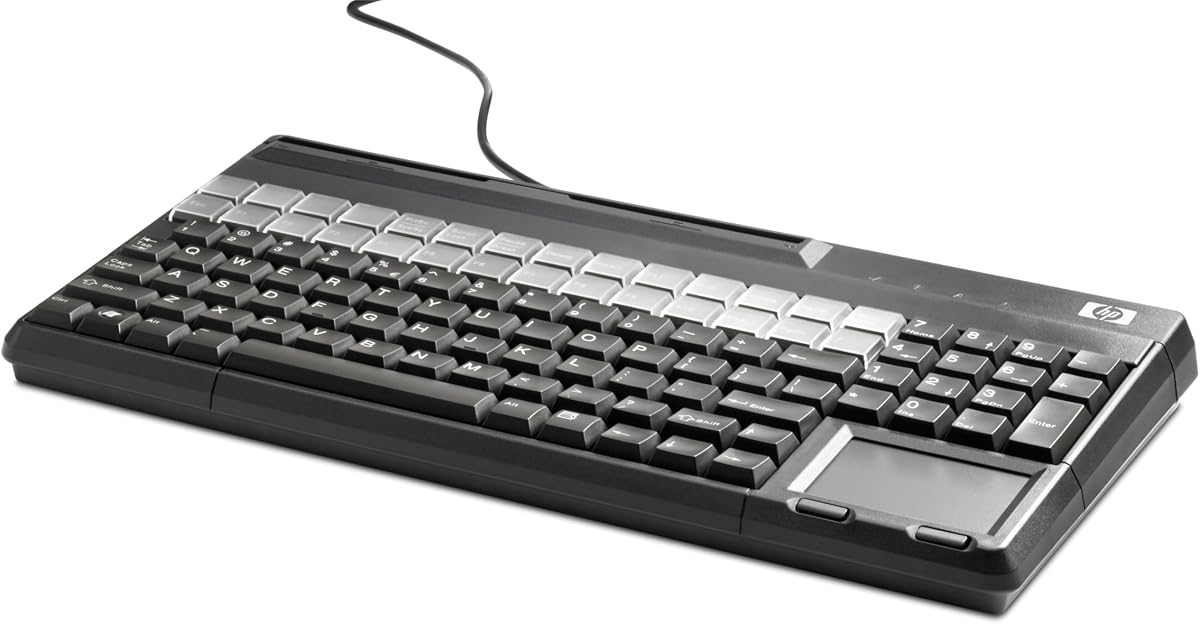
HP POS Keyboard
28 Relegendable Keys
Integrated Magnetic Stripe Reader
Full QWERTY Layout
Choosing the right keyboard for your point of sale system is crucial for efficient daily operations. A good POS keyboard needs to be durable enough to handle constant use while offering the specific layout and keys your staff requires to process transactions quickly and accurately without errors.
We evaluated ten different keyboards designed for commercial and industrial environments. Our comparison looks at build quality, key layout flexibility, connectivity options, and special features like integrated touchpads or card readers. We focused on models that balance performance with reliability for busy retail and service settings.
Each pick in this list highlights specific strengths that make it suitable for different business needs. Some offer extensive relegendable keys for custom workflows while others provide rugged protection against spills and dust. Please note that product availability and pricing can change over time so check current listings before purchasing.

4.2Editor score

4.2Editor score
As an Amazon Associate we earn from qualifying purchases.
The following table provides a side by-side overview of all ten keyboards analyzed in this guide. It highlights key specifications such as key count, interface type, and unique features to help you quickly identify which model aligns best with your specific operational requirements.


The HP POS Keyboard stands out as a comprehensive solution for businesses needing integrated hardware functionality. While specific customer ratings are not currently available this model is designed to streamline checkout processes with built-in card reading capabilities and a flexible key layout.
We may earn a commission when you buy through this link, at no additional cost to you.
This keyboard features 28 relegendable keys which allow staff to assign custom functions to specific buttons reducing the need for software navigation during transactions. The inclusion of a magnetic stripe reader directly on the keyboard surface saves valuable counter space and simplifies the payment workflow for cashiers.
The main trade-off is the higher cost compared to standard input devices but the consolidation of hardware often justifies the investment for high-volume retailers. Additionally the lack of current review data means users should verify compatibility with their specific POS software before purchasing to ensure smooth operation.
This model is ideal for established retail environments where speed and space efficiency are top priorities. If your business requires frequent card scanning and custom shortcuts this keyboard offers a robust all-in-one solution that can significantly enhance operational flow at the point of sale.
Integrating the magnetic stripe reader into the keyboard reduces clutter on your counter allowing for a cleaner and more organized workspace.
The relegendable keys let you map frequent commands to single keystrokes speeding up transactions and reducing training time for new employees.
We may earn a commission when you buy through this link, at no additional cost to you.
The Cherry G86-62401 offers a practical entry point for businesses seeking a reliable input device with added convenience features. With a 4.2 star rating it has proven dependable for users who need a compact keyboard that handles basic navigation without a separate mouse.
We may earn a commission when you buy through this link, at no additional cost to you.
Its spill resistant design is a significant advantage in busy environments where liquids are common around checkout stations. The integrated touchpad allows staff to navigate menus and select options without reaching for an external mouse which keeps the workspace tidy and efficient during peak hours.
While it lacks the extensive customization of higher-end models the standard layout ensures familiarity for all users. The absence of a numeric keypad might slow down data entry tasks that require frequent number input but this is often acceptable for general point of sale operations.
This keyboard is well suited for small shops or kiosks where desk space is limited. Its durability and straightforward setup make it a cost effective choice for businesses that need a no fuss solution to get their POS system up and running quickly.
The spill resistant build helps protect internal components from accidental liquid spills extending the lifespan of the keyboard in active work areas.
The integrated touchpad eliminates the need for extra mouse space allowing you to fit the keyboard into tighter counter setups effortlessly.
We may earn a commission when you buy through this link, at no additional cost to you.
The Logitech K120 is a widely recognized standard keyboard that brings exceptional durability to general POS setups. Boasting a 4.6 star rating it is known for its ability to withstand daily wear and tear while maintaining consistent performance over years of use.
We may earn a commission when you buy through this link, at no additional cost to you.
Its spill proof design ensures that accidental liquid incidents do not lead to immediate hardware failure a common risk in food and beverage service environments. The full size layout with a dedicated number pad supports efficient data entry which is essential for inventory management and complex transaction processing.
While it does not offer specialized POS features like card readers or relegendable keys its simplicity is often a benefit for businesses using software that handles those functions on screen. The deep profile keys provide a comfortable typing experience that reduces fatigue for staff working long shifts.
This keyboard is an excellent choice for businesses that prioritize reliability and comfort over specialized hardware integration. It serves well as a backup device or for secondary workstations where basic input is required without the need for specialized commercial features.
Built to last the K120 features sturdy tilt legs and anti fade keys that maintain functionality and appearance even in high traffic areas.
Plug and play functionality means you can install this keyboard instantly without needing to download drivers or configure complex settings.
We may earn a commission when you buy through this link, at no additional cost to you.
The Cherry Lpos G86-71411 is engineered for environments that demand a high degree of input flexibility and integrated hardware. While specific ratings are not currently listed this model is designed to support complex workflows through its extensive set of relegendable keys and card reading capabilities.
We may earn a commission when you buy through this link, at no additional cost to you.
With 42 relegendable keys users can assign specific actions to individual buttons reducing the need to navigate through software menus during busy periods. The magnetic stripe reader allows for seamless payment processing directly at the keyboard which helps maintain a clean and efficient checkout lane.
The larger key count of 169 provides ample space for adding custom function keys that can speed up inventory checks or other frequent tasks. However this level of customization requires an initial investment of time to configure the keys correctly to match your specific business processes.
This keyboard is best suited for medium to large retail operations where speed and efficiency are critical. If your business has unique operational requirements that standard keyboards cannot meet this model offers the flexibility needed to tailor the input experience to your exact needs.
The ability to reassign keys allows you to create a personalized keyboard layout that mirrors your most frequent tasks for faster processing.
Having the card reader built into the keyboard keeps the transaction flow uninterrupted without the need for external peripheral devices.
We may earn a commission when you buy through this link, at no additional cost to you.
The Perixx PERIBOARD-513III offers an impressive blend of features at a competitive price point making it a strong contender for general POS use. With a 4.2 star rating it has satisfied users who appreciate a quiet and compact keyboard that combines typing and navigation in one device.
We may earn a commission when you buy through this link, at no additional cost to you.
The quiet scissor switch keys provide a smooth and stable typing experience that minimizes noise in the retail environment which is beneficial for customer interactions. The integrated touchpad allows for easy menu navigation without the clutter of a separate mouse saving valuable space on the counter.
While it lacks dedicated POS keys it includes a full size layout with a numeric keypad which is essential for accurate data entry. The spill resistant design adds a layer of protection against common accidents ensuring that the keyboard remains functional over time without frequent replacements.
This model is ideal for small to medium businesses that need a reliable all-in-one input solution without breaking the budget. It works particularly well in settings where space is at a premium and a quiet professional typing environment is preferred by staff and customers alike.
The quiet scissor mechanism ensures that typing does not create unnecessary noise helping to maintain a pleasant atmosphere for customers nearby.
By combining the keyboard and touchpad into one unit you free up desk space for other essential POS equipment or transaction materials.
We may earn a commission when you buy through this link, at no additional cost to you.
The Adesso Easy Touch 630Ub is built specifically for harsh environments where standard keyboards would fail quickly. With a 4.2 star rating it is recognized for its rugged construction and waterproof capabilities making it suitable for industries where hygiene and durability are paramount.
We may earn a commission when you buy through this link, at no additional cost to you.
Its IP67 rating means it can withstand submersion in water which is an extreme level of protection against spills and cleaning fluids. The large durable keys offer excellent contrast and readability helping staff work accurately even in less than ideal lighting conditions or when wearing gloves.
While the membrane switches may not offer the tactile feedback of mechanical keys they are reliable and quiet which is often preferred in industrial settings. The waterproof build allows for easy and thorough cleaning ensuring that the workspace remains sanitary and compliant with health regulations.
This keyboard is the top choice for businesses in food service manufacturing or outdoor environments where equipment is exposed to the elements. If your priority is a keyboard that can be wiped down or rinsed without damage this model provides the necessary protection for long term use.
Engineered to withstand rough treatment and spills this keyboard ensures continuous operation even in the most demanding industrial workspaces.
The waterproof design makes cleaning effortless allowing you to maintain high hygiene standards without worrying about damaging the hardware.
We may earn a commission when you buy through this link, at no additional cost to you.
The Cherry G86-71401 offers a robust set of features for businesses that need a highly programmable input device. While the current user rating is lower than others on this list it remains a viable option for specific commercial applications where key customization is essential.
We may earn a commission when you buy through this link, at no additional cost to you.
With 127 programmable keys and 42 relegendable keys this model allows for deep integration with complex POS software workflows. The integrated touchpad adds convenience by removing the need for a separate mouse which can be useful in tight counter setups where space is limited.
The lower rating may indicate compatibility challenges or setup difficulties for some users so it is important to review technical specifications before purchasing. However for businesses that can configure it properly the flexibility it offers in terms of workflow optimization is significant compared to standard keyboards.
This keyboard is best suited for specialized retail or industrial environments that require extensive key mapping. If your operations involve many custom commands and you have the IT support to configure the device this keyboard can provide a tailored solution for your unique needs.
The high number of programmable keys allows you to map complex functions to single keystrokes reducing steps in your transaction process.
Combining a keyboard and touchpad reduces desk clutter and simplifies the hardware setup for your point of sale terminal.
We may earn a commission when you buy through this link, at no additional cost to you.
The Cherry KC 1000 is a specialized security keyboard designed for environments that require smartcard authentication. With a 4.6 star rating it is highly regarded for its secure features and reliable performance in government or high security commercial settings.
We may earn a commission when you buy through this link, at no additional cost to you.
Its integrated chip card terminal allows for secure PIN entry and reading of smartcards which is essential for compliance with certain regulatory standards. The device supports multiple protocols including FIPS 201 ensuring that it meets rigorous security requirements for identity verification and data protection.
While it is not a general purpose POS keyboard its specialized functionality makes it ideal for applications where employee authentication or secure payments are required. The thin design keeps it unobtrusive on the desk while providing all the necessary security features in a compact package.
This keyboard is recommended for businesses or organizations that mandate smartcard authentication for access or transactions. If security is a primary concern and your software supports card readers this model offers a robust and approved solution for secure input requirements.
FIPS 201 approval ensures that this keyboard meets federal standards for identity management which is critical for secure government operations.
The dedicated PIN entry features help prevent shoulder surfing and ensure that sensitive codes are entered securely without exposure.
We may earn a commission when you buy through this link, at no additional cost to you.
The Cherry G80-1800 brings the reliability of mechanical switches to a compact form factor designed for industrial use. With a 4.0 star rating it is appreciated by users who need a keyboard that can withstand continuous operation in tight spaces without compromising on typing feel.
We may earn a commission when you buy through this link, at no additional cost to you.
The mechanical MX Black switches ensure a long lifespan of over 100 million actuations per key making it suitable for environments where typing is constant and intense. Its compact dimensions save valuable desk space which is beneficial for kiosks or workstations where physical area is restricted.
The support for both USB and PS/2 connections via an included adapter offers great flexibility for compatibility with older legacy systems. While the lack of a number pad might limit some data entry tasks it is a strong choice for applications where space and durability are the main priorities.
This keyboard is ideal for industrial or retail kiosks where space is limited and heavy use is expected. If you need a rugged compact solution that offers the feedback of mechanical switches this model provides a reliable and long-lasting input experience.
CHERRY MX technology ensures reliable long-lasting performance with individual keys built to handle millions of keystrokes without failure.
The included PS2 adapter allows you to use this keyboard with older Unix systems or legacy hardware that lacks USB ports.
We may earn a commission when you buy through this link, at no additional cost to you.
The Logitech K270 provides the convenience of wireless connectivity for businesses that need flexibility at the checkout counter. With a 4.3 star rating it is recognized for its long battery life and reliable wireless connection making it a practical choice for mobile or multi-device setups.
We may earn a commission when you buy through this link, at no additional cost to you.
Its wireless design allows staff to move around freely without being tethered to a desktop which is useful for larger stores or service environments. The spill proof design and durable print characters ensure that the keyboard remains functional even after minor accidents in a busy workspace.
The 24-month battery life reduces maintenance requirements allowing you to go long periods without changing batteries. While wireless devices can sometimes be susceptible to interference the robust 2.4GHz connection typically provides a stable link suitable for most retail environments.
This keyboard is best suited for businesses that value mobility and a clutter-free workspace. If your POS setup does not require wired reliability for critical data entry and you prefer the freedom of wireless this model offers a comfortable and durable solution.
The wireless connection allows you to place the keyboard anywhere within range which helps in adapting to different counter layouts easily.
With up to two years of battery life you can minimize maintenance interruptions and keep your staff focused on customer service.
We may earn a commission when you buy through this link, at no additional cost to you.
Selecting the right keyboard for your point of sale system involves evaluating several key factors beyond basic typing. This guide outlines the essential features you should consider to ensure your new keyboard meets the demands of your specific business environment.
POS keyboards are subjected to constant use and potential spills so durability is a top priority. Look for models with spill proof or waterproof designs that can withstand liquid accidents without damage. Commercial grade keyboards often feature reinforced keys and sturdy casings to ensure they last through years of heavy daily use.
Investing in a durable keyboard reduces long term costs by minimizing the need for replacements due to wear and tear.
Consider whether your business needs standard typing keys or custom functions for specific tasks. Relegendable keys allow you to assign custom commands to buttons speeding up frequent actions like inventory checks or discounts. A full size layout with a numeric keypad is essential for businesses that require high volume data entry.
Customization options help streamline workflows and reduce the time staff spend navigating through software menus during busy shifts.
Some keyboards come with built-in peripherals like magnetic stripe readers or smartcard terminals which save valuable counter space. These integrated devices simplify the checkout process by allowing customers to swipe cards directly on the keyboard surface. If you have limited space or need to reduce cable clutter a keyboard with these features is a smart choice.
Integrated hardware can improve transaction speed and maintain a clean organized workspace for your staff.
Decide between wired and wireless connectivity based on your setup needs. Wired USB keyboards offer reliability and consistent performance without the need for battery changes while wireless options provide flexibility and reduce cable clutter. Ensure the keyboard supports the interface types your POS terminal accepts to avoid compatibility issues.
Choosing the right connectivity ensures stable operation and fits well with your existing hardware infrastructure.
The physical size of the keyboard impacts how much space it occupies on your counter. Compact models are ideal for small kiosks or limited workspaces where every inch matters. However full size keyboards with a separate number pad are generally more efficient for data entry heavy tasks.
Select a size that balances your space constraints with the typing efficiency your staff requires.
Ensure the keyboard is compatible with your POS operating system whether it is Windows or Linux. Most modern keyboards offer plug and play support but checking system requirements can prevent installation headaches. Some specialized keyboards may require drivers for advanced features like programmable keys.
Compatibility verification ensures a smooth setup process and full functionality of all keyboard features.
In food and beverage environments the ability to clean the keyboard thoroughly is vital for health compliance. Models with sealed surfaces or waterproof ratings can be wiped down or even rinsed without damage. Avoid keyboards with deep crevices where food particles or liquids can accumulate over time.
Easy cleaning options help maintain hygiene standards and extend the usable life of your equipment.
Staff members often type for hours so comfort is essential to prevent fatigue and strain. Look for keyboards with comfortable key travel and ergonomic designs that support a natural hand position. Features like adjustable tilt legs can also help customize the typing angle to suit different users.
Prioritizing user comfort leads to better productivity and fewer work related physical issues for your team.
To get the most out of your POS keyboard start by connecting it to your system using the appropriate cable or wireless receiver. Ensure that all necessary drivers are installed if you are using programmable or specialized keys to access full functionality.
Regular cleaning is essential to maintain performance. Use a soft cloth to wipe down the keys and surface. For spill resistant models you can use a slightly damp cloth but avoid excessive moisture unless the device is rated waterproof.
For keyboards with customizable keys take time to configure the layout to match your most frequent tasks. This customization can significantly speed up transactions. Also check battery levels on wireless models regularly to avoid unexpected interruptions during business hours.
For restaurants durability and spill resistance are critical. Look for keyboards with IP67 waterproof ratings and large easy to clean keys. Models like the Adesso Easy Touch are excellent for wet environments while keyboards with integrated touchpads save space on small counters.
Yes you can use a standard keyboard but it may lack features like a number pad or durability required for commercial use. Dedicated POS keyboards often offer better build quality and specific layouts that improve efficiency and reduce errors during high volume periods.
Wireless keyboards are reliable for many POS systems as long as the connection is stable. Look for models with strong 2.4GHz signals and long battery life. They are ideal for reducing cable clutter but ensure the range is sufficient for your workspace.
Relegendable keys allow you to change the label and function of a specific key. This is useful for mapping frequent commands like discounts or inventory checks to single buttons. It requires initial setup but can significantly speed up daily operations.
Waterproof keyboards can be cleaned with a damp cloth or even rinsed gently if rated for submersion. Avoid harsh chemicals that might damage key legends. For IP67 rated models you can use mild soap and water to ensure thorough sanitation.
Most basic POS keyboards are plug and play and work without drivers. However keyboards with programmable keys or integrated card readers may require specific software to customize settings. Check the product documentation to confirm if drivers are needed.
A full size layout with a separate numeric keypad is best for retail checkout to ensure fast and accurate data entry. The QWERTY layout is standard and familiar to most users making it easier to train staff quickly without additional learning curves.
On a budget look for basic spill resistance and a reliable connection type like USB. Ensure it has a numeric keypad for efficiency and a durable construction. Reading user reviews can help find cost effective models that still withstand daily wear.
Choosing the right keyboard for your POS system depends on your specific operational needs and environment. Whether you need advanced customization with relegendable keys or rugged waterproof protection this guide highlights ten options that cover a wide range of business requirements.
Prioritize durability and layout features that match your daily workflow. Investing in a high quality keyboard can improve efficiency reduce training time and provide a better experience for both your staff and customers at the point of sale.
Remember to check current availability and specifications before purchasing as product details can change. Select the model that offers the best balance of features and value for your business to ensure smooth and reliable operations.