
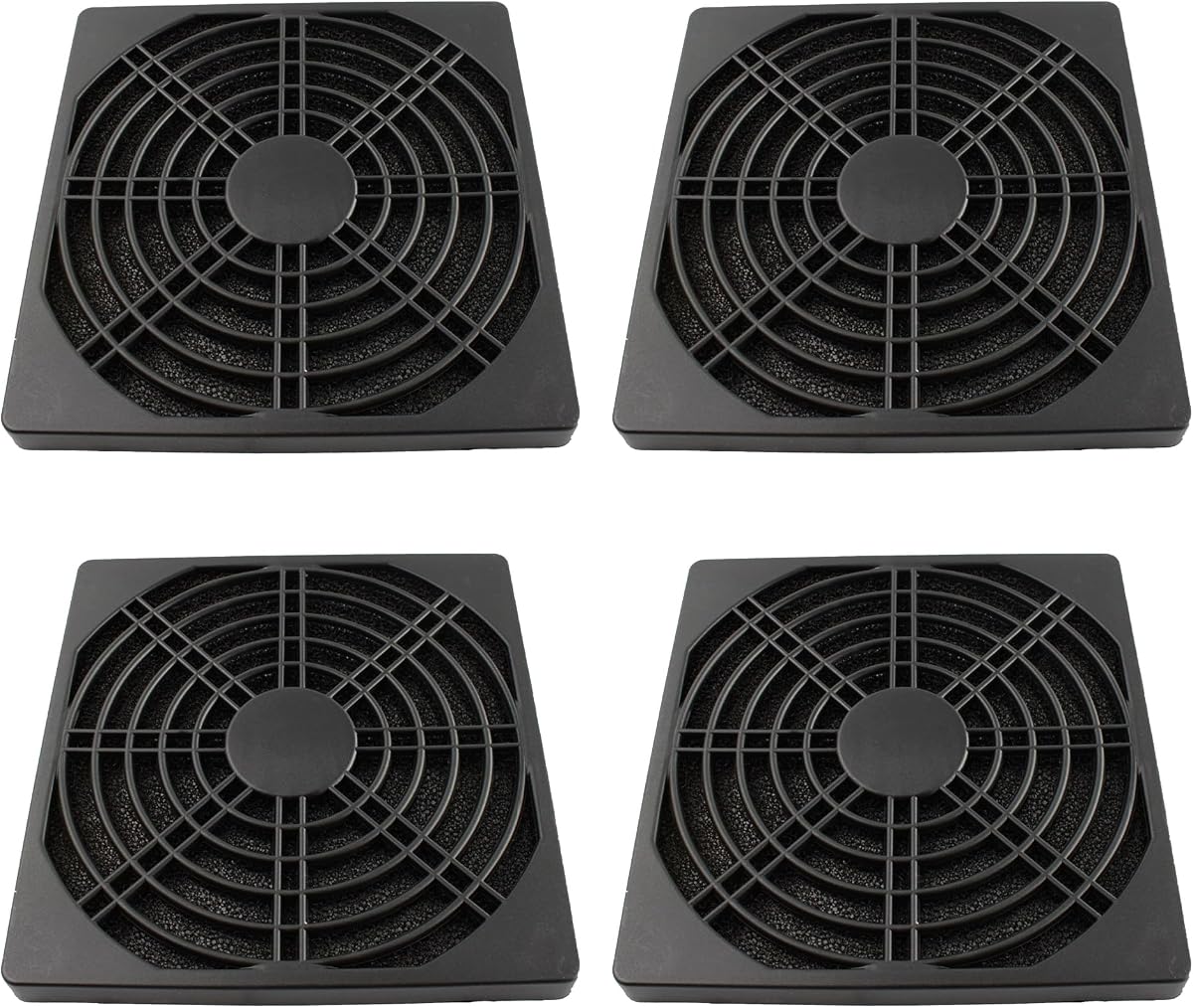
Wathai 2 Pack 120mm PC Fan Dust Filter Cover
4.7Editor score
Affordable two-pack value
Standard 120mm size fits most fans
Helps minimize fan noise
Protecting your computer components from dust is essential for maintaining optimal performance and extending the lifespan of your hardware. A good computer fan dust filter prevents debris from entering your case while allowing adequate airflow to keep temperatures low during intense usage sessions.
We evaluated ten top-rated dust filters based on their material quality, mesh fineness, mounting methods, and overall ease of installation. Our comparison covers magnetic, screw-in, and DIY cut-to-fit options to help you find the perfect match for your specific PC case and cooling needs.
Each pick in this list highlights key features, pros, and cons to guide your decision-making process. Keep in mind that prices and availability change frequently, so check the current listings before making your final purchase to ensure you get the best value available.
4.7Editor score

4.8Editor score

4.5Editor score
As an Amazon Associate we earn from qualifying purchases.
The following comparison table provides a side-by-side overview of all ten products reviewed in this guide to help you quickly identify the best fit for your system requirements and budget constraints.




The Computer Case Fan Dust Filter stands out as the Editor's Choice due to its exceptional balance of filtration and airflow. With a high rating of 4.8 stars, users appreciate its ultra-fine mesh design that effectively blocks dust without restricting cooling performance significantly.
We may earn a commission when you buy through this link, at no additional cost to you.
Its premium PVC construction ensures flexibility and durability, allowing it to fit various case contours without deforming over time. The magnetic frame simplifies installation by eliminating the need for screws or tools, making it accessible even for beginners building or upgrading their systems.
While the magnetic mounting is convenient, it relies on a metal surface which might not be present on all case panels. Additionally, the specific dimensions might need adjustment for cases with non-standard intake sizes, requiring a bit of customization effort.
Overall, this filter is highly recommended for anyone seeking reliable dust protection with minimal effort. Its combination of effective filtration, ease of use, and durable materials makes it a top-tier choice for maintaining a clean PC environment.
The ultra-fine mesh captures smaller particles that other filters might let through, ensuring internal components stay cleaner for longer periods.
The magnetic frame design allows users to install or remove the filter instantly without needing any tools, simplifying maintenance routines.
We may earn a commission when you buy through this link, at no additional cost to you.
The Wathai 2 Pack offers excellent value for budget-conscious builders looking for reliable dust protection. Rated at 4.7 stars, these filters are designed specifically for standard 120mm fans, making them a versatile choice for many PC cases.
We may earn a commission when you buy through this link, at no additional cost to you.
Constructed from durable PVC material, these filters provide a barrier against dust and debris while maintaining adequate airflow. Users have noted that they help minimize fan noise by preventing debris from interfering with fan blades, contributing to a quieter system.
Installation typically requires screws since these filters lack magnetic strips, which might be a minor inconvenience for some users. The straightforward design means they are easy to clean but lack the quick-release feature of magnetic models.
For those prioritizing cost-effectiveness without sacrificing basic functionality, this two-pack is an ideal solution. It provides a practical way to protect components across multiple fan locations at a very reasonable price point.
This two-pack provides an affordable way to cover multiple intake fans without breaking the bank, ideal for tight budgets.
By keeping debris away from spinning blades, these filters help maintain smooth fan operation and reduce potential rattling noises.
We may earn a commission when you buy through this link, at no additional cost to you.
The EBOOT 120 mm Filter is engineered for high-cooling needs with a mesh design that maximizes airflow efficiency. Rated at 4.5 stars, it balances dust protection with thermal performance, making it suitable for overclocked systems where heat management is critical.
We may earn a commission when you buy through this link, at no additional cost to you.
Its unique 0.8 mm grid effectively traps pet hair, preventing clogs and maintaining consistent cooling performance. The package includes 40 steel screws for permanent mounting, ensuring the filters stay securely in place even during active gaming sessions.
While the screw-based installation is robust, it requires more time and effort compared to magnetic options. Additionally, the mesh size is slightly larger than ultra-fine alternatives, which might let through very fine dust in dusty environments.
This premium option is best suited for users who prioritize airflow and need reliable protection against larger debris like pet hair. The inclusion of screws and high-quality materials justifies the higher price point for serious PC builders.
The engineered mesh design offers over 68% airflow efficiency, ensuring cooling fans can pull in cool air without significant restriction.
The grid size is optimized to trap pet hair effectively, preventing fur from jamming fans and causing overheating issues.
We may earn a commission when you buy through this link, at no additional cost to you.
The MoKo 400x300mm DIY Filter offers unmatched flexibility for those with non-standard case dimensions. Rated at 4.6 stars, it allows users to cut the mesh to size, ensuring a perfect fit for unique cooling ports or custom builds.
We may earn a commission when you buy through this link, at no additional cost to you.
Made from PVC material, it provides a balance of durability and flexibility. The package includes eight magnetic strips that attach to the mesh and case shell, simplifying the installation process once the cut is made.
The 1mm hole size prevents dust and hair from entering while maintaining airflow. However, the DIY aspect requires precise measuring and cutting, which might be daunting for users seeking a quick plug-and-play solution.
Ideal for custom PC enthusiasts, this filter adapts to various needs including gaming consoles and speakers. Its versatility and magnetic mounting make it a strong choice for those willing to invest time in a tailored fit.
The ability to cut the filter to size ensures it fits non-standard cooling ports perfectly, maximizing protection for unique setups.
Including magnetic strips allows for a secure, tool-free attachment to metal surfaces after cutting, simplifying the final installation step.
We may earn a commission when you buy through this link, at no additional cost to you.
This Cut-to-Fit Magnetic PC Dust Filter kit provides a versatile solution for protecting sensitive components like GPUs and CPUs from overheating. Rated at 4.5 stars, it combines a large size with magnetic strips for secure, tool-free installation on steel surfaces.
We may earn a commission when you buy through this link, at no additional cost to you.
The fine mesh pattern ensures superior dust filtration without significantly restricting airflow. Users can easily cut the sheets to size with household scissors, making it adaptable for custom SFF builds or other electronics.
While the magnetic mounting is convenient, it requires a metal surface which may not be available on all case panels. The need to measure and cut adds time to the setup process compared to pre-sized options.
For those needing a customizable solution that maintains cooling efficiency, this kit is highly recommended. Its durability and ease of cleaning make it a practical long-term investment for maintaining a clean system environment.
The large sheets can be cut to fit various device sizes, offering a universal solution for dust protection beyond standard PC cases.
Waterproof PVC allows for easy washing under water, ensuring the filter stays effective without needing replacement frequently.
We may earn a commission when you buy through this link, at no additional cost to you.
The 120mm Computer Fan Filter Grills feature a thickened aluminum frame and stainless steel mesh, providing robust protection for PC cases. Rated at 4.7 stars, these filters are designed not only for dust protection but also for physical safety against cables and fingers.
We may earn a commission when you buy through this link, at no additional cost to you.
The sturdy construction ensures longevity and resistance to deformation under pressure. The included 16 screws allow for a secure fit that won't shift or fall off, maintaining safety and filtration efficiency over time.
Installation involves screwing the grill into place which may be more labor-intensive than magnetic options. The metal construction also makes these heavier, which could be a consideration for very lightweight case designs.
These grills are ideal for users prioritizing safety and durability alongside dust protection. The premium materials justify the price, offering a reliable shield for internal components and preventing accidental contact with fans.
The rigid aluminum frame and grill design effectively protect fingers and cables from accidentally contacting spinning fan blades.
Constructed from aluminum and stainless steel, these grills resist wear and tear better than standard plastic filters for long-term use.
We may earn a commission when you buy through this link, at no additional cost to you.
This four-pack of 120mm black square plastic filters provides a cost-effective solution for covering multiple intake fans. Rated at 4.4 stars, they are made from durable materials that resist wear and tear, ensuring long-term performance in various environments.
We may earn a commission when you buy through this link, at no additional cost to you.
The unique mesh design allows for maximum airflow while filtering out dust particles effectively. Their square shape and standard size ensure compatibility with many computer case fan models, making installation straightforward for average users.
While the plastic material is durable, it lacks the flexibility of PVC options, which might make fitting tighter cases challenging. The design is basic without magnetic or screw accessories, requiring separate hardware for secure mounting.
For budget-conscious users needing a straightforward solution, these filters deliver reliable protection. Their straightforward design and affordability make them a practical choice for general PC maintenance and dust prevention.
The four-pack offers an affordable way to cover multiple fans, reducing the need to buy filters individually for different locations.
These filters provide essential dust protection with a simple design, suitable for users who prioritize functionality over advanced features.
We may earn a commission when you buy through this link, at no additional cost to you.
This bulk pack of twelve 120mm PVC filters offers excellent value for users managing multiple systems or extensive setups. Rated at 4.5 stars, they are designed to keep PCs clean and minimize fan noise, extending the lifespan of internal components.
We may earn a commission when you buy through this link, at no additional cost to you.
Constructed from durable PVC material, these filters are built to last and maintain their shape over time. Their compatibility with standard chassis fans and electronic products makes them versatile for various dust protection needs.
The lack of included mounting hardware means users will need to source screws or magnets separately. The basic design does not offer advanced features like magnetic strips but provides reliable standard protection at a great price.
For users needing many filters at once, this bulk pack is the most practical solution. It ensures you have enough covers for all your fans and even spare ones for future expansions or replacements.
Having twelve filters allows you to protect multiple computers or various sections of a large server rack efficiently without multiple purchases.
Keeping dust away from internal components helps prevent overheating, extending the operational life of your computer's critical parts.
We may earn a commission when you buy through this link, at no additional cost to you.
This five-pack of 140mm magnetic filters provides precise protection for larger cooling fans used in modern gaming computers. Rated at 4.4 stars, the ultra-fine hole diameter ensures fine dust is captured effectively, extending the service life of hardware components.
We may earn a commission when you buy through this link, at no additional cost to you.
The magnetic frame allows for tool-free installation on any computer case surface, simplifying the process for users. The PVC material is durable and designed to withstand repeated washing without deformation, ensuring long-term utility.
The magnetic adhesion relies on metal surfaces which may limit placement options on plastic panels. Additionally, cleaning requires removal which might be less convenient than fixed models for some users.
For owners of systems with 140mm fans, these filters offer a specialized solution that balances protection and ease of use. The five-pack ensures you can cover multiple intake points with reliable magnetic convenience.
Designed specifically for 140mm fans, these filters provide a perfect fit for systems that use larger cooling units for better airflow.
The ultra-fine 0.5mm holes effectively capture dust particles that larger mesh might miss, keeping components cleaner inside.
We may earn a commission when you buy through this link, at no additional cost to you.
The MoKo 120mm Dust Filter kit is a reliable choice for standard 120mm fan sizes, offering magnetic ease of use. Rated at 4.5 stars, these filters effectively reject dust entry while reducing noise, ensuring a quieter and cooler computing environment.
We may earn a commission when you buy through this link, at no additional cost to you.
Made from high-quality PVC mesh, they are durable and can be washed with water and soap if they become dirty over time. The magnetic frame allows placement anywhere on a metal chassis, simplifying installation for most PC cases.
Since they rely on magnetic attachment, they work best on metal surfaces and may not stick well to plastic or painted areas. Regular cleaning every couple of weeks helps maintain optimal performance and airflow efficiency.
This four-pack is ideal for those seeking a balance of convenience and effectiveness. The combination of washability and magnetic mounting makes maintenance straightforward, ensuring your PC stays clean with minimal effort.
These filters help reduce fan noise by preventing dust from interfering with blade movement, contributing to a quieter overall system experience.
The washable design allows users to rinse filters under water instead of replacing them, saving money and reducing waste over time.
We may earn a commission when you buy through this link, at no additional cost to you.
Selecting the right dust filter involves evaluating several key factors to ensure compatibility, effective protection, and ease of use for your specific computer setup.
Ensure the filter dimensions match your PC case's intake fans precisely. Standard sizes like 120mm and 140mm are common, but custom cases may require DIY cut-to-fit options for perfect alignment.
Always measure your case openings before purchasing to avoid filters that are too small or large, ensuring a snug fit that prevents dust bypass.
Finer mesh traps smaller dust particles but may restrict airflow more, potentially affecting cooling performance. Balance filtration with airflow efficiency based on your cooling needs and ambient dust levels.
Choose a mesh size that offers adequate protection without causing significant temperature increases during heavy usage.
Magnetic mounts offer easy installation and removal but require metal surfaces on your case. Screw-in mounts provide a more secure, vibration-proof fit but require tools and drilling or existing screw holes.
Decide based on your preference for ease of maintenance versus permanent secure mounting depending on your case design and habits.
PVC and stainless steel are common materials offering different benefits. PVC is flexible and lightweight but may deform over time, while metal frames are sturdier but heavier.
Select materials that withstand frequent cleaning and environmental conditions without cracking or tearing.
Filters should be easy to remove and clean to maintain optimal performance. Look for washable materials that can be rinsed without damaging the mesh structure.
Regular cleaning prevents dust buildup that can hinder airflow and increase noise levels over time.
Quality filters help prevent debris from interfering with fan blades, reducing potential rattling or humming noises during operation.
Consider filters with designs that minimize vibration transmission and keep fans running smoothly and quietly.
Buying multi-packs can offer better value if you need to cover multiple fans or have spare units ready for replacements.
Compare the price per unit across different options to ensure you are getting the most for your budget without compromising quality.
Some filters include additional features like hair-trapping grids or reinforced screw holes for better security in active environments.
Identify specific needs such as pet hair protection or vibration resistance to choose filters that offer tailored benefits beyond basic dust protection.
Begin by measuring your case's intake fans to select the correct filter size. If using cut-to-fit filters, trace and cut the mesh carefully with scissors for a clean fit before installation.
Attach the filters using the provided mounting method whether magnetic strips or screws to ensure they stay securely in place. For magnetic types, ensure the surface is metal and free of obstructions for best adhesion.
Regularly remove and clean the filters every few weeks or as needed by rinsing with water and allowing them to dry completely before reinstalling to maintain optimal airflow and filtration performance.
Quality filters designed with appropriate mesh sizes balance dust protection and airflow to minimize cooling impact. While very fine mesh may slightly restrict airflow, most modern filters are engineered to maintain efficient cooling while keeping internal components clean.
It is recommended to clean your dust filters every few weeks or whenever you notice visible dust buildup. Regular cleaning ensures optimal airflow and prevents dust from accumulating inside the case, maintaining consistent system performance.
Magnetic filters require a metal surface for effective adhesion. If your case is made of plastic or other non-magnetic materials, you may need to use adhesive pads or consider screw-in filters as an alternative mounting solution.
Check your PC case fan dimensions before purchasing; common sizes are 120mm and 140mm. Measure your intake openings carefully to ensure the filters fit snugly without gaps that could allow dust to enter.
Most dust filters are designed for easy installation without tools, especially magnetic ones. Screw-in filters require a screwdriver but provide a more secure fit. Detailed instructions are typically included to guide the process.
Yes, dust filters help reduce fan noise by preventing debris from interfering with blade movement. Clean, unobstructed fans operate more smoothly and quietly compared to those clogged with dust or hair.
Most PVC and plastic filters are washable with water and mild soap. Ensure they are completely dry before reinstalling to prevent moisture damage inside your computer case.
Dust filters can help protect against dust in humid environments but may trap moisture if the mesh is too fine. Choose materials and mesh sizes that resist moisture buildup to maintain effective filtration.
Choosing the right computer fan dust filters is essential for protecting your investment and maintaining system longevity. Our top picks offer a range of options from budget-friendly to premium solutions tailored to different needs.
Prioritize compatibility with your case dimensions and mounting preferences to ensure a seamless installation process. Consider your environment's dust levels and cooling requirements to select the best mesh and material balance.
Prices and availability may change frequently, so verify the latest details before purchasing to secure the best value. Regular maintenance and proper care will keep your PC running cool and quiet for years to come.