
VEVOR 45W CO2 Laser Engraver
5.0Editor score
45W laser power
12×8 inch work area
LightBurn software compatible
This expert guide compares the top 10 CO2 Laser Engraver models for 2026, analyzing power, speed, safety features, and software compatibility to help you
Choosing the right CO2 Laser Engraver is essential for makers and businesses seeking precision cutting and engraving. These machines handle wood, acrylic, and leather with ease, offering versatile applications for customization and production needs in modern workshops.
We evaluated ten leading models based on laser power, work area size, safety features, and software compatibility. Our analysis focuses on reliability, speed, and user experience to ensure you find a machine that meets your specific crafting or commercial requirements effectively.
Each pick highlights key strengths and potential trade-offs to guide your decision. Prices and availability change frequently, so verify current details before purchasing. This guide aims to simplify your search for a high-quality CO2 Laser Engraver tailored to your workspace.
5.0Editor score

4.4Editor score

4.5Editor score
This side-by-side comparison outlines the key specifications of all ten selected CO2 Laser Engraver models. Reviewing power, area, and features helps identify the best fit for your workflow and material requirements.



The VEVOR 45W CO2 Laser Engraver stands out as a top budget choice for hobbyists. With a 5.0 rating, it delivers reliable performance for small projects like keychains and coasters. Its compact design fits well in home workshops.
We may earn a commission when you buy through this link, at no additional cost to you.
This model engraves wood and acrylic with burr-free edges at speeds up to 300mm/s. The built-in air assist keeps the lens clean, while the pull-out waste tray simplifies cleanup. Compatibility with LightBurn and GRBL ensures flexibility for users.
While the 12×8 inch area limits large projects, it is perfect for detailed small items. Manual focusing requires attention but offers hands-on control. Overall, it balances cost and performance effectively for entry-level users.
Buyers seeking an affordable entry point into CO2 laser engraving should consider this unit. It provides essential features without overwhelming complexity. Verify dimensions match your workspace before purchasing to ensure smooth operation.
The small footprint makes it ideal for limited spaces while maintaining professional engraving capabilities.
Support for LightBurn and CorelDRAW allows users to leverage familiar tools for design and output.
We may earn a commission when you buy through this link, at no additional cost to you.
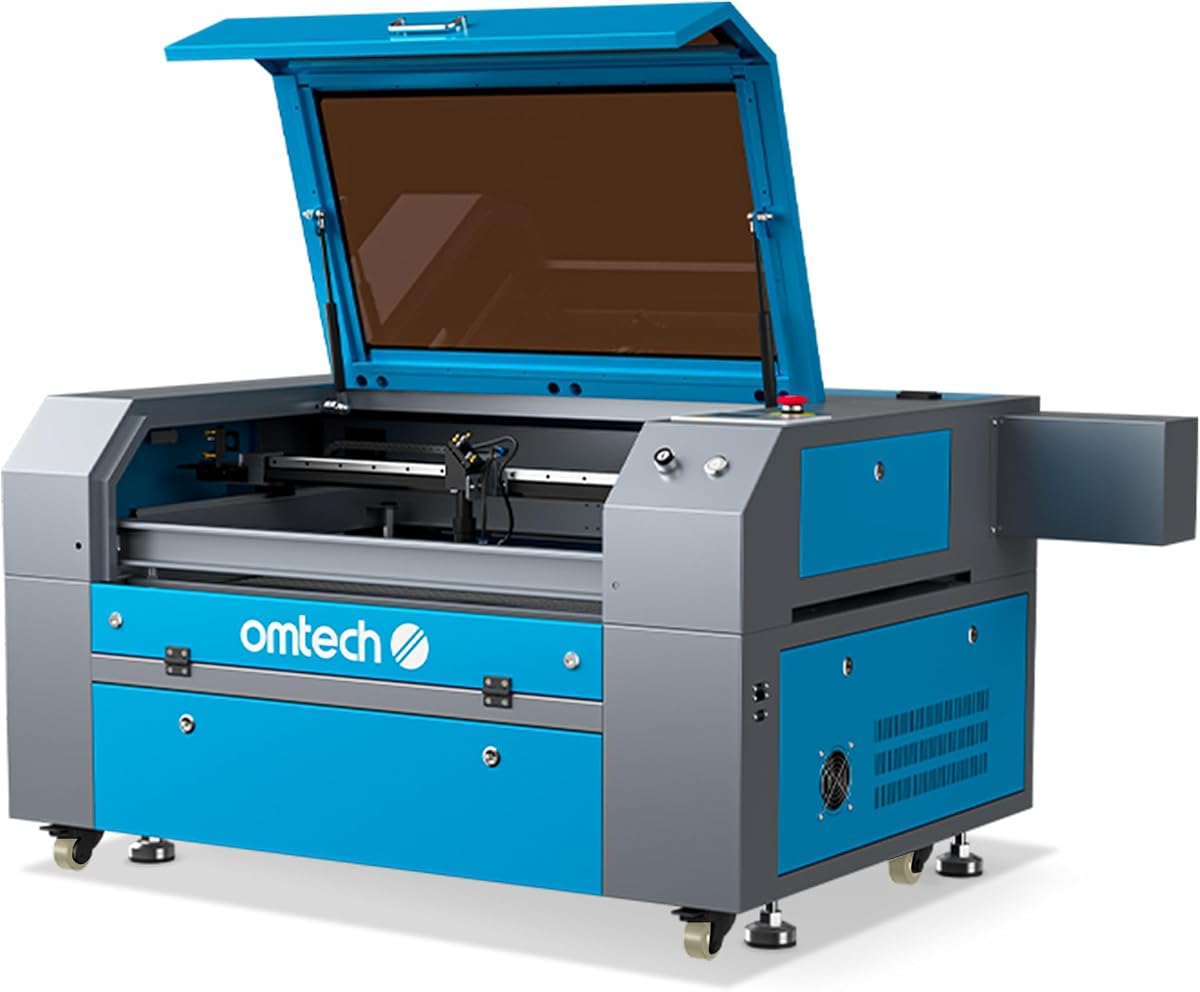
The OMTech K40+ earns Editor's Choice for its balance of safety and functionality. Rated 4.4 stars, it caters to DIY makers needing reliable cutting and engraving. The integrated air assist protects the lens during operations.
We may earn a commission when you buy through this link, at no additional cost to you.
It supports LightBurn and LaserGRBL for seamless workflows. Safety features like emergency stop and door protection prioritize user security. The 24/7 global support provides peace of mind for troubleshooting and maintenance needs.
Despite the compact workspace, it handles 10mm acrylic and 8mm wood effectively. Auto-adjusting airflow reduces carbonization, enhancing cut quality. Beginners appreciate the clear instructions and accessible setup process.
Choose this machine if safety and support are priorities for your initial setup. It offers a solid foundation for learning laser operations. Always check current availability and warranty terms before ordering online.
Multiple protective features ensure a secure working environment for users of all experience levels.
Access to expert technical guidance helps resolve issues quickly to minimize downtime.
We may earn a commission when you buy through this link, at no additional cost to you.
The xTool P3 leads premium options with intelligent automation and industrial-grade power. Its 4.5 rating reflects top-tier performance for serious production. The automated workflow reduces setup time significantly for large batches.
We may earn a commission when you buy through this link, at no additional cost to you.
Dual HD cameras and LiDAR ranging ensure precise positioning. Smart nesting maximizes material use at 98.7% efficiency. The enclosed design meets Class 1 safety standards, allowing safer operation in shared spaces.
While expensive, the speed and reliability justify costs for commercial users. It cuts 25mm acrylic effortlessly. Accessories like conveyors expand capabilities but add to total budget. Ideal for scaling production without manual intervention.
Invest in this unit if you need throughput and precision daily. It transforms workflows through automation. Confirm accessory needs and space requirements to maximize value from this flagship CO2 Laser Engraver.
Intelligent systems streamline complex tasks allowing you to focus on design and business growth.
Fully enclosed design protects operators while maintaining high performance in professional environments.
We may earn a commission when you buy through this link, at no additional cost to you.
The OMTech Maker 60W simplifies setup with autofocus and includes LightBurn for immediate use. Rated 4.7 stars, it is favored for its ease of operation. The 20×28 inch area supports larger projects effortlessly.
We may earn a commission when you buy through this link, at no additional cost to you.
Four-way pass-through doors allow long items to pass through. The water chiller ensures consistent performance during extended use. A widened viewing window improves visibility while maintaining safety standards for users.
Autofocus eliminates guesswork, speeding up production. This is valuable for commercial needs. However, space and cooling requirements must be managed. It offers a strong middle ground between power and usability.
Consider this model for growing businesses needing efficiency. It balances automation with affordability. Check local electrical requirements before installation to ensure safe operation in your facility.
Automated focusing reduces setup time and ensures consistent focal distance for every project.
Spacious bed and pass-through doors accommodate oversized materials without compromising quality.
We may earn a commission when you buy through this link, at no additional cost to you.
The OMTech Maker 90W delivers powerful performance for intensive production tasks. With up to 600mm/s speeds, it handles bulk orders efficiently. The 12,000-hour tube life ensures long-term reliability for serious users.
We may earn a commission when you buy through this link, at no additional cost to you.
Four-way pass-through doors simplify handling large materials. The flame-retardant window maintains safety during operation. Global support provides assistance whenever needed. Automatic interlock adds security when the lid opens.
Higher power means faster cuts but more ventilation is required. It suits workshops needing output. Users should manage expectations regarding size and cooling. It delivers professional-grade results consistently.
Choose this for high-volume commercial applications. Its power and durability support growth. Verify local safety codes and electrical capacity before purchasing to ensure compliance and safety.
Long lifespan components reduce maintenance needs and maximize uptime for production schedules.
Access to expert assistance ensures smooth operation and quick resolution of technical issues.
We may earn a commission when you buy through this link, at no additional cost to you.
This OMTech K40+ model provides reliable entry-level capabilities with strong support. It supports LightBurn and LaserGRBL for versatile workflows. Air assist keeps cuts clean, reducing carbonization and protecting lenses effectively.
We may earn a commission when you buy through this link, at no additional cost to you.
Emergency stop and door protection prioritize safety. The honeycomb bed handles flat items well. Optional rotary axis allows cylindrical engraving. Global support ensures help is available whenever needed.
It fits hobbyists wanting dependable performance. The 12×8 inch area is sufficient for small goods. Setup is straightforward for beginners. Check ventilation needs before installing to ensure safety and compliance.
Select this for a balance of ease and capability. It offers a smooth start into laser work. Always verify product details match your expectations before completing your purchase online.
Compact yet flexible design supports a wide range of creative projects within small spaces.
Built-in safety measures protect users during operation while maintaining productivity and quality.
We may earn a commission when you buy through this link, at no additional cost to you.
The OMTech Pronto 100W offers unmatched efficiency for high-volume production. With speeds up to 39.4 inches per second, it transforms creative visions quickly. The 40×24 inch area handles large items with ease.
We may earn a commission when you buy through this link, at no additional cost to you.
Autofocus simplifies setup for intricate designs. Powerful airflow ensures clean cuts and reduced burn. Temperature alarms add an extra layer of safety. Pass-through doors allow long items to pass easily.
This powerhouse suits professional needs requiring speed. Setup may need planning for space and power. It delivers consistent precision on non-metals. Verify electrical requirements match your workspace capabilities.
Invest in this for rapid output and capacity. It supports business growth effectively. Ensure your facility can handle the size and power needs for optimal use.
Fast engraving and cutting speeds allow for quicker turnaround on large orders.
Real-time alerts monitor conditions to prevent issues and ensure consistent safe operation.
We may earn a commission when you buy through this link, at no additional cost to you.
This OMTech Maker 90W variant offers exceptional performance with a rated tube. It ensures consistent power for long runs. The cover interlock enhances safety by cutting the beam immediately when opened.
We may earn a commission when you buy through this link, at no additional cost to you.
Four-way pass-through doors accommodate large projects. Water chiller maintains stable performance during operation. A 5.0 rating highlights user satisfaction. LightBurn software ensures intuitive navigation and workflow integration.
Ideal for commercial settings needing reliability. Space and budget requirements are significant. Check local safety codes to ensure compliance before installation. It delivers premium results consistently.
Choose this for high-demand environments. It offers value for long-term users. Verify warranty details and support options before purchasing to protect your investment.
High-quality tubes provide consistent power output over extended periods of daily use.
Automatic safety features protect operators without hindering operational efficiency.
We may earn a commission when you buy through this link, at no additional cost to you.
This OMTech 100W model delivers powerful performance for bulk projects. Instant autofocus eliminates manual adjustments for precision. The 28×20 inch area handles large materials efficiently for commercial needs.
We may earn a commission when you buy through this link, at no additional cost to you.
X and Y-axis motors ensure steady movement. Turbo exhaust fans keep the workspace clean. Multiple software integrations offer flexibility. Air sensors pause operation for safety if issues arise.
Ideal for users needing reliable large-scale output. Setup requires space planning. It balances power with smart controls. Always check electrical and ventilation needs to ensure compliance and performance.
Select this for professional-grade cutting. It delivers consistent results over time. Verify warranty and support terms to protect your long-term investment effectively.
Instant autofocus simplifies setup to reduce manual effort and improve precision.
Support for various software allows users to adapt to existing design workflows.
We may earn a commission when you buy through this link, at no additional cost to you.
This OMTech Maker 90W provides strong capabilities for diverse materials. With six hundred mm/s speeds, it handles glass and acrylic well. Global support and a 2-year service plan offer long-term peace of mind.
We may earn a commission when you buy through this link, at no additional cost to you.
Flame-retardant windows enhance durability. Four-way pass-through doors handle large items. The integrated air assist keeps lenses clean. Automatic cover interlock shuts off when the lid opens for safety.
It suits businesses needing consistent output. Space requirements are substantial. Verify electrical capacity and safety compliance before purchasing. It supports a wide range of projects.
Choose this for reliable commercial engraving. It balances performance with support features. Check current terms and availability before finalizing your order to ensure satisfaction.
Extended support coverage ensures reliable operation and quick issue resolution.
Expert guidance and local demos help you maximize your machine's potential.
We may earn a commission when you buy through this link, at no additional cost to you.
Selecting the right CO2 Laser Engraver depends on your project needs and workspace. We outline key factors to evaluate for optimal performance and value.
Power determines cutting depth and speed. Higher wattage like 90W or 100W cuts thicker materials faster than 45W models. Ensure the tube matches your material thickness needs for efficiency.
Choose power based on intended use. Beginners may prefer lower wattage while professionals need high output for speed.
The work area defines the maximum material size you can process. Desktop units offer 12×8 inches while larger models provide 40×24 inches. Measure your projects to ensure compatibility.
Larger beds support bigger projects but need more space. Balance your needs with available workshop room.
Compatible software streamlines the design-to-cut workflow. Support for LightBurn or RDWorks is essential for most users. Check if the machine works with your existing tools to avoid extra costs.
Flexible software options allow seamless integration into your design process. Ensure drivers and compatibility match your operating system.
Safety is critical for laser operation. Look for emergency stop buttons, cover interlocks, and flame-retardant panels. Proper safety features prevent accidents and protect users during use.
Never compromise on safety. Ensure the machine meets local safety standards and includes essential protections for your environment.
Air assist clears debris and protects the lens. Exhaust systems remove smoke to keep the workspace clean. These features enhance cut quality and machine longevity over time.
Check for built-in pumps and fans. Adequate ventilation is necessary to prevent buildup and ensure clear visibility.
Reliable support helps resolve issues quickly. Global support teams and comprehensive warranties provide peace of mind. Verify the duration and coverage before purchasing to protect your investment.
A strong warranty indicates manufacturer confidence. Ensure you have access to technical help for maintenance and troubleshooting needs.
Autofocus simplifies setup by finding the correct focal point automatically. This saves time and ensures precision. Manual models require careful adjustment by the user each time.
Autofocus is ideal for frequent use. Consider models with this feature to improve efficiency and reduce errors.
Laser tube lifespan affects long-term value. High-performance tubes can last up to 12,000 hours. Ensure the model uses quality components to maintain consistent output over years.
Longer tube life reduces replacement costs. Check specifications for expected usage hours before buying.
Start by preparing your design file and ensuring materials are clean and flat. Use the provided software to align settings with your chosen material type.
Run a test cut on scrap material to verify focus and power. Adjust the air assist as needed to optimize cut quality and reduce smoke.
Maintain your machine by regularly cleaning the lens and mirrors. Check water levels and filters to ensure cooling systems function correctly during operation.
A CO2 Laser Engraver is excellent for non-metal materials like wood, acrylic, leather, and glass. It cannot cut bare metals but may engrave coated surfaces with proper settings and safety precautions in mind.
Yes, proper ventilation is critical to remove smoke and fumes. Most machines include exhaust fans but connecting them to an external vent ensures a clean and safe workspace for extended use.
You should clean the lens every few weeks or whenever cut quality declines. Using a soft lens cloth and appropriate cleaner prevents debris buildup that can damage optics or reduce power.
Absolutely. Many models support commercial work with high speed and large work areas. Ensure safety compliance and proper ventilation for production environments to maintain efficiency and quality.
Laser tubes typically last between 8,000 to 12,000 hours depending on usage. Lower settings extend life while consistent maintenance ensures reliable performance over the expected lifespan.
LightBurn is widely supported by many CO2 Laser Engraver models. Check specific compatibility for your brand to ensure seamless workflow and access to its advanced design and control features.
Always wear appropriate eyewear and avoid leaving the machine unattended. Ensure safety locks are functional and follow recommended settings to prevent fires or accidental exposure.
Standard CO2 lasers cannot engrave bare metal directly. They work on coated metals or surfaces that absorb infrared light. You may need fiber optics for direct metal engraving.
We covered ten top models ranging from budget-friendly desktop units to professional-grade machines. Each offers unique benefits for different needs and workspace constraints to ensure you find the right match.
Prioritize power and workspace size based on your typical projects. Safety features and software compatibility are also critical for a smooth and efficient workflow in your shop.
Verify current prices and availability before purchasing as they can change rapidly. Check reviews and warranty terms to ensure you make a confident and informed investment.