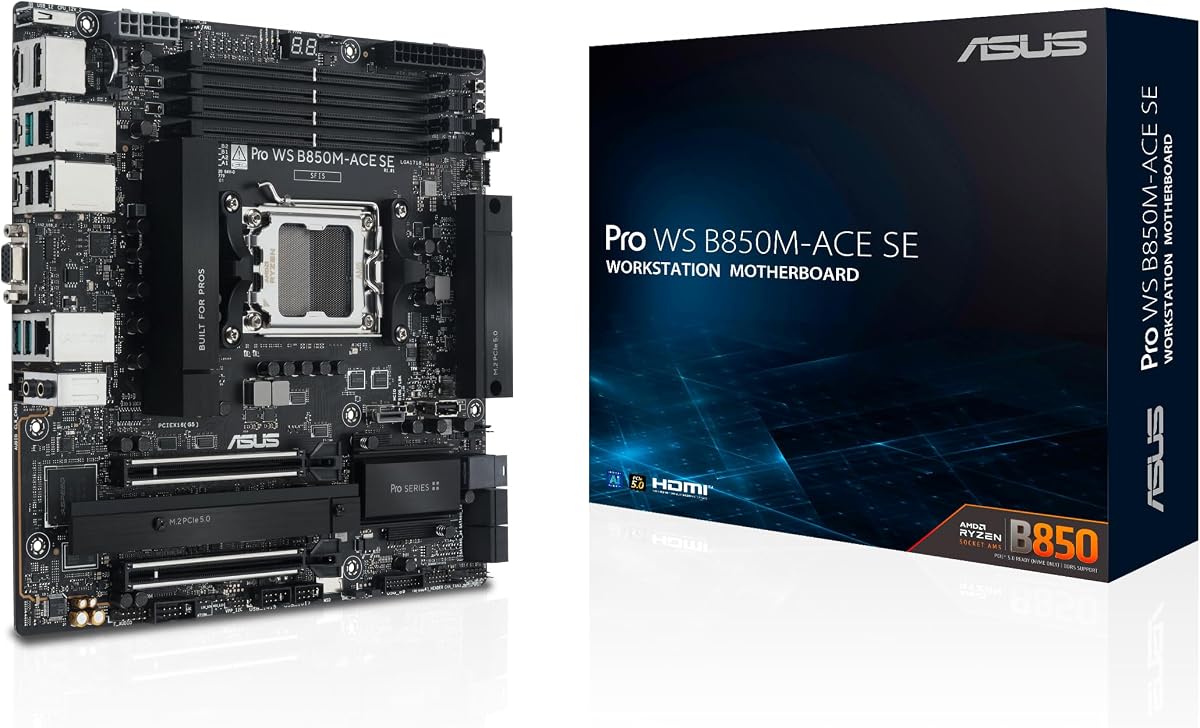
ASUS Pro WS B850M-ACE SE
4.3Editor score
AMD AM5 Socket Support
Dual 10G & 2.5G LAN
Server-grade IPMI Remote Management
This guide compares the top ASUS server motherboards for workstations and data centers, evaluating performance, connectivity, and reliability for enterprise
Selecting the right server motherboard is critical for building reliable workstations and data centers. ASUS offers a wide range of options designed for high performance and stability under heavy loads.
We analyzed ten top models based on socket support, connectivity options, power delivery, and remote management features. Our comparison helps you find the best fit for your specific infrastructure needs.
Each pick highlights key strengths and trade-offs to guide your decision. Prices and availability change frequently, so verify current details before purchasing to ensure compatibility and value.
4.3Editor score

3.7Editor score

5.0Editor score
Below is a side-by-side comparison of all ten ASUS server motherboards featured in this guide to help you evaluate their specifications and capabilities quickly.


The ASUS Pro WS WRX90E-SAGE SE is a powerhouse workstation motherboard built for demanding tasks like rendering and simulation. It supports the latest AMD Ryzen Threadripper PRO 7000 WX-Series processors and offers exceptional connectivity with seven PCIe 5.0 x16 slots.
We may earn a commission when you buy through this link, at no additional cost to you.
Its standout quality lies in its ultrafast connectivity and robust power delivery. With dual 10Gb LAN ports and support for up to 2TB of ECC memory, it ensures your data center or workstation runs smoothly under heavy multi-threaded loads without bottlenecks.
The board includes server-grade IPMI remote management via the AST2600 BMC controller. This allows for real-time monitoring and management through ASUS Control Center Express. However, the EEB form factor means you need a compatible chassis, which may limit case options.
This board is ideal for professionals who need maximum expansion and CPU power. It balances advanced features with stability, making it a top choice for those building high-end workstations or small server clusters where uptime and performance are paramount.
With seven PCIe 5.0 x16 slots, you can deploy multiple GPUs or accelerators simultaneously for AI training or 3D rendering tasks.
Integrated IPMI support with a dedicated LAN port lets you manage hardware remotely, reducing downtime and simplifying maintenance.
We may earn a commission when you buy through this link, at no additional cost to you.
The ASUS Pro WS W890E-SAGE SE is designed for the future of AI computing with the power needed for demanding applications. It supports Intel Xeon 600 Processors for Workstation and features the exclusive NitroPath DRAM technology for enhanced memory performance.
We may earn a commission when you buy through this link, at no additional cost to you.
Key strengths include its seven PCIe 5.0 x16 slots and dual Intel E610-XAT2 10Gb LAN ports. The board offers extensive connectivity including four M.2 slots, MCIO, SlimSAS, and USB4. This makes it suitable for complex workflows requiring massive data throughput and storage.
Robust power and thermal design ensure stability with 16+(2+2)+1+2 power stages and active cooling for VRM and memory. While the EEB form factor may limit case options, the server-grade IPMI remote management provides essential tools for monitoring and maintenance.
This motherboard is best for professionals building high-end AI workstations. It offers the stability and connectivity required for enterprise tasks. If you need top-tier Intel platform performance and expansion, this model stands out as a premium choice.
With USB4 and USB 20Gbps Type-C, the board ensures rapid data transfers for external storage and high-speed peripherals.
Active cooling for VRM and chipset maintains optimal temperatures even during sustained high-load operations like AI model training.
We may earn a commission when you buy through this link, at no additional cost to you.
The ASUS Pro WS B850M-ACE SE is built to power next-gen AI workloads with robust performance in a compact form. It is compatible with AMD Ryzen 9000/8000/7000 Series and AMD EPYC 4005 Series processors making it versatile for business environments.
We may earn a commission when you buy through this link, at no additional cost to you.
Its standout feature is the server-grade IPMI remote management with onboard BMC AST2600. Even in a MicroATX size, it delivers dual 10G & 2.5G LAN and two PCIe 5.0 M.2 slots. This ensures fast connectivity and storage options for efficient data access.
The board balances size with enterprise features including Control Center Express for IT management. While it lacks extensive PCIe expansion, it provides proven reliability with broad compatibility and 24/7 operation testing. This makes it ideal for space-constrained setups needing stability.
For small businesses or offices needing a reliable server board, this model is an excellent choice. It offers the necessary remote management and speed without the bulk of larger workstation boards. It is a cost-effective way to build a stable infrastructure.
IPMI support allows for remote monitoring and control even in a compact MicroATX design suited for smaller offices.
AMD AM5 socket support ensures longevity and compatibility with future processor upgrades for evolving business needs.
We may earn a commission when you buy through this link, at no additional cost to you.
The ASUS Pro WS W890-SAGE is designed for the future of AI computing with powerful connectivity. It supports Intel Xeon 600 Processors for Workstation and uses NitroPath DRAM technology to enhance ECC memory performance for reliable workstation operation.
We may earn a commission when you buy through this link, at no additional cost to you.
Key strengths include four PCIe 5.0 x16 slots and dual LAN speeds of Realtek 10Gb and Intel 2.5Gb. The board offers extensive connectivity with four M.2 slots and SlimSAS support. This makes it a robust choice for users needing flexible storage and network access.
Thermal design ensures stability with thorough cooling for VRM and chipset. While it supports IPMI expansion cards, the hardware must be added separately compared to boards with onboard BMC. This trade-off allows for modular customization depending on server needs.
This motherboard is ideal for workstation users wanting balance between performance and cost. It offers the essential connectivity and power delivery needed for AI tasks. With proper IPMI hardware, it can serve as a reliable component in a custom server build.
IPMI expansion support allows you to customize remote management based on your specific infrastructure requirements.
Multiple M.2 slots with PCIe 5.0 ensure rapid boot times and fast data transfer for demanding workloads.
We may earn a commission when you buy through this link, at no additional cost to you.
The ASUS Pro WS TRX50-SAGE WIFI supports up to 96-core CPUs and is ready for AMD Ryzen Threadripper PRO 7000 WX-Series Processors. It features 36 power stages and massive VRM cooling to ensure stability during heavy sustained workloads without overheating.
We may earn a commission when you buy through this link, at no additional cost to you.
Key strengths include WiFi 7 integration and ultrafast connectivity with three PCIe 5.0 x16 slots. This board supports up to 1TB of ECC R-DIMM DDR5 memory. The combination of wireless connectivity and wired options like 10 Gb LAN provides versatile network access.
Server-grade IPMI remote management hardware and software support via IPMI expansion cards. This ensures real-time monitoring for critical infrastructure. The thermal pad and heatsinks on M.2 slots maintain performance even during data intensive tasks.
This board is ideal for workstation users needing wireless flexibility and high performance. It balances advanced connectivity with robust power delivery. If you require the latest wireless standards alongside server-grade reliability, this model is a strong contender.
Integrated WiFi 7 ensures high-speed wireless access without needing external adapters in your workstation setup.
The 36 power stage design provides stable power to high TDP CPUs ensuring consistent performance under load.
We may earn a commission when you buy through this link, at no additional cost to you.
The ASUS Pro WS TRX50-SAGE WiFi A is designed for the future of AI computing with high power. It supports AMD Ryzen Threadripper 9000 & 7000 Series Processors and is ready for CPU and memory overclocking for performance tuning.
We may earn a commission when you buy through this link, at no additional cost to you.
Key strengths include two USB4 40Gbps ports and support for up to 1TB of ECC R-DIMM DDR5 memory. The board features three PCIe 5.0 x16 slots and three PCIe 4.0 x16 slots. This ensures massive expansion potential for GPUs and accelerators.
Its robust thermal design includes massive VRM cooling and M.2 heatsinks. Server-grade IPMI remote management provides real-time monitoring. While overclocking adds power draw, the 20 power stage design ensures stability during intensive workloads.
This board is best for enthusiasts and professionals wanting performance tuning capabilities. It offers high-speed connectivity and expansion. If you need flexible overclocking support alongside AI computing features, this model fits those advanced needs.
CPU and memory overclocking support allows users to squeeze extra performance for specific benchmark or task needs.
Dual USB4 40Gbps ports enable ultra-fast external storage access for video editing and data transfers.
We may earn a commission when you buy through this link, at no additional cost to you.
The ASUS Pro WS W680-ACE IPMI supports 13th Gen Intel Core processors and features dual PCIe 5.0 Safeslots for high-speed expansion. Its design focuses on enhanced power solution with DrMOS and durable capacitors for stable power delivery under load.
We may earn a commission when you buy through this link, at no additional cost to you.
Key strengths include a Thunderbolt 4 header and bundled IPMI expansion card. This combination offers versatile connectivity for external displays and servers. The motherboard also provides dual Intel 2.5Gb Ethernet and SlimSAS support for robust storage options.
Thermal design features large VRM heatsinks and hybrid fan headers. While it does not have onboard BMC without the card, the bundled IPMI expansion ensures remote management. This setup is ideal for workstation environments needing both I/O flexibility and manageability.
This motherboard is best for IT professionals needing standard ATX form factor with enterprise features. It balances modern I/O like Thunderbolt 4 with server-grade management. If you require expandability and management, this board offers a strong middle ground.
The bundled IPMI expansion card provides intelligent control for IT infrastructure without needing separate hardware purchases.
Thunderbolt 4 support allows fast external connections for displays and storage in a workstation environment.
We may earn a commission when you buy through this link, at no additional cost to you.
The ASUS P12R-M/10G-2T server motherboard supports the Intel Xeon E-2300 processor with LGA 1200 socket. It features the Intel C252 chipset designed for reliability in entry-level server environments and small business deployments.
We may earn a commission when you buy through this link, at no additional cost to you.
Key strengths include its Micro ATX form factor and dual 10Gbps network support. This compact board offers enough performance for file serving and light virtualization. It provides a reliable platform for users needing to reuse existing LGA 1200 hardware.
Thermal design and power delivery are robust for entry-level workloads. While it lacks newer features like PCIe 5.0, it ensures stability for 24/7 operation. The design focuses on practicality for specific legacy infrastructure needs.
This board is ideal for small offices upgrading or maintaining existing hardware. It offers solid server features in a compact size. If you need a simple server motherboard without the latest platform demands, this model is a functional choice.
Dual 10Gbps ports ensure fast data transfer for network file servers and backup systems.
The Micro ATX form factor fits in smaller cases making it suitable for compact office environments.
We may earn a commission when you buy through this link, at no additional cost to you.
The ASUS Z13PE-D16 is an E-ATX motherboard suitable for two Intel Xeon processors of the 5th Generation. It supports up to 350 W TDP and features 16 x DDR5 4800 RDIMM slots for up to 4TB RAM making it ideal for memory-hungry workloads.
We may earn a commission when you buy through this link, at no additional cost to you.
Key strengths include built-in dual M.2 with PCIe 5.0 x4 bandwidth for faster OS booting. Dual Intel 10Gbps Ethernet ports with teaming support ensure robust network performance. This board is designed for data centers requiring massive storage and memory capacity.
IT infrastructure management is handled via ASUS Control Center and ASMB11-iKVM. While the E-ATX size requires a large chassis, the expansion capabilities are unmatched. A single CPU supports up to three PCIe cards for GPU acceleration.
This motherboard is best for heavy data processing and virtualization. It offers unparalleled memory capacity and network speed. If you need to run large databases or virtual machines, this model provides the hardware to scale effectively.
Up to 4TB RAM support allows for handling huge datasets and complex virtualization tasks efficiently.
Dual 10Gbps ports with teaming ensure high availability and fast throughput for critical server operations.
We may earn a commission when you buy through this link, at no additional cost to you.
The ASUS Pro WS W680-ACE IPMI supports 13th Gen Intel Core processors with PCIe 5.0 support for high-speed expansion. It features 2 Intel 2.5 Gb Ethernet and 3 PCIe 4.0 M.2 slots ensuring robust storage performance and data access for workstations.
We may earn a commission when you buy through this link, at no additional cost to you.
Key strengths include multiple display outputs like HDMI DisplayPort and VGA. This makes it useful for multi-monitor setups in server environments. The board includes an IPMI expansion card bundle for intelligent BMC control and remote management.
Cooling is comprehensive with large VRM heatsinks and hybrid fan headers. The advanced power solution ensures stable delivery. While user ratings vary, the hardware design focuses on reliability and comprehensive IT infrastructure management for professional users.
This motherboard is best for users needing standard desktop outputs on a server board. It offers manageability and connectivity for office servers. If you need to manage local displays alongside remote administration, this model provides the necessary flexibility.
Multiple video outputs allow direct local monitoring of server status alongside remote IPMI access.
DrMOS and alloy inductances ensure consistent power to the CPU and peripherals for long uptime periods.
We may earn a commission when you buy through this link, at no additional cost to you.
Selecting the right motherboard requires evaluating socket type, expansion needs, and management features. This guide outlines the key factors to consider for your workstation or server build.
Ensure the motherboard supports your intended CPU. AMD TR5 supports Threadripper PRO 7000 WX-Series while Intel LGA 4710-2 supports Xeon 600 Series. Compatibility ensures you can utilize high core counts and memory bandwidth effectively.
Always check the QVL list for CPU and RAM compatibility to avoid boot issues or performance bottlenecks.
Consider how many GPUs or accelerators you need. Models like the WRX90E-SAGE SE offer seven PCIe 5.0 x16 slots whereas others have fewer. This dictates your ability to expand storage or compute power without bottlenecks.
Check if your GPUs need x16 bandwidth. Some slots may be shared or reduced to x8/x4 when all are populated.
Server workloads require large and reliable memory. Look for ECC R-DIMM DDR5 support. The Z13PE-D16 supports up to 4TB RAM while others cap at 2TB. Ensure your RAM type matches the board specification.
Memory overclocking support can enhance performance if the budget allows for high-speed RAM modules.
Fast network is critical for servers. Dual 10Gb LAN ports offer redundancy and throughput. Some boards mix 10Gb with 2.5Gb. Choose based on your server's bandwidth needs and network switch compatibility.
Consider if you need SlimSAS or MCIO for storage connectivity alongside Ethernet.
IPMI support is essential for remote administration. Some boards include BMC onboard while others need an expansion card. ASUS Control Center Express allows real-time monitoring of temperature and health.
Ensure the management software is compatible with your OS. This simplifies maintenance and reduces downtime.
Server boards come in EEB E-ATX ATX and MicroATX sizes. Ensure your case supports the board dimensions and mounting points. EEB boards offer more expansion but require larger chassis.
Check power supply compatibility. Some high power boards require dual PSU connectors for stable operation under load.
SSD performance affects boot and app speed. Look for PCIe 5.0 M.2 slots and U.2 support. The number of M.2 slots dictates how many internal SSDs you can install without adapters.
Ensure the board supports your RAID configurations. Some boards offer better support for NVMe RAID setups.
High core count CPUs need robust VRMs. Boards with 32+ power stages deliver stable power. Active cooling for VRM and chipset ensures the board stays stable under 24/7 loads.
Check for thermal pads on M.2 heatsinks to prevent SSD throttling during long data transfers.
Install the motherboard in a compatible chassis with proper grounding. Connect the power cables securely to CPU and PCIe slots. Ensure all fans are connected to the correct headers for active cooling and proper airflow.
Enter BIOS to configure XMP profiles and IPMI settings. Set RAID arrays if using multiple storage drives. Update the BIOS to the latest version for stability and security patches provided by ASUS.
Monitor system health via ASUS Control Center Express. Keep the chassis clean from dust to prevent overheating. Replace thermal paste on CPU and VRM heatsinks if you plan to run intensive workloads long term.
ASUS server motherboards support ECC memory and Xeon or Threadripper processors which are designed for continuous operation. They feature robust power delivery systems and remote management tools like IPMI that ensure stability and maintainability in 24/7 environments.
It depends on the model. Some boards like the Pro WS W890E-SAGE SE have onboard BMC. Others such as the Pro WS W680-ACE IPMI bundle an expansion card. Always check the specifications before buying to ensure your management needs are met.
No ECC memory requires motherboard support. Consumer boards typically do not support ECC R-DIMMs. Using ECC RAM on unsupported boards may result in the system failing to boot or memory running in non-ECC mode.
PCIe 5.0 offers double the bandwidth of PCIe 4.0 allowing faster data transfer for GPUs and storage. If you use high-end graphics cards or NVMe SSDs PCIe 5.0 ensures your system keeps up with the fastest components.
Download the latest BIOS file from the ASUS website and use the USB BIOS Flashback button if available. Alternatively enter the BIOS setup and use the EZ Flash utility. Ensure the PC stays powered during the update to prevent corruption.
Yes EEB motherboards are larger than ATX boards and require a case with extra space and mounting holes. Using a standard ATX case may result in physical fitting issues or poor airflow if the board is forced into place.
This guide reviewed ten top models ranging from compact MicroATX boards to massive E-ATX solutions. Whether you need massive RAM capacity or advanced AI connectivity there is an ASUS model to fit your requirements.
Prioritize socket compatibility and PCIe expansion when building. Look for boards that offer the remote management tools you need to keep operations running smoothly and securely without constant physical access.
Always verify current prices and availability before purchasing as these details change frequently. Ensure you have the compatible PSU and case before finalizing your build to save time and avoid compatibility issues.