
Tablo TV 4th Gen 2-Tuner
3.4Editor score
No subscription fees
50 plus hours storage
Whole-home access
This guide compares the top DVR recorders for TV in 2026, evaluating features, compatibility, and performance to help you find the ideal device for your setup.
Finding the right DVR recorder for TV can transform how you consume media at home. Whether you want to archive analog tapes or record live broadcast channels, a quality device ensures you never miss a moment. Modern units offer flexible connectivity and storage options for every household.
We evaluated ten leading models based on tuner count, recording quality, and ease of use. Our analysis covers standalone recorders, over-the-air units, and hybrid devices. Each product was assessed for compatibility with existing setups and overall value proposition for consumers seeking reliable recording solutions.
Each pick highlights specific strengths like resolution support or network capabilities. Prices fluctuate frequently so verify current offers before purchasing. These selections represent the current best available options for capturing video content directly to your television environment.
3.4Editor score
4.0Editor score

4.1Editor score
The following table provides a side-by-side comparison of all ten selected DVR recorders for TV. Use this to quickly identify key specifications like tuner counts, resolution capabilities, and storage options for each model.


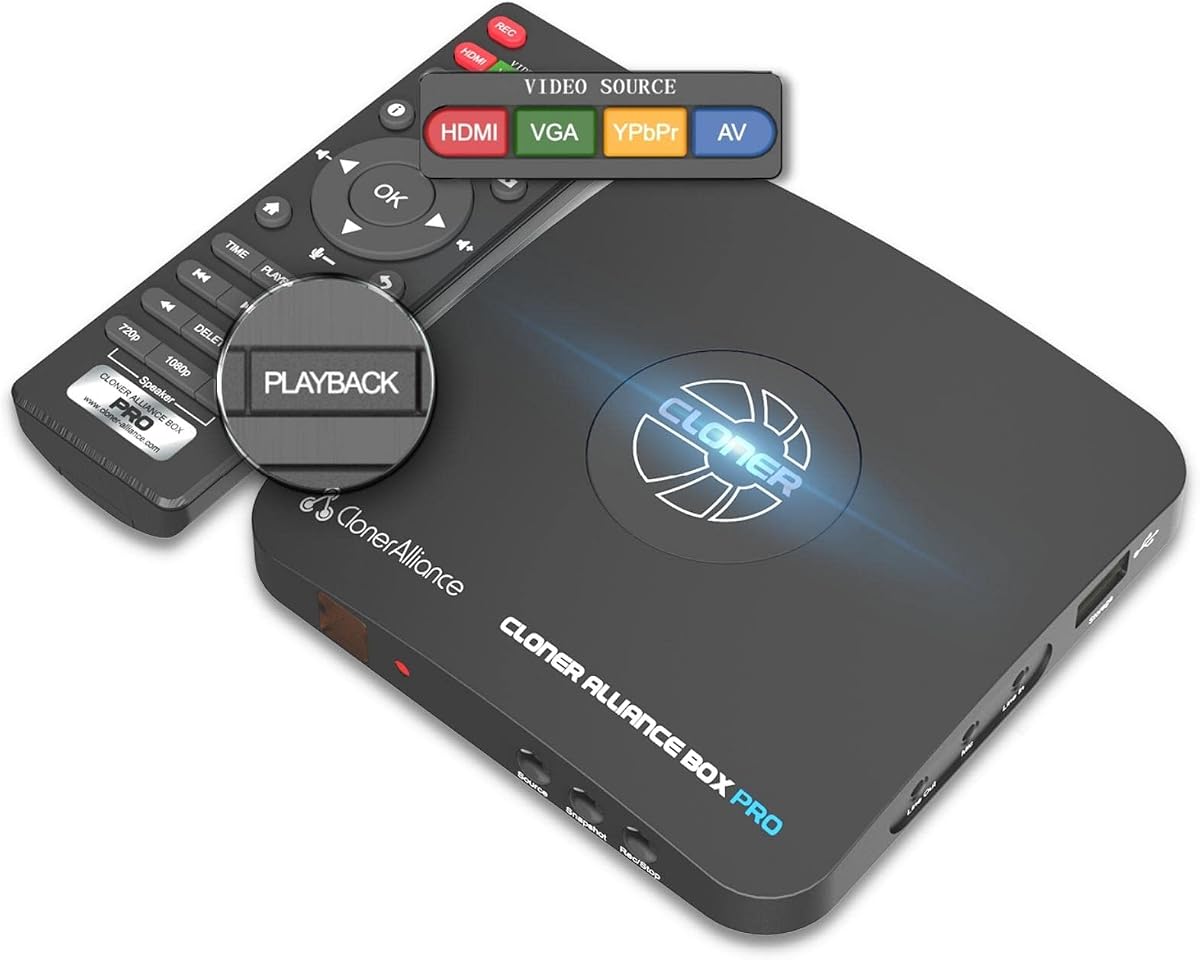
The ClonerAlliance Box Pro stands out as a versatile standalone device for capturing video content without needing a computer. It supports 1080p recording at 60fps and accepts various analog inputs like RCA and VGA. This makes it ideal for digitizing old VHS tapes or archiving cable box outputs.
We may earn a commission when you buy through this link, at no additional cost to you.
Its key strength lies in its flexibility. Users can record directly to USB storage while watching playback on TV via the included remote. The ultra-low latency ensures minimal delay during live capture sessions. Schedule tasks allow automated recording for recurring programs.
A notable limitation is the lack of HDCP support, meaning protected content from streaming devices will not record. Additionally, the free editing software is limited to Windows systems. Despite these constraints, it remains a powerful tool for analog preservation.
This device is perfect for families wanting to preserve home videos or retro gaming sessions. It bridges the gap between old analog hardware and modern digital storage efficiently. We recommend it for users prioritizing standalone operation and input versatility.
This unit converts legacy formats into MP4 files easily. You can save recordings on modern PCs without extra hardware.
Watch your recorded content directly on your television screen. The remote simplifies navigation through stored files.
We may earn a commission when you buy through this link, at no additional cost to you.
The Tablo TV 4th Gen 4-Tuner is a robust over-the-air DVR designed for cord-cutters. It offers four tuners allowing you to record multiple shows simultaneously. With no subscription fees required, it provides a cost-effective way to access local broadcast networks permanently.
We may earn a commission when you buy through this link, at no additional cost to you.
Its whole-home access feature lets compatible devices stream recorded content anywhere in the house. You can watch live TV on smartphones or smart TVs through the Tablo app. The device integrates easily with your home Wi-Fi network for seamless operation.
Setup requires a stable internet connection and a compatible TV antenna. Non-smart TVs cannot use this device directly without extra hardware. While powerful, it depends heavily on network quality for optimal streaming performance.
This model is best suited for households with multiple viewers wanting flexible access to local TV. It eliminates ongoing costs while providing extensive recording capabilities. Choose this if you prioritize subscription-free living and smart home integration.
Share your recorded shows with family members easily. The app supports various smart platforms.
Store content on internal storage for quick access. You can also add external USB drives for more space.
We may earn a commission when you buy through this link, at no additional cost to you.
The Tablo TV 4th Gen 2-Tuner offers an affordable entry point into OTA DVR territory. It allows recording of two channels at once and supports over 50 hours of storage. Without subscription fees, it remains a budget-friendly solution for basic local TV recording needs.
We may earn a commission when you buy through this link, at no additional cost to you.
It connects to your home network to stream content to various devices. This flexibility means you can watch recordings on a phone or tablet remotely. The setup process is straightforward for users comfortable with network configuration.
Limitations include a dependency on internet connectivity and only two tuners. If you need to record three shows simultaneously this unit will not suffice. It works best for smaller households with moderate recording demands.
For those seeking a no-hassle DVR experience without monthly bills, this is a strong candidate. It balances cost with essential features like pause and replay. Select this if your primary goal is saving money on cable bills.
Connect via Ethernet or Wi-Fi for streaming. The app guides you through initial configuration steps.
Control live broadcasts with pause and replay functions. You gain flexibility over how you watch TV.
We may earn a commission when you buy through this link, at no additional cost to you.
This bundle combines the Tablo 2-Tuner DVR with a 35-mile range indoor antenna. It simplifies setup by providing everything needed to start recording local channels immediately. You avoid the hassle of sourcing compatible antennas separately.
We may earn a commission when you buy through this link, at no additional cost to you.
The DVR features two tuners for recording two programs at once. It connects to your network to stream live or recorded content to multiple devices. The included coaxial cable ensures a secure connection between the antenna and the unit.
While convenient, the included antenna may struggle in areas with weak signal. Users in rural locations might need to upgrade the antenna separately. Also note that internet connectivity remains mandatory for full functionality.
Ideal for beginners wanting a plug-and-play DVR experience. The cost savings compared to buying separately make it attractive. Pick this if you want a ready-to-use solution for catching local broadcasts.
Receive the DVR and antenna in a single box. Installation guides help you get started quickly.
Enjoy free over-the-air broadcasts alongside network streaming. It combines traditional TV with modern features.
We may earn a commission when you buy through this link, at no additional cost to you.
The Mediasonic HomeWorx HW250STB serves as a reliable ATSC digital converter box with recording capabilities. It outputs 1080p video via HDMI making it compatible with modern TVs. The Clear QAM feature allows viewing unscrambled cable channels without a subscription.
We may earn a commission when you buy through this link, at no additional cost to you.
You can record live TV to an external USB hard drive up to 2TB. It also acts as a multimedia player for photos and videos stored on USB drives. The metal case provides durability and better heat dissipation than plastic alternatives.
It does not support ATSC 3.0 which limits future broadcast compatibility. The interface is functional but lacks advanced smart features found in other DVRs. However, it works well for simple conversion and recording needs.
This unit is perfect for upgrading an analog TV to digital broadcast. It offers a straightforward way to record programs without complex setups. Choose this if you need a basic converter with recording at a low cost.
Access basic cable channels without a box. This works with providers offering unencrypted signals.
Connect a USB hard drive to save recordings. It handles large capacities up to 2TB efficiently.
We may earn a commission when you buy through this link, at no additional cost to you.
The Toshiba DVR670KU is a classic device combining DVD and VHS recording with a built-in tuner. It allows dubbing between tapes and discs for archiving home movies. The HDMI upconversion enhances older DVD quality on modern high-definition televisions.
We may earn a commission when you buy through this link, at no additional cost to you.
It supports various surround sound formats including Dolby Digital and DTS. Front and rear inputs facilitate easy recording from digital cameras or external sources. This makes it a central hub for managing analog and early digital media.
While reliable, it does not record in 1080p which limits modern recording needs. The technology is dated compared to network-connected DVRs available today. However, for preserving physical media it remains highly effective.
This recorder is best for collectors preserving VHS tapes. It bridges the gap between old formats and modern HDMI displays. Select this if you primarily need to convert analog media to DVD.
Move content from VHS to DVD easily. This keeps your library organized and accessible.
Upgrade DVD quality for HD screens. The HDMI port simplifies connection to new TVs.
We may earn a commission when you buy through this link, at no additional cost to you.
This package features the 4-Tuner DVR paired with a 35-mile indoor antenna. It allows recording four shows simultaneously while streaming live TV to other rooms. It is the ultimate solution for large households needing maximum recording flexibility without subscriptions.
We may earn a commission when you buy through this link, at no additional cost to you.
The DVR connects via Wi-Fi or Ethernet to distribute content. You can control playback on tablets or smartphones throughout the home. The included antenna helps pick up major network signals in many suburban areas.
Its primary requirement is a consistent internet connection for streaming. Without it, the device functions locally but lacks remote access features. Ensure your router signal reaches the device location before buying.
This is the premium choice for serious cord-cutters. It maximizes tuner availability and provides a complete hardware set. Pick this if you want the most powerful OTA setup possible.
Never miss a show with four tuners. Record multiple timeslots simultaneously.
Save money by not buying a separate antenna. It comes ready for indoor use.
We may earn a commission when you buy through this link, at no additional cost to you.
The ClonerAlliance UHD Pro is a high-end standalone device designed for capturing 4K video. It supports advanced codecs like H.265 for efficient storage of high-resolution content. Its HDMI passthrough ensures you can view 4K content on your TV without signal loss.
We may earn a commission when you buy through this link, at no additional cost to you.
You can record at cinematic frame rates or standard 30fps. This flexibility suits various video creation needs from gaming to conferencing. Like its HD counterpart, it requires no PC for operation.
Recording protected content via HDCP is not supported. Windows software is included for basic editing. Despite this, its raw capture performance is unmatched in this category.
Perfect for content creators needing 4K archival. It bridges the gap between professional capture and consumer ease. Choose this if high resolution is your top priority.
H.265 reduces file sizes without quality loss. This saves space on your hard drives.
Watch 4K content on your TV while recording. It maintains visual quality throughout the chain.
We may earn a commission when you buy through this link, at no additional cost to you.
This renewed version of the Tablo 2-Tuner DVR offers significant savings. It provides the same core features as the new model including 128GB of internal storage. Buying renewed allows you to access OTA capabilities at a lower cost.
We may earn a commission when you buy through this link, at no additional cost to you.
It includes standard network streaming capabilities. You can add external USB storage if needed for more space. Amazon ensures it is tested to function properly before shipping.
The only difference from new is cosmetic appearance and prior ownership. It still supports Wi-Fi and the same companion app. Just ensure you check the return policy for renewed goods.
Ideal for budget-conscious buyers willing to accept a pre-owned unit. It delivers full functionality without the price premium. Choose this if you want a reliable OTA DVR for less.
Get the same performance for less money. This reduces the entry barrier for OTA TV.
Start recording immediately with built-in storage. You do not need extra drives right away.
We may earn a commission when you buy through this link, at no additional cost to you.
This renewed unit provides access to four tuners at a fraction of the price. It supports time-shift viewing and streaming across multiple devices. You get the benefits of a premium DVR without the new device markup.
We may earn a commission when you buy through this link, at no additional cost to you.
It includes 128GB of onboard storage and supports up to 8TB externally. The network integration works seamlessly with modern smart TVs. It is a great way to upgrade your home setup affordably.
As a refurbished product, it undergoes testing for quality assurance. However, you may notice minor signs of use. Ensure your network is stable for optimal performance.
Best for those seeking top-tier features on a budget. It removes financial barriers for multi-channel recording. Pick this if you need maximum tuner power for a lower price.
Expand your library with USB drives. This keeps your collection growing indefinitely.
Start watching shows that are already recording. This gives you control over your viewing schedule.
We may earn a commission when you buy through this link, at no additional cost to you.
Selecting the right DVR recorder for TV depends on your specific needs like broadcast type and storage. This guide outlines key factors to consider before making a purchase.
Ensure the device supports your existing connections like HDMI RCA or VGA. Older VHS tapes require analog inputs while modern cable boxes need HDMI. Check if the unit supports HDCP if you plan to record streaming content.
Compatibility ensures seamless integration with your current TV and media sources.
Tuner count determines how many shows you can record simultaneously. A single tuner is basic while multi-tuner units offer flexibility. Choose at least two tuners if you have overlapping schedules.
More tuners prevent scheduling conflicts during prime viewing times.
Consider internal versus external storage options. Some devices have built-in space while others rely on USB drives. Large libraries require expandable storage up to several terabytes.
Adequate storage prevents you from deleting favorite shows prematurely.
Determine the maximum resolution you need like 1080p or 4K. High resolution requires more storage space but offers better quality. Standard HD is often sufficient for casual viewing.
Match resolution to your TV's capabilities for the best visual experience.
Network-connected DVRs need a stable Wi-Fi connection. Standalone units operate without internet for local playback. Check if you want remote access features that demand connectivity.
Decide if network access is essential for your household usage.
Look for intuitive interfaces and simple setup guides. Remote controls and mobile apps enhance usability. User-friendly devices save time and frustration.
Choose a system that fits your technical comfort level.
Many OTA DVRs require no monthly fees while others do. Always check the pricing model to avoid hidden costs. One-time purchases are generally better for long-term value.
Avoid recurring charges if you want a cost-effective solution.
Connect the device to your TV using the appropriate cable like HDMI. Plug in the power adapter and follow the on-screen setup instructions to configure settings.
Use the remote or app to schedule recordings for specific times. Ensure your hard drive is formatted correctly to store video files effectively.
Keep the unit in a well-ventilated area to prevent overheating. Regularly update firmware to maintain performance and security features.
Many devices support Clear QAM allowing recording of unencrypted cable channels. However, encrypted channels from providers like Comcast usually require a specific box. Always check compatibility before buying.
Most standalone DVRs operate without a computer for recording and playback. You can view content directly on your TV via USB drives. Some editing software may require a PC.
External storage capacity varies by model. Some units support up to 2TB while others allow up to 8TB. USB flash drives are often not recommended for reliability reasons.
Standalone units connect to any TV with HDMI inputs. Smart TVs may need extra setup if you want to use apps for streaming recorded content. Check device compatibility lists.
Network-connected DVRs like Tablo allow streaming to mobile devices. Standalone units typically require physical USB transfer to mobile devices. Ensure your device supports the app.
If the unit lacks a battery backup the recording stops abruptly. Once power is restored the device usually resumes operation. Uninterruptible power supplies protect against this issue.
Only specific models like the ClonerAlliance UHD Pro support 4K recording. Most standard DVRs record in 1080p. Ensure you select a model that matches your resolution needs.
Most manufacturers offer a one-year warranty covering defects. Renewed items may have shorter terms. Always read the warranty details before purchasing.
We highlighted top choices like the ClonerAlliance Box Pro and Tablo TV for different user needs. Whether you prioritize resolution or network features there is a fit for everyone.
Focus on tuner count and input types when comparing models. These factors dictate the flexibility of your recording setup significantly.
Prices and stock change so verify details before buying. Your perfect DVR is one that matches your media habits.