
TECKNET Compact Ambidextrous Wireless Mouse for Laptop Pink
4.6Editor score
Compact portable size
Soft quiet clicks
Long battery life
This guide compares the top cute laptop mouse options for style and performance, helping you find the perfect wireless or Bluetooth device for your setup.
Finding a cute laptop mouse can transform your workspace into a personalized haven that reflects your unique style while delivering essential functionality. These devices combine aesthetic appeal with reliable performance to ensure you stay productive without compromising on visual flair or ergonomic comfort.
We evaluated ten standout models based on connectivity options, design uniqueness, and overall usability to bring you this curated list. Each product was assessed for its compatibility with various operating systems, battery efficiency, and the ability to provide a smooth tracking experience across different surfaces.
Each pick highlights specific strengths such as silent operation, dual-mode connectivity, or playful themes to help you narrow down your choices effectively. Please note that prices and availability may change over time, so verifying current details before purchasing is always recommended for the best deal.
4.6Editor score

4.7Editor score

4.6Editor score
This side-by-side comparison highlights the key specifications and unique attributes of each selected model to help you make an informed decision based on your specific needs and preferences.




This rechargeable wireless mouse stands out with its unique donut design and high customer satisfaction. It offers a seamless blend of portability and performance, making it a top contender for those seeking a cute laptop mouse that performs well.
We may earn a commission when you buy through this link, at no additional cost to you.
The dual-device connection feature allows users to switch between a laptop and a tablet effortlessly. The built-in battery supports up to 20 days of use, and it can be used while charging, ensuring uninterrupted productivity during long work sessions.
While the donut shape is distinct and appealing, some users might find it less ergonomic compared to traditional shapes. The silent clicks are a significant plus for office environments, though the DPI is fixed at 1200 which might limit customization for power users.
Ideal for students and professionals who prioritize a quiet and stylish workspace. This model is a strong recommendation for anyone looking for a reliable and eco-friendly wireless option that does not compromise on style or functionality.
Switch between devices instantly with one button to maintain workflow without disruption.
Rechargeable battery eliminates the need for disposable AA batteries reducing environmental waste.
We may earn a commission when you buy through this link, at no additional cost to you.
The TECKNET Compact Ambidextrous Wireless Mouse offers a budget-friendly entry into the world of stylish computing accessories. Its compact design and soft click mechanism make it an excellent choice for users seeking simplicity and value.
We may earn a commission when you buy through this link, at no additional cost to you.
Designed with small to medium hands in mind, this mouse fits comfortably in bags and pockets. The smart sleep modes help extend battery life significantly, ensuring you rarely need to replace the AA battery during normal usage.
The lack of Bluetooth connectivity limits its use to devices with USB A ports which may be a drawback for newer ultrabooks. However, for general browsing and document editing, its performance remains consistent and reliable without unnecessary features.
Perfect for travelers or students needing a functional and affordable accessory. If your priority is a cute design that fits easily in a backpack and performs basic tasks silently, this mouse delivers excellent value for money.
Compact dimensions allow for easy storage and comfortable use in cramped travel spaces.
Adjustable sleep modes ensure extended battery life based on how long you have been inactive.
We may earn a commission when you buy through this link, at no additional cost to you.
FMOUSE brings a playful yet functional twist with its cartoon-themed wireless mouse. This premium option combines aesthetic charm with robust connectivity options, making it suitable for both home and office environments.
We may earn a commission when you buy through this link, at no additional cost to you.
The dual-mode capability ensures compatibility with MacBooks and tablets lacking USB ports by switching to Bluetooth. The ergonomic shape fits small to medium hands comfortably, while the silent click feature is perfect for shared workspaces.
While the design is undeniably cute, the thicker body might not appeal to those preferring a minimal profile. Additionally, the need to purchase a separate battery adds a slight initial cost, though the battery lasts for months of daily use.
Ideal for remote workers or cat lovers who want a cheerful desk accessory that performs well. This mouse is highly recommended for those who need versatility in connection types without sacrificing on style or quiet operation.
Toggle between Bluetooth and USB receiver to support various devices without extra dongles.
Up to ninety percent quieter than standard mice allows focus during important meetings or late work.
We may earn a commission when you buy through this link, at no additional cost to you.
The wegear USB Wireless Mouse offers versatility with its adjustable DPI settings and extra navigation buttons. It caters to users who need more than just basic pointing capabilities, providing a pink aesthetic that suits modern desk setups.
We may earn a commission when you buy through this link, at no additional cost to you.
With five DPI levels ranging from 800 to 4000, users can switch between precise design work and fast browsing easily. The ergonomic shape reduces hand strain during extended use, and the battery life extends up to 24 months on a single charge.
The side buttons for forward and backward navigation are useful on Windows but may not function on macOS systems. Additionally, the reliance on a standard AA battery means you will eventually need to replace it, unlike rechargeable models.
Best suited for Windows users who need extra control buttons for productivity. This mouse is a practical choice for those who want customizable cursor speeds and a comfortable grip without a steep price tag.
Adjust cursor speed on the fly to match your specific task needs accurately.
Side buttons streamline navigation through web pages and documents with fewer clicks.
We may earn a commission when you buy through this link, at no additional cost to you.
Akko delivers a unique cat-themed mouse that blends gaming performance with adorable aesthetics. This model is designed for users who want a playful look without sacrificing the speed and responsiveness needed for daily tasks or light gaming.
We may earn a commission when you buy through this link, at no additional cost to you.
The tri-mode connectivity supports Bluetooth 3.0, 5.0, and 2.4G wireless, offering flexibility across multiple devices. The ergonomic design ensures a comfortable fit, while the anti-slip bottom keeps the mouse stable during rapid movements.
While the cat shape is distinctive, it might not provide the grip variety of a standard mouse for all users. The gaming features are present but may not appeal to hardcore gamers looking for extensive RGB customization or high-speed polling rates.
Ideal for gamers who appreciate cute designs and need multi-device connectivity. This mouse is a great option for those seeking a balance between fun visuals and reliable performance across laptops and desktops.
Connect to three different devices via Bluetooth or wireless for seamless switching.
Anti-slip base ensures the mouse stays put even during intense cursor movements.
We may earn a commission when you buy through this link, at no additional cost to you.
The Unipows Wireless Mouse features a slim ergonomic design with a unique gradient pink to purple finish. It is perfect for users who value a lightweight and stylish accessory that packs well into bags and suits modern aesthetics.
We may earn a commission when you buy through this link, at no additional cost to you.
Built to endure millions of clicks, this mouse is durable for daily use. The silent clicks and auto-sleep mode help save energy and reduce noise, making it suitable for quiet environments like libraries or offices.
The reliance on a USB receiver limits its use to devices with USB ports which excludes many newer tablets or ultrabooks. Also, the gradient design might vary slightly between production batches, so color expectations should be managed.
Best for users who need a slim and durable mouse for travel or office use. This model is highly recommended for those who appreciate a quiet, long-lasting device with a visually appealing gradient finish.
Unique gradient finish makes your mouse stand out and reflect your personal style.
Slim profile and compact receiver storage make it easy to carry everywhere.
We may earn a commission when you buy through this link, at no additional cost to you.
HuGuWdy offers a sports car-shaped mouse with LED lights that adds a fun twist to your workspace. This unique design is great for car enthusiasts or anyone looking to add a playful element to their computer setup.
We may earn a commission when you buy through this link, at no additional cost to you.
The wireless connectivity provides a stable connection within a 10-meter range. It includes a handy receiver storage compartment and a bottom switch to turn off the mouse to save power when not in use.
The car shape might not fit ergonomically for all hand sizes during long sessions. LED lights can be distracting in dark rooms or during late night work, though they add to the fun factor of the design.
Ideal for gift-givers looking for a fun and quirky tech accessory. This mouse is best for users who prioritize style and novelty over long ergonomic comfort or silent operation.
Car shape and LED lights bring a unique flair to your desk setup.
Bottom switch allows easy power off to save batteries when idle.
We may earn a commission when you buy through this link, at no additional cost to you.
JUHOO Wireless Mouse focuses on delivering a silent and durable experience for daily users. It is a practical choice for environments where noise reduction is key, such as libraries or shared workspaces.
We may earn a commission when you buy through this link, at no additional cost to you.
The silent click mechanism ensures smooth navigation without disturbing others nearby. With a rating of 5 million keystrokes, it offers long-term reliability. The auto-sleep mode after eight minutes helps conserve battery life effectively.
While the design is simple and lacks flashy elements, it performs reliably for standard tasks. The lack of extra buttons or DPI adjustments makes it less versatile for advanced users needing customization.
Perfect for users who prioritize silence and simplicity. This mouse is a solid recommendation for those needing a reliable wireless companion for travel or office work without any distractions.
Silent design lets you click freely without disturbing people around you.
Portable form factor ensures easy packing and mobility for on-the-go usage.
We may earn a commission when you buy through this link, at no additional cost to you.
TENMOS M101 features a colorful flower design that appeals to users seeking a visually distinct mouse. It combines aesthetic appeal with silent operation to create a pleasant user experience across various devices.
We may earn a commission when you buy through this link, at no additional cost to you.
The silent soundless design allows you to focus on work without disturbing colleagues or family. It maintains a stable wireless connection up to 10 meters and includes an accurate optical sensor for precise tracking on most surfaces.
The unique design might not suit everyone's taste and could clash with minimalist setups. Also, the reliance on an AA battery means periodic replacement is needed, which adds to ongoing maintenance compared to rechargeable units.
Best for those who want a colorful and quiet mouse for home use. This model is recommended for users who value a unique look alongside reliable performance for browsing and document editing.
Colorful design adds a personal touch to your workspace and reflects your style.
Silent operation ensures you can work in shared spaces without making noise.
We may earn a commission when you buy through this link, at no additional cost to you.
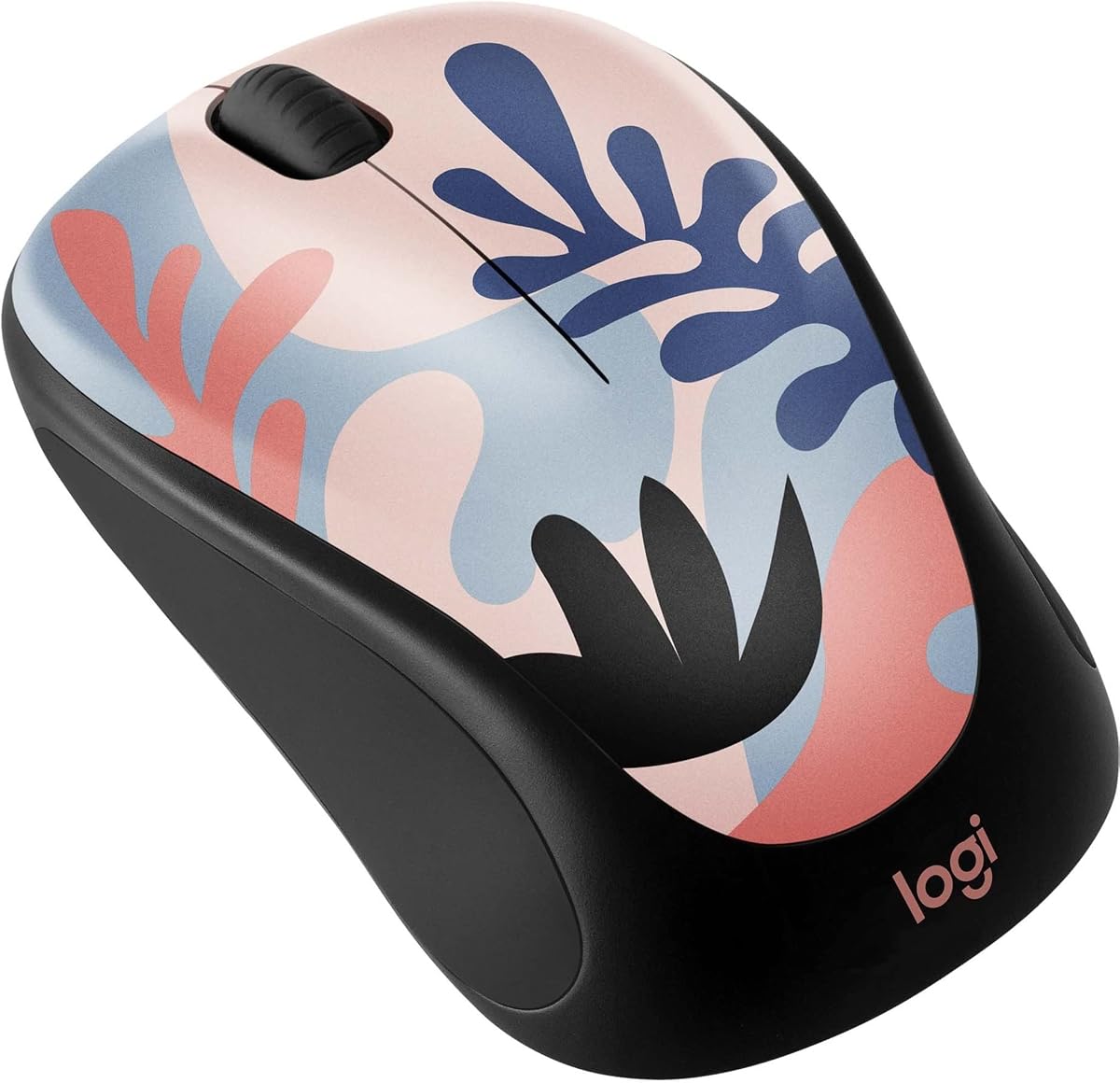
The Logitech Design Collection Limited Edition Wireless Mouse combines trusted reliability with vibrant colors. It is designed for users who appreciate a reputable brand and a sustainable approach to manufacturing tech accessories.
We may earn a commission when you buy through this link, at no additional cost to you.
With soft rubber side grips, the mouse ensures comfort during long use. The unifying receiver allows you to connect multiple devices to one USB port, keeping your workspace tidy and organized without extra dongles.
Although it lacks Bluetooth connectivity, the unifying receiver is efficient for compatible devices. The use of recycled plastic supports sustainability goals, but some may find the design too standard compared to more playful options.
Ideal for eco-conscious users who prioritize brand trust and comfort. This mouse is a solid choice for those who want a reliable and portable device with a touch of color and sustainability.
Built with recycled plastic parts to reduce environmental impact and support green initiatives.
Unifying receiver supports multiple devices to reduce clutter on your desk.
We may earn a commission when you buy through this link, at no additional cost to you.
Selecting the right mouse involves balancing aesthetics with practical features to ensure you get a device that looks great and performs well.
Connectivity determines how your mouse links to your device. Wireless options typically use a USB receiver for universal compatibility, while Bluetooth models offer cleaner setups for devices without USB ports. Some advanced models support both, giving you the flexibility to switch between laptops and tablets effortlessly.
Consider which ports your devices have and how many you need to connect. If you switch between multiple devices often, a dual-mode mouse will save you from constant plugging and unplugging dongles.
Ergonomics are vital for long sessions to prevent strain. Cute mice often come in unique shapes like cars or donuts which might be less ergonomic than traditional contours. Look for a size that fits your hand comfortably to avoid fatigue during extended work or study periods.
Always check the dimensions and design intent. If you have small hands, a compact or ambidextrous shape might be more comfortable than a larger ergonomic grip.
Battery life varies significantly between models, with some lasting up to 24 months on a single AA battery. Rechargeable options reduce waste and eliminate the need for replacements but may have shorter runtimes per charge. Consider your usage habits to decide if a rechargeable unit is worth the potential downtime.
If you use your mouse daily, a rechargeable battery might offer better long-term value. For occasional users, AA batteries may be more convenient and less costly upfront.
Click noise can be a concern in shared environments like offices or libraries. Many modern models offer silent click technology that reduces noise by up to 90 percent. This feature helps maintain focus and courtesy to those around you without sacrificing tactile feedback.
Prioritize silent options if you work in a quiet space. Standard clicks may be too disruptive if you use your device during meetings or study sessions.
Most modern mice are plug-and-play and work with Windows, macOS, Chrome OS, and Linux without drivers. However, some specific features like side buttons might not function on certain operating systems. Always verify compatibility with your primary device to ensure full functionality.
Check the product details for OS support. If you use a Mac, ensure any specialized features you want are supported on that platform to avoid limitations.
The main appeal of a cute mouse is its visual design. Look for colors and themes that match your personal style or desk setup. Unique patterns like flowers or gradient finishes can make your device stand out and feel more personalized.
Choose a design that makes you happy to use it. A cute mouse can brighten up your workspace and boost your mood while you work.
Durability is often measured by the number of clicks the mouse is rated for, with some models lasting up to 5 million clicks. Warranty terms also vary, with some brands offering multi-year support. A strong warranty indicates confidence in the product's longevity.
Look for a solid warranty to protect your investment. High click ratings suggest the mouse can handle heavy use without wearing out quickly.
Portability matters if you travel frequently or commute. Compact mice fit easily into bags and pockets, making them ideal for on-the-go use. Ensure the receiver is stored securely inside the mouse to prevent loss during transport.
Select a slim and lightweight option if you move around often. A portable design ensures your mouse is ready whenever you need it without adding bulk.
Begin by inserting a battery or charging the device if it is rechargeable. Remove the protective sticker from the bottom sensor and ensure the power switch is turned on for initial use.
Pair the mouse with your device by inserting the USB receiver into a free port or connecting via Bluetooth. Follow any on-screen prompts to complete the setup process before you start clicking.
Clean the surface regularly with a soft dry cloth to prevent dust buildup. Avoid exposing it to moisture or extreme temperatures to extend its lifespan and maintain performance.
Most models listed in this guide are compatible with Mac computers including those running macOS. However, some features like side buttons may not function on macOS systems. Check the product specifications for specific OS compatibility before purchasing.
Check the product description to see if it mentions a built-in battery or USB charging port. Rechargeable models usually do not require AA batteries and may include a cable for charging. If it uses AA batteries, it is likely not rechargeable.
A silent mouse reduces clicking noise significantly which is useful in quiet environments like libraries or offices. It helps maintain focus and prevents disturbing others around you. This feature is especially valuable for remote workers or students.
Some models support Bluetooth connectivity which allows use without a USB receiver. Others rely on a 2.4G USB receiver for connection. Always check the connectivity options to see if the device supports Bluetooth for receiver-free operation.
Battery life varies but can range from a few months to over a year on a single AA battery depending on usage. Rechargeable batteries typically last up to 20 days per charge. Active usage patterns significantly impact the actual duration.
Some models like the Akko Cat theme mouse offer gaming features such as high precision and multi-mode connectivity. However, most are optimized for daily tasks. For competitive gaming, consider models specifically designed with high refresh rates.
Choosing the right cute laptop mouse can enhance both your productivity and desk aesthetics. The top picks in this guide offer a range of options from budget-friendly compact models to premium dual-mode devices.
Prioritize features like silent operation and battery life based on your specific needs. A wireless option with ergonomic comfort will serve you best for long hours of work or study.
Remember to check current prices and availability before making a purchase. These devices offer great value and style to keep your workspace organized and enjoyable.