
SCRIB3D P1 3D Printing Pen with Display
4.4Editor score
Stepless speed control slider
Adjustable temperature settings
Includes starter PLA filament
Discover the top 3D printing pens for kids compared by safety and features to help parents choose the right creative STEM toy for their children today.
3D printing pens offer a unique way for children to bring their imagination to life by drawing in three dimensions. These devices melt safe plastic filament that cools quickly so kids can build sculptures and objects by hand. Finding a pen that balances ease of use with safety features is essential for young artists starting their creative journey.
We evaluated ten top models based on safety certifications, filament compatibility, and included accessories like stencils and mats. Each product was reviewed for its suitability for different age groups and skill levels ranging from beginners to more advanced young creators. Our goal is to highlight tools that encourage STEM learning without frustrating technical complexities.
Each pick in this guide showcases key strengths and ideal user scenarios to help you make an informed decision for your family. Please note that product availability and promotional offers can change frequently so verify current details before purchasing. We aim to provide clear comparisons to streamline your shopping experience for these innovative educational toys.
4.4Editor score
4.4Editor score
4.5Editor score
This side-by-side comparison highlights the key specifications and unique selling points of each top-rated 3D printing pen to help you decide which model fits your specific needs and budget best.


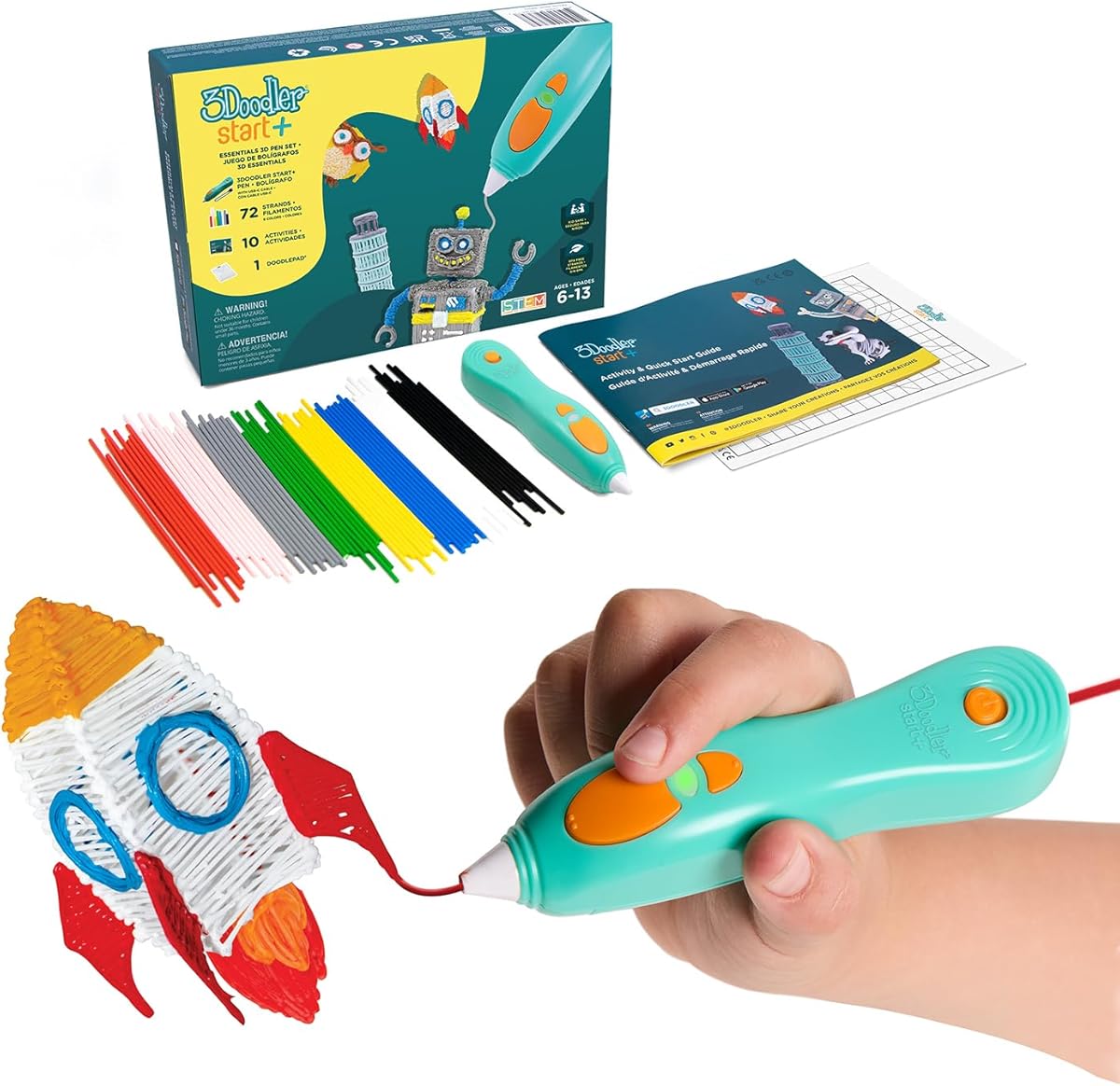
The 3Doodler Start+ Essentials Set stands out as a top choice for families seeking a safe and educational tool for young artists. It holds a strong rating and is specifically engineered to eliminate burn risks for children starting at age six.
We may earn a commission when you buy through this link, at no additional cost to you.
Its standout quality lies in the completely safe design with no hot parts meaning kids can touch the nozzle without fear. The upgraded experience includes more plastic strands and ten new stencils which enhances creative possibilities immediately. The included DoodlePad helps contain the creative mess while the USB-C charging ensures long sessions without frequent interruptions.
While the pen uses proprietary filament which might cost more over time it ensures safety and consistency for young users. The price point is higher than some competitors but the safety features and included accessories justify the investment for peace of mind.
This pen is ideal for parents prioritizing safety and educational value over raw performance. If you want a tool that encourages STEM learning with minimal setup it is a highly recommended starting point for young children.
The nozzle and plastic are cool to the touch allowing children to manipulate their creations safely without adult supervision risks.
With 72 strands of mixed color plastic and multiple stencils kids have ample materials to explore various artistic ideas immediately.
We may earn a commission when you buy through this link, at no additional cost to you.
The SCRIB3D P1 offers a fantastic entry point for families looking for an affordable yet functional 3D printing pen. With a solid rating it delivers essential features that allow both beginners and experienced users to create complex shapes easily.
We may earn a commission when you buy through this link, at no additional cost to you.
Its stepless speed slider provides optimal control for different tasks whether you need slow precision or fast infill work. The adjustable temperature accommodates both PLA and ABS filaments giving flexibility for various projects. It comes ready to use with starter colors and a stencil book which adds significant value right out of the box.
Users should note that this pen requires a warm up period of about two to three minutes before starting. Additionally it must remain plugged in during use which limits portability compared to battery operated models.
This model is perfect for budget conscious shoppers who still want high quality performance. If you need a reliable tool for home or classroom use without breaking the bank the P1 is an excellent choice.
The stepless speed slider allows users to fine tune flow rates for intricate details or rapid filling without changing tools.
Included starter colors and a free stencil guide mean you can start creating immediately without buying extra accessories first.
We may earn a commission when you buy through this link, at no additional cost to you.
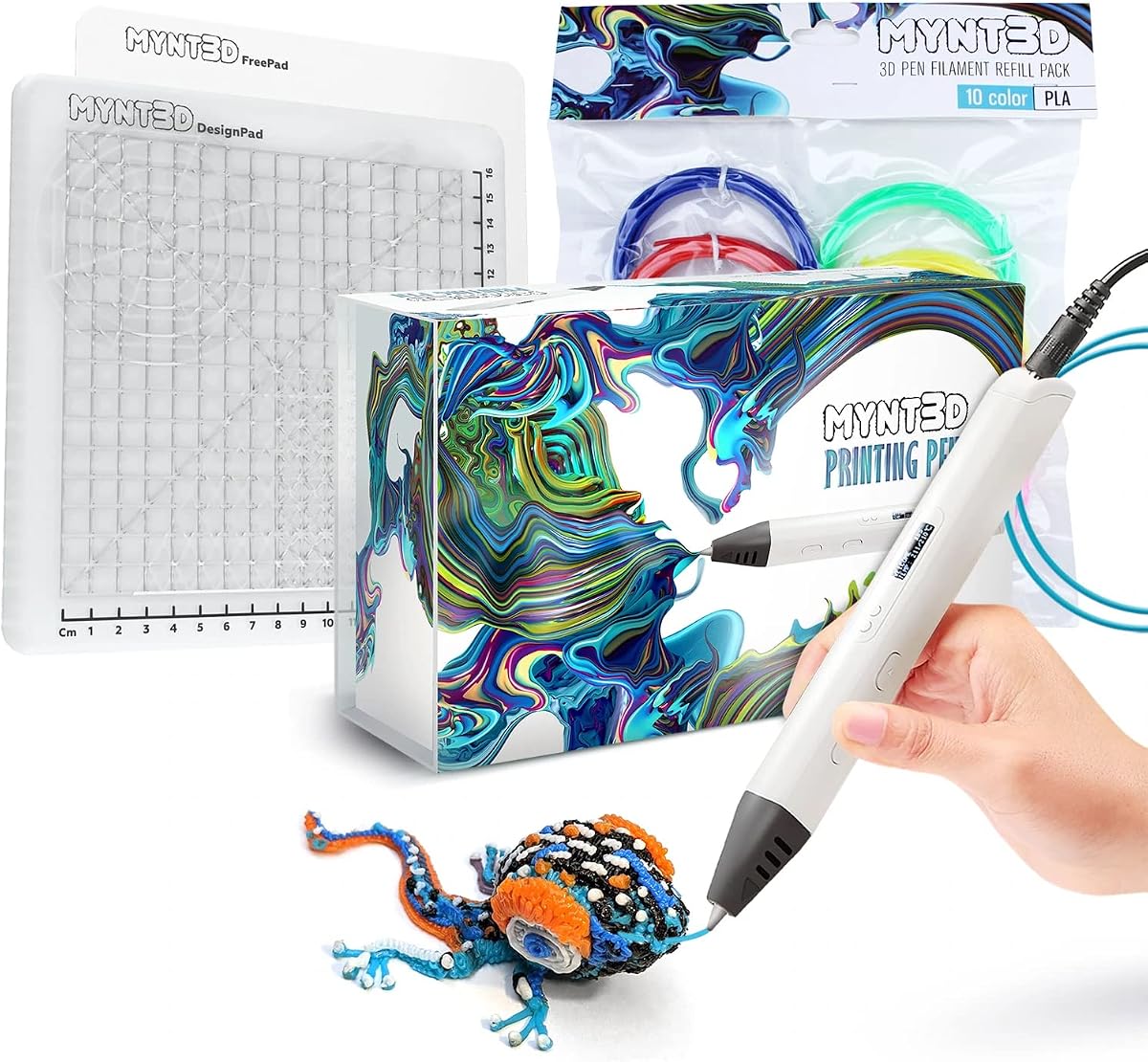
The MYNT3D Pro Kit represents a premium option for serious creators and older kids who want professional level features. It holds the highest rating in our list and comes bundled with extensive accessories to support advanced projects.
We may earn a commission when you buy through this link, at no additional cost to you.
It features stepless speed control and discrete temperature adjustability allowing precise material management for complex designs. The replaceable sealed nozzle ensures long lasting operation without clogging which is a common issue with lesser pens. The kit includes ten colors of PLA and a DesignPad mat that helps create perfect geometric shapes easily.
The higher price reflects the quality and the volume of included accessories which might not fit every budget. It is also designed for users comfortable with more technical settings which might be overwhelming for very young children.
If you want a durable tool that supports growth and skill advancement this kit is unmatched. It is ideal for teens or adults helping children create intricate designs with confidence and precision.
The replaceable sealed nozzle design minimizes clogs ensuring smooth extrusion and longer lifespan for the device.
The DesignPad mat with channels helps you draw geometric shapes and patterns consistently without freehand errors.
We may earn a commission when you buy through this link, at no additional cost to you.
The MYNT3D Professional Printing Pen brings professional grade monitoring to a portable handheld device. Its OLED display allows users to see temperature settings clearly which helps in achieving consistent results across different projects.
We may earn a commission when you buy through this link, at no additional cost to you.
You can adjust temperature in one degree increments from 140 to 230 C for precise control. The adjustable feed lets you regulate speed and flow which is critical for maintaining line quality. It includes a three color filament set and comes with a slim ergonomic design that fits comfortably in the hand.
While highly effective it is more expensive than standard pens and lacks a built-in battery for cordless use. The focus on precision makes it better for older kids or adults who understand how temperature affects material flow.
This pen is best for those who value accuracy and visibility in their tools. If you need a reliable pen that offers clear feedback and tight control it is a strong contender in the professional category.
Adjustable increments allow users to fine tune heat settings for different plastic behaviors and artistic effects.
The OLED display provides real time temperature monitoring so you never guess if the pen is ready.
We may earn a commission when you buy through this link, at no additional cost to you.
The MYNT3D Super 3D Pen is designed to be great for artists and engineers of all ages including older kids. It features an ultrasonic sealed nozzle that significantly reduces the risk of clogging during operation.
We may earn a commission when you buy through this link, at no additional cost to you.
Its stepless speed slider provides optimal control over material flow allowing for smooth lines and detailed work. The pen is compatible with both ABS and PLA filaments which gives users more material options for different projects. The ergonomic touch pen design ensures comfort during long creative sessions.
Because of its technical features it is not recommended for very young children who might struggle with temperature settings. It requires a higher level of focus and control compared to simpler beginner pens.
This pen is an excellent choice for older kids and teens who want to develop engineering skills. If durability and material flexibility are your priority the Super 3D Pen offers a robust solution.
The ultrasonic sealed nozzle provides market leading durability and reduces interruptions caused by clogs.
The slim ergonomic touch pen fits comfortably in the hand to reduce fatigue during extended use.
We may earn a commission when you buy through this link, at no additional cost to you.
The SCRIB3D Advanced Pen is designed for making accurate and creative 3D models and structures with professional grade precision. It features a large LCD screen to help monitor heat and ensure correct settings for consistent results.
We may earn a commission when you buy through this link, at no additional cost to you.
It includes eight different speed options so you can regulate flow and line thickness with optimal control. The soft touch surface provides comfort during use making it a great pick for detailed work. It comes with 50 feet of PLA which is a generous amount for extended practice.
The price is higher than basic models which might be a consideration for families on a tight budget. The setup and learning curve are moderate but manageable for most users looking to upgrade.
This pen is ideal for older kids and parents who want more control over their creations. If accuracy and comfort are key requirements the Advanced pen delivers a refined experience.
The soft touch surface and multiple speed options allow for a comfortable and precise drawing experience.
The large LCD screen keeps track of temperature settings so you know exactly when the pen is ready.
We may earn a commission when you buy through this link, at no additional cost to you.
This bundle combines the popular Super 3D Pen with a substantial supply of filament and a DesignPad mat to create a complete studio experience. It is a high value option for those who want everything in one purchase.
We may earn a commission when you buy through this link, at no additional cost to you.
The stepless speed control and temperature adjustability allow you to work with ABS or PLA easily. The included DesignPad mat helps you design and create perfect geometric shapes without freehand struggles. The ten color PLA refill set ensures you can work for a long time without needing extra supplies.
The higher cost reflects the bundled value but might be steep for those who only want the pen. It is not designed for very young children due to the technical settings involved.
This kit is perfect for committed hobbyists or older kids who plan to use the pen regularly. If you want a long term solution with ample materials this bundle is an excellent investment.
With extra filament and a design pad this bundle provides everything needed to start advanced projects immediately.
The ten color PLA refill set ensures consistent quality and vibrant colors for a wide range of creations.
We may earn a commission when you buy through this link, at no additional cost to you.
The 3Doodler Flow is designed for teens adults and creators who want a reliable tool with broad filament compatibility. It offers a user friendly experience with minimal setup and strong monitoring features.
We may earn a commission when you buy through this link, at no additional cost to you.
It is compatible with 1.75 plastic filaments such as PLA ABS and wood allowing for diverse creative possibilities. The integrated LCD provides real time temperature monitoring to ensure smooth printing. It includes eight color spools totaling 80 feet of plastic and a comprehensive activity guide.
The rating is slightly lower than other models which might indicate some learning curve or inconsistency. It is also targeted more at teens so younger children might find it too complex.
This pen is best for older kids and adults looking for a versatile tool. If you need a pen that works with various materials and is easy to transport the Flow is a solid choice.
Compatibility with PLA ABS and wood gives you flexibility to explore different textures and strengths.
The integrated LCD helps you maintain consistent temperatures for reliable results every time.
We may earn a commission when you buy through this link, at no additional cost to you.
This bundle adds a valuable silicone mat to the standard P1 pen setup providing a dedicated surface for tracing and practice. It is designed to make the creative process smoother and cleaner for beginners.
We may earn a commission when you buy through this link, at no additional cost to you.
The smooth silicone mat features built-in shapes and patterns to help guide designs and support consistent work. It is durable heat-resistant and easy to wipe clean ensuring long term usability. The bundle includes everything needed to start right out of the box including a project guide and power adapter.
The rating is currently N/A as it is a newer bundle which means less long term data is available. The added mat increases bulk slightly but the convenience often outweighs this minor inconvenience.
This option is perfect for parents who want a ready to go solution with extra accessories. If you want to protect your workspace and guide young hands the mat makes this bundle a practical choice.
The built-in shapes on the mat help users trace and create consistent designs with less frustration.
The heat-resistant mat protects tables from hot plastic and is easy to clean for repeated use.
We may earn a commission when you buy through this link, at no additional cost to you.
This extended bundle builds on the safe 3Doodler Start+ pen with over 1250 feet of additional filament for endless creativity. It is an ideal choice for classrooms or families with multiple children.
We may earn a commission when you buy through this link, at no additional cost to you.
It includes the 3Doodler Start pen DoodlePad 72 strands of filament USB-C cable activity guide and ten new stencils. The free app provides additional stencils and step-by-step instructions that expand the learning experience further. The pen remains completely safe with no hot parts for children six and up.
The rating is N/A so it is newer to the market and lacks long term reviews. The high price reflects the bulk supplies which might be more than a single child needs immediately.
This bundle is best for schools or families with several young children. If you need a long lasting supply and robust safety features this set delivers excellent value over time.
With over 1250 feet of filament kids can spend months creating without needing to reorder supplies.
The free app offers templates and instructions that help kids learn STEM concepts through digital guidance.
We may earn a commission when you buy through this link, at no additional cost to you.
Selecting the right 3D printing pen for children requires balancing safety features with technical capabilities and included accessories.
Safety is the most critical factor when choosing a pen for kids. Look for pens that advertise no hot parts or cool touch nozzles to prevent accidental burns. Pens specifically rated for ages 6 and up ensure that the design considers a child's ability to handle heat and plastic safely. Always check the manufacturer's age recommendations to ensure the pen matches your child's maturity and motor skills.
Prioritize pens with explicit safety certifications or claims about burn risk reduction for young users.
Different pens support different types of plastic filament such as PLA or ABS. PLA is generally safer and easier for kids to use as it is derived from corn starch and has a lower melting point. Ensure that you consider the ongoing cost of refills since proprietary filaments can be more expensive than standard ones. Check if the pen supports standard 1.75mm filament for flexibility in sourcing colors.
Choose pens that use widely available safe PLA filament to keep ongoing costs manageable for families.
Children need intuitive controls to stay engaged with their creative process. Look for features like stepless speed sliders or adjustable flow rates that are easy to understand and operate. A pen with simple loading and unloading mechanisms prevents frustration during setup. Some pens have displays that show temperature or readiness clearly which helps users avoid errors.
Opt for pens with simple buttons and clear feedback to keep kids focused on creating rather than troubleshooting.
Many 3D pen kits come with stencils mats and starter filament which add significant value. Stencils help kids practice shapes without needing advanced freehand skills. Mats protect surfaces and provide a clean workspace which is helpful for home use. Bundles with extra colors encourage experimentation and extend the usable life of the purchase.
Select bundles that include mats and stencils to give kids more support and protection for their workspace.
Adjustable temperature settings allow for more control over how the plastic melts and flows. Higher precision temperature control can help avoid clogs and ensure smoother lines which is important for detailed work. However for younger children fixed temperature models might be simpler to manage effectively. Always consider if the child needs fine tuning or just a simple plug-and-play experience.
Ensure the temperature controls are intuitive and safe to adjust without risking accidental burns or clogs.
Some pens are battery powered while others require a constant connection to a power outlet. Battery powered pens offer more portability and freedom to move around the room while creating. Corded pens might be more reliable but limit movement. Consider where the pen will be used most often such as on the couch or at a desk.
Choose a power source that fits your family's habits and whether portability or consistent power is more important.
Kids can be rough with toys so a durable build is essential for longevity. Look for pens with solid casing and no exposed internal parts that can break easily. Quality motors and nozzles ensure the pen lasts longer without clogging or jamming. A durable pen saves money by reducing the need for replacements.
Prioritize pens with sturdy construction and reliable motors to withstand daily creative use by children.
Many pens are marketed as educational STEM toys that teach engineering and spatial skills. Look for models that include guides or app support to enhance learning outcomes. Pens that allow kids to build models from templates help them understand 3D structures. Educational value ensures that the toy supports development beyond simple play.
Select pens with guides or app support to maximize the educational benefit for growing minds.
To start using your pen, plug it into a power source and press the power button. Wait for the pen to heat up which usually takes two to three minutes indicated by a light or display change. Insert a strand of compatible filament into the back of the pen and press the feed button to push it through to the nozzle.
Once the filament starts coming out of the nozzle begin drawing on your mat or paper. Hold the pen steady and use the speed button to control how much plastic flows. For 3D shapes lift the pen slightly as you draw to create height and structure. Always let your creation cool completely before touching or moving it.
To care for your pen, turn it off when not in use to save energy and prevent burns. Clean the nozzle occasionally by running a fresh strand of filament through it to remove residue. Store the pen in a safe place away from heat sources and direct sunlight to maintain plastic flow.
Yes, many pens like the 3Doodler Start+ are specifically designed for children ages 6 and up. They feature cool to the touch nozzles that eliminate burn risks. Always check the specific age rating on the packaging and supervise use if your child is new to this type of toy.
Most pens use standard 1.75mm PLA filament which is widely available and safe for kids. Some models use proprietary plastic designed for specific safety profiles. Always verify the compatible filament size and type before purchasing extra refills to ensure proper function.
To prevent clogging, ensure you use the correct temperature settings for your filament type. Always retract the filament before turning off the pen and store it in a dry place. Cleaning the nozzle regularly by running fresh plastic through it can also keep it clear of residue.
While some pens are designed to be safer, adult supervision is recommended especially for younger children. Children should be taught to let creations cool before handling them to avoid burns. Check the manufacturer's safety warnings to ensure you follow best practices for your specific model.
Yes, 3D pens help develop spatial awareness, fine motor skills, and creativity. They are excellent tools for introducing basic engineering concepts and building structures. Many educational kits include activity guides that teach kids how to build objects step by step.
If plastic gets stuck, try pushing it through with a new filament strand. You can also try heating the nozzle slightly more to soften the plastic before removing it. If it remains stuck, consult the user manual for specific unjamming instructions for your pen model.
Filament usage depends on how much your child creates. A single 30 foot strand might last a few sessions for small projects. Kits with bundled refill packs offer more value for families planning to use the pen frequently. Always track your usage to know when to reorder.
Yes, many pens like the SCRIB3D P1 are designed with beginners in mind. They include guides and simple controls to help new users get started. Look for kits that come with stencils which make it easier to learn basic skills without complex freehand drawing.
In this guide we explored ten top-rated 3D printing pens ranging from safe models for young kids to advanced tools for teens. The 3Doodler Start+ remains the top pick for safety while the SCRIB3D P1 offers the best budget value.
When choosing a pen prioritize safety features and ease of use to ensure a positive experience for your child. A pen that supports growth with adjustable settings can serve well as skills improve over time.
We hope this comparison helps you find the perfect tool to spark creativity in your child. Please check current prices and availability on Amazon before making your final purchase decision.