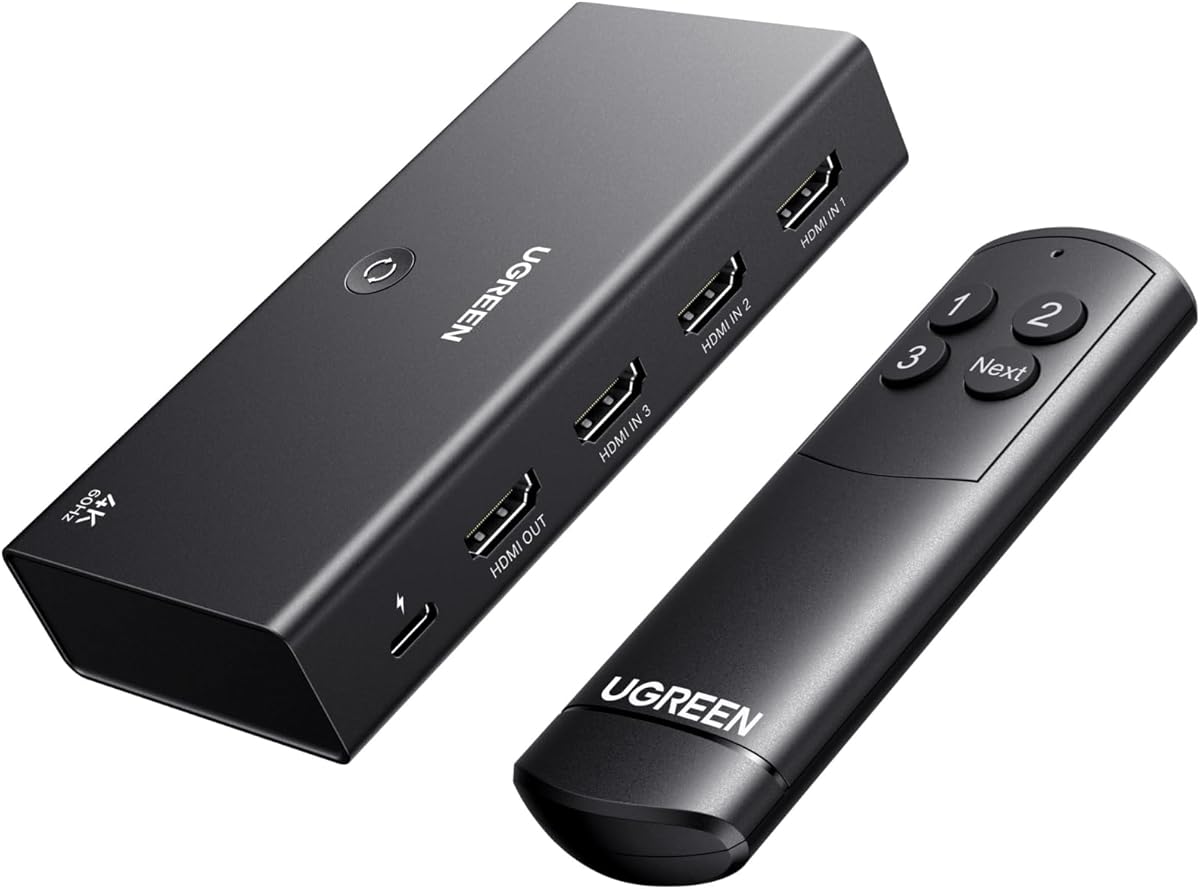
UGREEN HDMI Switch 3 in 1 Out
4.4Editor score
Supports 4K at 60Hz
Includes remote control
USB powered design
This guide compares the top 10 cheap HDMI switch models to help you find the best budget-friendly device for connecting multiple sources to one display.
Finding a reliable cheap HDMI switch can transform your entertainment setup without breaking the bank. Whether you manage multiple gaming consoles or streaming devices, a quality selector simplifies your cabling. We focus on performance and value to ensure smooth switching experiences.
We evaluated ten popular models based on resolution support, build quality, and ease of use. Our comparison looks at features like remote control, port count, and transmission stability. This list covers a range of options to fit different needs and setups.
Each pick highlights key strengths and potential limitations found in real user feedback. You will see how each model handles 4K signals and connects various devices. Note that availability and offers change frequently, so verify details before buying.
4.4Editor score

4.3Editor score

4.1Editor score
This side-by-side comparison highlights the core specifications and capabilities of each model. Use this table to quickly identify which device matches your required port count and resolution needs for your specific setup.


This model stands out for its five input ports and strong performance features. It supports 4K at 60Hz with VRR and HDR making it suitable for modern setups. Users appreciate the remote control and clear LED indicators for each port.
We may earn a commission when you buy through this link, at no additional cost to you.
The high bandwidth of 18Gbps ensures stable transmission without signal loss. Compatibility with VRR and dynamic HDR enhances the gaming experience on supported displays. The manual switch and remote provide flexibility for different viewing environments.
While it lacks automatic switching this is a common limitation in this class. The need for external power ensures stability but adds a cable to manage. These trade offs are acceptable given the robust feature set and port count.
Ideal for users with multiple consoles who need a reliable central hub. This device offers a great balance of ports and performance for the price. It is a strong recommendation for those needing more than standard inputs.
Support for VRR and 4K 60Hz ensures smooth gameplay on compatible TVs.
Includes both manual buttons and a remote for easy switching from a distance.
We may earn a commission when you buy through this link, at no additional cost to you.
This option delivers high performance at an accessible price point for most users. It handles 4K at 60Hz and includes HDR10+ for better visual quality. The remote control allows easy switching from the couch without reaching the unit.
We may earn a commission when you buy through this link, at no additional cost to you.
Stable transmission is supported by high bandwidth and USB power. It connects well with various consoles and media players. The audio support includes Dolby which enhances the overall media experience significantly.
The need for an external power adapter is a minor inconvenience for better stability. It does not support automatic switching which means manual selection is required. These are typical constraints for budget friendly reliable switches.
Perfect for users needing three inputs without spending too much. It balances cost and quality effectively for home theater or gaming use. We recommend it for those prioritizing value and solid performance.
Offers premium features like 4K 60Hz and HDR10+ at a lower cost.
Dolby and DTS support ensure high quality sound pass through to your system.
We may earn a commission when you buy through this link, at no additional cost to you.
This model is designed for reliability with advanced adaptive equalization technology. It supports transmitting signals over long distances up to 30 feet without loss. The included pigtail cable simplifies setup and reduces extra costs.
We may earn a commission when you buy through this link, at no additional cost to you.
Compliance with HDCP 2.3 ensures compatibility with newer content protection standards. Audio pass through supports uncompressed digital channels for a rich home theater experience. The warranty and customer service add to the premium reliability.
The price is higher than basic models but justified by the long transmit range. It still requires a power connection which adds to the cable management. The fixed pigtail can limit flexibility for some mounting positions.
Ideal for users needing long cable runs or specific technical features. The quality and support make it a strong choice for professional or demanding setups. Choose this if transmission distance is a key requirement.
Adaptive equalization helps maintain signal quality over long HDMI cable runs.
Includes a fixed pigtail cable to save you buying one separately.
We may earn a commission when you buy through this link, at no additional cost to you.
This unit offers a simple solution with bidirectional flexibility and no power needs. The aluminum build feels durable and helps with heat dissipation. It is easy to use with a manual button and LED indicators.
We may earn a commission when you buy through this link, at no additional cost to you.
Support for 4K at 60Hz is present though cable length constraints apply. The bidirectional feature allows one source to two displays in some cases. It is a straightforward hub for basic home connections.
Lacking a remote means you must be near the unit to switch inputs. The two port limit may not suit larger setups with many devices. These limitations keep the price and complexity low for casual users.
Best for simple setups needing just two inputs or a display switch. It is a no fuss choice for those who want plug and play reliability. Consider this if you do not need extra ports.
Does not require external power so setup is even easier.
Allows switching between two sources or two displays depending on needs.
We may earn a commission when you buy through this link, at no additional cost to you.
This model delivers compact design with solid 4K 60Hz performance. It supports seamless transitions between two sources with manual button control. The brand reputation adds confidence for durability and support.
We may earn a commission when you buy through this link, at no additional cost to you.
The setup is simple with no extra power requirements. It handles a wide range of devices from laptops to consoles well. The warranty period is generous and shows commitment to quality.
It lacks a remote and extra ports which limits flexibility for large setups. The small size is great for tight spaces but may lack features others have. These trade offs work for minimalists or desk setups.
Recommended for users needing a small reliable switch for two devices. It is perfect for office monitors or basic home entertainment. Choose this if you prioritize brand trust and size.
Backed by a trusted brand with an 18 month warranty and support.
One button switching makes transitions quick and without cables.
We may earn a commission when you buy through this link, at no additional cost to you.
This option offers a high port count with five inputs for many devices. It includes a remote and LED indicators for easy management. The metallic body provides durability and better heat dissipation.
We may earn a commission when you buy through this link, at no additional cost to you.
It supports 4K at 60Hz and is compatible with various consoles. The remote allows control from a distance which is convenient for living rooms. Gold plated ports help ensure stable signal transmission over time.
It does not support auto switching so manual selection is required. The power adapter is not included which adds to the setup cost. These are acceptable limits for the high port availability.
Ideal for users with five or more devices to connect. It is a practical choice for home theaters or multi console gamers. Consider this if you need to consolidate many inputs.
Five inputs allow you to connect multiple consoles and media devices at once.
Metallic body and gold plated ports improve durability and signal quality.
We may earn a commission when you buy through this link, at no additional cost to you.
This model comes with a fixed pigtail cable which simplifies setup. It supports three inputs and connects easily to most HDMI displays. The USB C power helps maintain stable transmission during use.
We may earn a commission when you buy through this link, at no additional cost to you.
Users can switch between inputs quickly with a manual button. It is ideal for setups where a short output cable works well. The design is compact and fits easily in media cabinets.
Resolution support is limited to 30Hz for 4K which affects smoothness. It lacks a remote control so you must be near the unit to switch. These limits keep costs low for casual viewing needs.
Recommended for users needing a quick setup with three inputs. It works well for office or simple home use. Choose this if you value the included cable and price.
Comes with a pigtail cable to save you buying one separately.
USB C power and simple button make it easy to connect.
We may earn a commission when you buy through this link, at no additional cost to you.
This unit includes a short HDMI cable which simplifies initial connections. It supports 4K at 60Hz and uses gold plated connectors for durability. Setup is easy with manual buttons and simple instructions.
We may earn a commission when you buy through this link, at no additional cost to you.
Transmission stability is supported by high bandwidth and good build. It is compatible with many devices and works well for home theaters. The included cable reduces the need for extra purchases.
It does not include a remote control which limits convenience from a distance. The need for external power adds a cable to the setup. These are standard limitations for this price range.
Ideal for users who want a simple setup with included cables. It works well for three sources in a living room or office. Choose this if you prefer everything in the box.
Includes a HDMI cable to reduce extra setup costs.
Gold plated connectors help prevent corrosion and ensure stable signal.
We may earn a commission when you buy through this link, at no additional cost to you.
This model offers five inputs with an aluminum housing for durability. It includes a remote and supports 4K at 60Hz for quality. The LED indicators show which port is active clearly.
We may earn a commission when you buy through this link, at no additional cost to you.
It handles high bandwidth transmission well and supports HDR and 3D. Users appreciate the remote for controlling from a distance. The build quality is solid and fits well in home setups.
Auto switching is not supported which means manual selection is needed. The power adapter is not included and you need to supply it. These are typical constraints for robust high port switches.
Recommended for users needing five inputs and a durable build. It is a great choice for multi device entertainment centers. Choose this if you value port count and build quality.
Aluminum housing improves durability and helps with heat dissipation.
Five inputs allow you to connect consoles and media devices easily.
We may earn a commission when you buy through this link, at no additional cost to you.
This unit provides a simple remote controlled switch for three inputs. It supports 4K at 30Hz and is easy to set up without hassle. LED indicators help you see which source is active at a glance.
We may earn a commission when you buy through this link, at no additional cost to you.
Transmission speed is adequate for standard video and audio needs. The design is sleek and fits easily on media shelves or desks. It is a straightforward solution for basic media switching.
Resolution limits to 30Hz may not suit high refresh gaming. Bandwidth is lower than top models which affects peak performance. These limits make it suitable for casual streaming and office use.
Ideal for users needing a simple remote control setup at a low cost. It works well for three inputs without complex features. Choose this if you value simplicity and price.
Included remote allows easy switching from your couch or desk.
Plug and play setup makes it easy to use without technical skills.
We may earn a commission when you buy through this link, at no additional cost to you.
Choosing the right HDMI switch requires understanding your device count and video needs. Here are key factors to consider before you buy a budget model.
The number of input ports determines how many devices you can connect without unplugging cables. Look for at least the number of devices you plan to use plus one extra for future expansion. More ports mean more flexibility but may increase price slightly.
Ensure the switch supports the resolution and refresh rate of your display. Many budget models support 4K but some limit it to 30Hz which affects gaming. For smoother video check for 4K at 60Hz support if possible.
Some switches require external power while others draw from the HDMI port. External power ensures stable transmission especially for long cable runs. If you want plug and play without extra adapters check the product description carefully.
A remote control adds convenience especially if the switch is hard to reach. Manual buttons work fine if the device is accessible. Consider your setup layout when deciding between manual only or remote options.
Aluminum housings and gold plated ports help with durability and signal integrity. Cheaper plastic models may overheat or wear faster. Look for reviews that mention build quality and heat dissipation performance.
Check if the switch supports HDMI 2.0 for 4K60 or 1.4 for 4K30. Newer versions support HDR and wider color gamuts which enhance picture quality. Ensure the version matches your display and source devices for best results.
Some switches can detect active signals and switch automatically while others require manual selection. Manual switches are common in budget models and avoid unwanted switching. Decide if you prefer automatic convenience or manual control.
Longer HDMI cables can degrade signal quality especially at 4K resolutions. Some switches include a pigtail cable which can save cost. Check the maximum recommended cable length to avoid signal loss issues.
Keep the switch in a well ventilated area to prevent overheating. Avoid bending or twisting HDMI cables excessively to maintain signal quality. Periodically check connections to ensure a stable video experience.
Many affordable models now support 4K at 60Hz but some only offer 30Hz. Check the product details for HDMI 2.0 support and bandwidth. If you need smooth gaming video prioritize switches with 60Hz support.
Some switches draw power from the HDMI port while others need an external adapter. Models requiring external power tend to have more stable transmission. Check the product description before purchasing to see what is included.
Most HDMI switches are designed to connect multiple sources to one display. To output to multiple TVs you need an HDMI splitter not a switch. Confirm if the device supports 1 in multiple out before buying.
A quality switch should not degrade video if it matches your display specs. Low quality or underpowered models may cause signal loss. Stick to well reviewed models with adequate bandwidth for best results.
Most switches use a manual button on the unit or a remote control. Press the button corresponding to the input port you want to use. Ensure all devices are powered on before switching inputs.
Automatic switching is less common on budget models and may be absent. Manual selection avoids unwanted switching and keeps control with you. Check product specs if auto switching is a priority for your setup.
Always verify current specs and availability before purchasing. Prices and offers change often so check details for your needs. With the right switch your home entertainment or work setup will be streamlined.