
ASRock Motherboard Micro ATX DDR3 1066 NA D1800M
4.0Editor score
Low Cost Option
Simple Connectivity
Legacy Support
This guide compares the top low power motherboard options for NAS, home servers, and efficient desktop builds based on performance and connectivity.
Finding a low power motherboard is essential for users building energy efficient NAS systems or compact home servers. These boards minimize electricity consumption while maintaining reliable performance for 24/7 operation.
We compared ten real products based on their processor efficiency, network connectivity options, storage expansion capabilities, and overall build quality. This list covers various form factors and chipsets to suit different needs.
Each pick shows specific strengths like multi-gigabit networking or compact designs. Note that prices and availability change frequently so always check the current listing before making your final purchase decision.
4.0Editor score

4.5Editor score
This table provides a side-by-side comparison of all ten products to help you quickly identify the best match for your specific low power computing requirements.




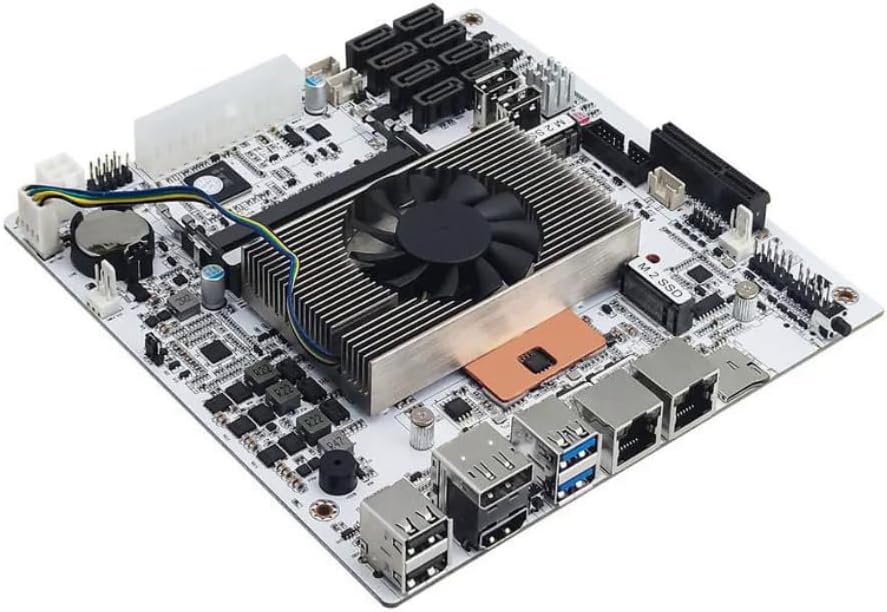
This industrial NAS motherboard ranks highest due to its robust connectivity and low power efficiency. It holds a strong rating of 4.5 stars from users who value reliability in their home server builds.
We may earn a commission when you buy through this link, at no additional cost to you.
The standout feature is the inclusion of four 2.5GbE network ports which are rare at this price point. It also supports up to 32GB of DDR4 RAM and features six SATA ports alongside two M.2 NVMe slots for versatile storage expansion.
The trade-off is that the motherboard requires both 24PIN and 4PIN power connections which adds complexity. Users may also experience a longer first boot time as the system reads memory information before becoming fully operational.
Anyone building a high performance firewall appliance or multimedia server will find this board ideal. Its balance of speed and power efficiency makes it the top recommendation for serious low power computing projects.
The four i226 2.5GbE ports deliver secure and stable connections perfect for network security appliances.
With six SATA ports and two M.2 slots you can configure extensive RAID arrays or high speed storage pools.
We may earn a commission when you buy through this link, at no additional cost to you.
This Micro-ATX board is the most economical choice on our list making it perfect for budget conscious builders. It received a solid 4.0 rating from users looking for basic low power functionality without overspending.
We may earn a commission when you buy through this link, at no additional cost to you.
The J1800 processor offers dual core performance at low wattage which is sufficient for light web serving or file sharing. It includes a mix of USB 3.0 and 2.0 ports alongside standard VGA and HDMI outputs for legacy display compatibility.
Using DDR3 RAM means you might need to source older memory modules which could be less efficient than modern standards. The PCIe slots also run at reduced speeds which limits their utility for high end network cards.
This board is best suited for entry level projects where cost is the primary concern. It delivers reliable performance for simple home automation or basic network storage tasks without breaking the bank.
At a low price point this board delivers essential functionality for basic server applications efficiently.
Multiple video outputs including VGA and HDMI ensure compatibility with a wide range of older monitors.
We may earn a commission when you buy through this link, at no additional cost to you.
The B550M K is a strong contender for those who want modern AMD performance with energy efficiency. It holds a 4.4 rating based on its ability to handle Ryzen 5000 series processors efficiently in compact cases.
We may earn a commission when you buy through this link, at no additional cost to you.
Key features include a digital 3+3 VRM design which ensures steady power delivery to the CPU. It supports DDR4 memory with Extreme Memory Profiles and offers two M.2 slots including one PCIe 4.0 slot for fast storage access.
While efficient under load it may not match the idle power savings of dedicated low power processors like the Celeron. It also lacks multiple high speed network ports which are often desired for NAS builds.
This board is ideal for general purpose home builds that require occasional high performance. It balances modern features with reasonable power consumption making it a versatile choice for mixed usage scenarios.
Ready for AMD Ryzen 5000 series processors this board offers excellent upgradability and performance headroom.
Advanced thermal armor with chipset heatsinks ensures better heat dissipation during extended operation periods.
We may earn a commission when you buy through this link, at no additional cost to you.
The PRO B550M-P offers solid reliability for AMD users seeking a balance between power and functionality. It has received a 4.4 rating from users who appreciate its memory boost capabilities and cooling features.
We may earn a commission when you buy through this link, at no additional cost to you.
It features MSI Core Boost technology which improves stability and performance under load. The Frozr AI cooling system automatically adjusts fan settings based on CPU and GPU temperatures ensuring efficient thermal management without manual tuning.
One limitation is the absence of built-in wireless connectivity which requires an add on card for WiFi users. The network hardware relies on a standard Gigabit LAN controller which is sufficient but lacks the multi-gigabit speeds found in specialized boards.
This board works well for home gaming or workstation builds where power efficiency is secondary to general performance. It provides a stable platform for Ryzen processors with features that support consistent operation.
DDR4 slots enable extreme overclocking speeds up to 4400+ MT/s OC for responsive system performance.
Audio Boost technology ensures high fidelity sound with 7.1 channel HD audio for immersive listening.
We may earn a commission when you buy through this link, at no additional cost to you.
This board uses the J4125 processor which is known for its balance of low power and decent performance. It has a 3.4 rating reflecting user experiences with its limitations in expansion capabilities.
We may earn a commission when you buy through this link, at no additional cost to you.
The quad core architecture supports multitasking better than dual core options found in older boards. It also supports DDR4 memory which is more efficient and affordable than DDR3 alternatives available on similar boards.
The main drawback is the use of PCIe 2.0 which limits the speed of add-in cards like network adapters. Users looking to expand connectivity may find this constraint restrictive when building advanced systems.
Despite the limitations it remains a good choice for basic home servers where network speed is not critical. The low power consumption ensures it remains energy efficient for 24/7 operation without overheating issues.
The quad-core J4125 handles everyday server tasks efficiently while keeping energy usage low.
Support for DDR4 RAM ensures compatibility with modern memory standards for better performance.
We may earn a commission when you buy through this link, at no additional cost to you.
This board provides strong performance for AMD users needing reliable connectivity and modern features. It earned a 4.5 rating from users who appreciate its stable power design and memory overclocking capabilities.
We may earn a commission when you buy through this link, at no additional cost to you.
It supports DDR4 speeds up to 4733+ MHz which allows for very responsive memory performance. The inclusion of three video outputs ensures maximum monitor compatibility making it flexible for multi-screen setups.
While it offers robust power delivery and protection features it lacks built-in WiFi which may require an adapter. The PCIe slots support 4.0 speeds but are limited in number for extensive card expansion.
Ideal for office or home systems this board balances performance with reliability. It is a solid choice for users who need a dependable AMD platform with good upgrade potential for the future.
Multiple video outputs including HDMI DVI-D and VGA ensure compatibility with almost any monitor setup.
Full Spike Protection on USB Audio and LAN ports guards against electrical surges to protect your hardware.
We may earn a commission when you buy through this link, at no additional cost to you.
The A520I AC stands out for its compact size and integrated wireless connectivity making it perfect for small form factor builds. It holds a 4.4 rating due to its robust power design and useful connectivity features.
We may earn a commission when you buy through this link, at no additional cost to you.
It features a Direct 6 Phase Digital PWM with 55A DrMOS which ensures stable power delivery for Ryzen processors. The Intel Dual Band AC WiFi and Bluetooth allow for wireless networking without needing an extra card.
The small form factor means only two memory slots are available which limits total RAM capacity compared to larger boards. Additionally PCIe expansion is limited to one slot which restricts future add-in card options.
This board is highly recommended for users building compact home theater PCs or small servers. Its combination of WiFi and strong power delivery in a tiny footprint makes it a top choice for space constrained builds.
Integrated Intel WiFi and Bluetooth remove the need for extra adapters in compact systems.
Optimized VRM heatsink ensures efficient heat dissipation to maintain system stability under load.
We may earn a commission when you buy through this link, at no additional cost to you.
This board is a top performer for users needing advanced wireless features and memory capacity. It holds a perfect 5.0 rating from users who value its 8-phase power design and comprehensive connectivity options.
We may earn a commission when you buy through this link, at no additional cost to you.
It supports up to 128GB of DDR4 memory which is exceptional for this price segment. The Wi-Fi 6E support provides low latency wireless performance ideal for gaming or high throughput network applications.
The limited number of physical PCIe expansion slots might restrict users needing multiple add-on cards. The network hardware uses a standard Gigabit LAN controller which does not match the multi-gigabit speeds of some specialized boards.
Ideal for users building a robust home system this board delivers premium features at a competitive cost. Its reliability and connectivity make it a strong contender for modern computing needs.
Wi-Fi 6E with 6GHz band support ensures low latency connectivity for demanding applications.
Hyper M.2 slot plus four SATA ports provide ample options for fast and large capacity storage.
We may earn a commission when you buy through this link, at no additional cost to you.
This specialized board excels in storage capacity and virtualization support for compact systems. It has a 4.1 rating from users who appreciate its high core count and extensive port selection for networking.
We may earn a commission when you buy through this link, at no additional cost to you.
The 8th generation U-series processor offers a strong 8 thread performance which is excellent for running multiple virtual machines. It also includes dual 2.5GbE ports and eight SATA ports making it perfect for large storage arrays.
A known sleep mode bug may affect users needing instant-on functionality for certain applications. The system also requires specific power connections which can be tricky for less experienced builders to manage correctly.
This board is highly recommended for home server enthusiasts who prioritize storage and virtualization. Its balance of power and compact size makes it a powerful tool for dedicated home infrastructure.
Support for VT-x and VT-d ensures smooth operation for virtualization tasks and container systems.
Eight SATA 3.0 ports allow for extensive hard drive configurations for large storage needs.
We may earn a commission when you buy through this link, at no additional cost to you.
This motherboard is designed specifically for high performance NAS builds requiring significant processing power. It rates highly for its Core i5 processor and extensive connectivity options suited for continuous 24/7 operation.
We may earn a commission when you buy through this link, at no additional cost to you.
The 8th Gen i5 CPU provides strong performance for demanding applications like transcoding or complex virtualization. It includes eight SATA ports and dual 2.5GbE LAN controllers which are essential for large storage pools and fast network access.
The higher cost reflects the premium specifications which may be overkill for simple storage needs. Users must also be prepared for specific power requirements and a lack of sleep mode support which could impact energy savings.
For users building a top tier home server this board delivers unmatched features. Its capacity for high speed storage and powerful processing makes it the ultimate choice for advanced NAS projects.
Core i5 8265U processor offers 4 cores and 8 threads for high performance in virtualization tasks.
Dual 2.5GbE LAN controllers support link aggregation for faster network throughput speeds.
We may earn a commission when you buy through this link, at no additional cost to you.
Selecting the right low power motherboard involves evaluating several key factors that influence energy efficiency and system capabilities.
Low power motherboards often use integrated CPUs like Intel Celeron or J series chips which are designed for efficiency. These processors consume significantly less electricity than standard desktop CPUs while providing enough power for file serving.
Look for a processor with a low TDP to ensure your system remains energy efficient throughout the year.
For NAS and server builds multiple gigabit or 2.5-gigabit network ports are highly beneficial. They allow for link aggregation which increases total bandwidth for file transfers across the network.
Prioritize boards with multiple Ethernet ports if you plan to use the device as a network firewall or router.
Ensure the motherboard has enough SATA ports for your intended number of hard drives. Some specialized boards offer up to eight ports while standard consumer boards typically offer four or fewer.
Check for M.2 slots to add high speed NVMe storage for faster boot times and application loading.
Virtualization tasks often require more RAM than standard home use. Verify that the board supports enough DDR4 slots and maximum capacity to handle your virtual machines smoothly.
Opt for boards that support ECC memory if you require data integrity for critical storage applications.
Mini-ITX boards are best for compact cases saving space while maintaining performance. Micro-ATX boards offer more expansion slots but take up more room in your chassis.
Confirm your case supports the chosen form factor before purchasing to ensure physical compatibility.
Some industrial boards require additional power connectors beyond the standard 24PIN cable. Ensure your power supply unit matches these requirements to avoid boot issues.
Efficiency in power delivery helps reduce heat generation and overall electricity costs over time.
Modern motherboards often include built-in WiFi Bluetooth or multiple display outputs. These features reduce the need for add-in cards which can increase power usage.
Check the available USB ports to ensure you can connect all necessary peripherals like drives and controllers.
Running virtual machines requires CPUs and chipsets that support VT-x and VT-d technologies. Verify this support in the product specifications if you plan to run multiple operating systems.
Strong virtualization support is crucial for efficient resource management in home server environments.
Proper installation requires careful handling of the motherboard to avoid static damage. Always use an anti-static wrist strap or ground yourself before touching the board components to ensure safe handling.
Ensure all power connectors are securely plugged in especially if the board requires a 4PIN or additional power source. Loose connections can lead to instability or failure to boot during startup.
Regular dust cleaning using compressed air helps prevent overheating over time. Keep the area around your server or PC well ventilated to maintain optimal operating temperatures.
A low power motherboard uses integrated processors and efficient power circuitry to reduce electricity consumption. These boards are designed to consume less watts during idle and load compared to standard gaming or workstation boards.
Most low power motherboards use standard ATX power connectors. However some industrial models may require additional connectors so check the manual before installing your power supply unit.
Yes many modern options include 2.5-gigabit Ethernet ports for faster network speeds. This is especially common in specialized NAS boards designed for high throughput data transfers.
Some industrial and NAS specific boards support ECC memory which helps prevent data corruption. Check the memory specifications carefully as consumer boards often do not support ECC modules.
Ensure your case has adequate airflow and use quality cooling fans even for low power CPUs. Passive cooling options exist but active fans are often needed for compact enclosures to prevent throttling.
Many of the boards listed support virtualization features like VT-x and VT-d which are essential for running virtual machines. Verify the CPU specs to ensure full support for your desired hypervisor software.
These boards often have long lifespans due to lower operating temperatures and continuous run optimization. Regular maintenance and proper cooling can extend their life to many years of reliable service.
Yes most low power motherboards support Windows operating systems via UEFI or Legacy BIOS modes. Ensure the drivers are available for your specific OS version before installation.
We reviewed ten excellent options ranging from budget friendly models to premium NAS solutions. The Celeron N5105 board offers the best overall balance while the ASRock D1800M remains the top budget choice for basic needs.
Prioritize your specific needs such as storage capacity or network speed before making a decision. A board with more SATA ports might be better for storage while a powerful CPU suits virtualization tasks.
Always check current prices and compatibility before purchasing as models may change over time. This guide provides a reliable starting point for building an efficient and powerful low power system.