
ASRock Intel Arc A380 Challenger ITX 6GB OC
4.3Editor score
Compact 2-slot ITX design
AV1 hardware encode support
Single fan silent operation
This guide compares the top 10 GPUs for small form factor PCs including low profile and compact designs for gaming and professional workloads.
Building a compact computer requires careful selection of components that fit within tight chassis constraints. A suitable GPU ensures performance without sacrificing the small footprint that defines these unique systems.
We evaluated ten leading graphics cards designed for small form factor builds based on size, power efficiency, and output capabilities. Each option was assessed for compatibility with mini cases and typical usage scenarios.
Every pick highlights key strengths and potential limitations to help you match hardware to your specific needs. Prices and availability change frequently so verify current listings before making your final purchase decision.
4.3Editor score

4.3Editor score

4.8Editor score
The following table presents a side-by-side overview of all ten graphics cards examined in this guide. Use this comparison to quickly identify memory capacity, interface types, and physical dimensions.


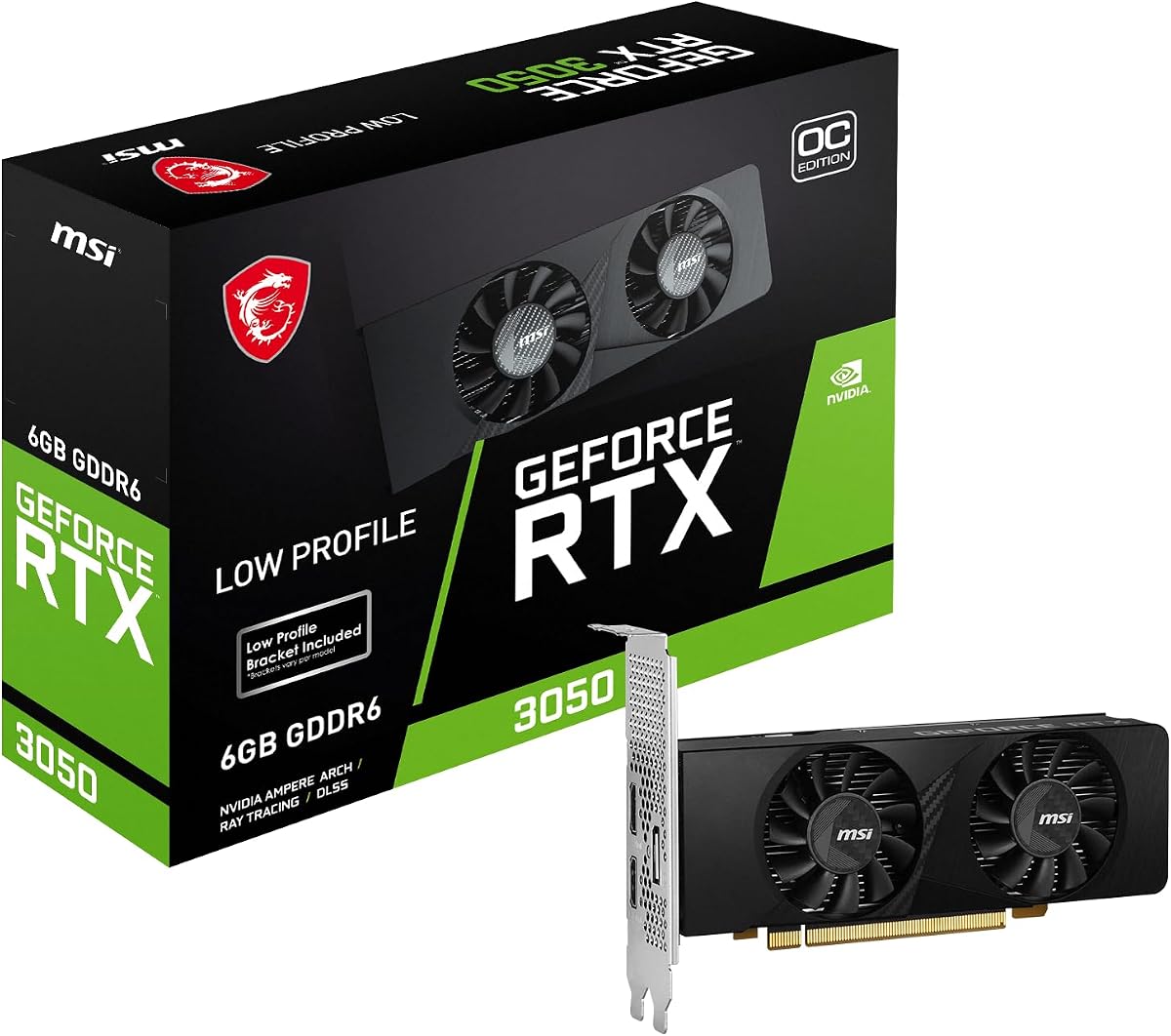


The maxsun GeForce RTX 3050 stands out as a highly capable graphics solution for compact builds. Its low profile form factor ensures compatibility with tight chassis while delivering reliable performance for gaming and media consumption.
We may earn a commission when you buy through this link, at no additional cost to you.
Powered by the NVIDIA Ampere architecture this card leverages DLSS technology to enhance frame rates without compromising visual fidelity. The integrated 6GB GDDR6 memory interface supports demanding applications effectively within its power envelope.
While the memory capacity may limit future scalability at ultra high resolutions the card offers excellent value for mid-range targets. Its compact dimensions make it ideal for users prioritizing desk space over maximum graphical power.
We recommend this GPU for builders seeking a balance of size and performance in a small form factor system. The HDMI 2.1 and DisplayPort 1.4a outputs ensure flexible connectivity for modern displays.
The slim design allows installation in cases where full sized cards simply will not fit.
AI driven upscaling helps maintain smooth gameplay even in graphically intense scenarios.
We may earn a commission when you buy through this link, at no additional cost to you.
ASRock Arc A380 offers a budget friendly entry into dedicated graphics for compact systems. Its ITX design fits easily into mini cases while providing modern features like AV1 encoding for content creators.
We may earn a commission when you buy through this link, at no additional cost to you.
The Intel Xe architecture powers this card delivering decent performance for esports and media tasks. The 0dB silent feature stops the fan during light loads ensuring a quiet computing environment at all times.
Although driver support has improved significantly over time some legacy titles may still see occasional issues. The low power consumption makes it a safe choice for systems with limited PSU capacity.
This GPU is ideal for users building a home theater PC or basic gaming rig on a strict budget. Its connectivity options including DisplayPort 2.0 ensure compatibility with high refresh rate monitors.
Hardware acceleration for AV1 encoding speeds up video editing workflows significantly.
The fan stops spinning at low temperatures for completely silent operation when idle.
We may earn a commission when you buy through this link, at no additional cost to you.
The GIGABYTE GeForce RTX 5070 represents the cutting edge of graphics technology for small form factor PCs. With Blackwell architecture and GDDR7 memory it delivers exceptional performance for high resolution gaming and productivity tasks.
We may earn a commission when you buy through this link, at no additional cost to you.
The WINDFORCE cooling system ensures thermal stability even under sustained loads. Its SFF ready certification guarantees compatibility with compact chassis without sacrificing the cooling efficiency needed for such powerful silicon.
The premium price tag reflects the advanced capabilities and future proofing offered by this card. Users investing in this hardware can expect years of top tier performance in demanding workflows.
We recommend this GPU for enthusiasts who demand maximum performance within a compact chassis. The 12GB VRAM ensures smooth operation in memory intensive applications like 3D rendering and AI workloads.
Blackwell architecture brings significant efficiency and speed improvements over previous generations.
Specialized cooling design maintains optimal temperatures even in restricted airflow scenarios.
We may earn a commission when you buy through this link, at no additional cost to you.
MSI delivers a reliable option for small builds with this RTX 3050 LP. Its low profile design fits into tight spaces while maintaining robust build quality and performance consistency.
We may earn a commission when you buy through this link, at no additional cost to you.
The dual HDMI 2.1a outputs provide excellent connectivity for multi monitor setups. The 1492 MHz boost clock ensures solid frame rates in modern games without excessive power consumption.
While the single slot profile limits cooling potential the card manages heat effectively for its power class. This makes it a safe choice for cases with limited clearance and airflow.
We suggest this card for users needing multiple display outputs in a compact package. It balances cost performance and size effectively for general purpose computing and light gaming.
Dual HDMI ports make it ideal for digital signage or multi screen workstations.
Low power draw ensures compatibility with standard power supplies without extra cables.
We may earn a commission when you buy through this link, at no additional cost to you.
The PNY RTX A400 is purpose built for professional workflows in compact business systems. Its low power consumption and single slot design make it ideal for office environments requiring reliable compute power.
We may earn a commission when you buy through this link, at no additional cost to you.
Four Mini DisplayPort outputs enable extensive multi monitor setups without taking up PCIe slots. The optimized CUDA cores accelerate tasks like video editing and 3D modeling efficiently within its power envelope.
Gaming performance is secondary to stability and certification in this design. It ensures applications run smoothly without crashes which is critical for professional productivity tasks.
We recommend this GPU for business workstations and video editing stations in small form factors. Its energy efficiency reduces heat output and power consumption significantly compared to gaming cards.
Certified drivers ensure compatibility with professional creative and engineering applications.
Four outputs allow connecting multiple high resolution screens for extended productivity.
We may earn a commission when you buy through this link, at no additional cost to you.
MSI GeForce RTX 3050 LP combines compact sizing with effective cooling features. The dual fan setup ensures quiet operation while maintaining stable thermal performance during extended gaming sessions.
We may earn a commission when you buy through this link, at no additional cost to you.
The custom PCB with hardened circuits provides enhanced reliability for long term use. MSI Center software allows users to monitor and tweak settings easily without third party tools.
While it lacks extensive VRAM it handles most modern games at 1080p effectively. The support for 4K displays makes it a versatile choice for media consumption and productivity tasks.
We suggest this card for small form factor gamers seeking a balance of cost and features. Its reliable cooling ensures consistent performance even when placed in cases with limited airflow.
MSI Center provides easy access to system monitoring and performance tuning tools.
Dual fan design maintains cool temperatures without excessive noise levels.
We may earn a commission when you buy through this link, at no additional cost to you.
ASUS Prime RTX 5070 offers next generation features tailored for enthusiast small form factor builds. The PCIe 5.0 interface and GDDR7 memory ensure maximum data throughput for demanding tasks.
We may earn a commission when you buy through this link, at no additional cost to you.
Axial-tech fans improve cooling efficiency with longer blades and optimized airflow. The Dual BIOS switch provides a safety net for stability ensuring reliability during overclocking or updates.
This card pushes performance boundaries in compact cases but requires careful case selection. Its 3 year warranty adds confidence for long term use in high intensity scenarios.
We recommend this GPU for power users who prioritize future proofing and advanced features. It delivers exceptional performance for 4K gaming and professional workloads within a smaller chassis.
PCIe 5.0 support prepares systems for upcoming hardware and higher bandwidth needs.
Phase change thermal pads ensure consistent heat transfer for stable performance.
We may earn a commission when you buy through this link, at no additional cost to you.
MSI RTX 5060 Ti Shadow 2X OC delivers high mid range performance with next gen architecture. Its Blackwell architecture ensures efficiency and speed for modern gaming and content creation tasks.
We may earn a commission when you buy through this link, at no additional cost to you.
TORX Fan 5.0 provides targeted airflow to keep temperatures low during intense sessions. The multiple display outputs support multi monitor setups for enhanced productivity and immersive gaming.
Power requirements are higher than entry level options but manageable with modern power supplies. This card balances performance and size effectively for users seeking quality without extreme pricing.
We suggest this GPU for gamers needing reliable 4K performance in compact setups. Its modern connectivity ensures compatibility with high refresh rate monitors for smooth visuals.
TORX Fan 5.0 stabilizes airflow to maximize thermal efficiency in restricted spaces.
GDDR7 memory provides faster data access for faster frame rates and rendering.
We may earn a commission when you buy through this link, at no additional cost to you.
AMD Radeon Pro WX 4100 offers a compact professional solution for small form factor builds. Its low power design ensures reliable operation in confined spaces without requiring additional power connectors.
We may earn a commission when you buy through this link, at no additional cost to you.
Support for up to four 4K displays makes it ideal for multi monitor workstations. AMD ZeroCore Power technology minimizes energy usage when the system is idle for efficiency.
Gaming performance is secondary but sufficient for basic tasks. The focus remains on stability and reliability for professional environments requiring consistent output.
We recommend this card for business PCs and digital signage in tight spaces. Its efficiency ensures minimal heat output while providing essential multi display connectivity.
Dynamic power optimization reduces consumption without impacting active performance.
Multiple high resolution outputs support versatile workstation configurations easily.
We may earn a commission when you buy through this link, at no additional cost to you.
ASUS Dual Radeon RX 9060 XT provides substantial VRAM for demanding tasks. The 16GB memory buffer supports high texture gaming and large model rendering effectively.
We may earn a commission when you buy through this link, at no additional cost to you.
Axial-tech fans ensure cooling performance while 0dB technology maintains silence during light use. Dual BIOS switch offers flexibility between performance and quiet modes for different scenarios.
While physically larger than some low profile options it fits many mini cases. Its reliability features ensure consistent performance even under sustained workloads over time.
We suggest this GPU for users needing high memory capacity in compact builds. It balances performance and thermal management well for enthusiasts prioritizing longevity.
16GB VRAM supports large datasets and high resolution textures efficiently.
Fan stops spinning at low loads for completely silent operation when idle.
We may earn a commission when you buy through this link, at no additional cost to you.
Choosing the right graphics card for a compact system involves balancing physical constraints with performance needs. Use these factors to identify the best fit for your build.
Always measure your case's maximum GPU length before purchasing. Low profile and single slot cards often fit tighter enclosures better than standard dual fan models.
Check clearance for height and width to avoid conflicts with CPU coolers or power supply units.
Verify your power supply wattage and connector availability. Compact cases often use lower wattage PSUs that lack dedicated PCIe power cables.
Select cards with low TDP if your system relies on passive cooling or standard connectors only.
VRAM determines how well a card handles high resolutions and textures. Aim for at least 6GB for modern gaming and 8GB for professional workloads.
Larger memory buffers ensure longevity and future proofing for evolving application requirements.
Ensure the card supports your monitors preferred interface and resolution. HDMI and DisplayPort versions vary between models affecting refresh rates.
Multi display users should prioritize cards with multiple output ports for flexible workstation setups.
Thermal performance impacts stability in enclosed spaces. Look for cards with efficient fans and heat sinks designed for compact airflow.
Consider passive or low noise models if quiet operation is a priority for your environment.
Check for regular driver updates and software tools from the manufacturer. Stable drivers ensure compatibility with new games and applications.
Vendor software can help optimize settings and monitor system health effectively over time.
Set a realistic budget based on your usage goals. Entry level cards offer sufficient power for media and light gaming.
Higher end models justify their cost with advanced features and performance for professional tasks.
Look for cards with solid warranty terms from trusted manufacturers. Long coverage indicates confidence in build quality.
Choose brands known for reliable components to reduce risk in critical builds.
Install the GPU carefully by aligning it with the PCIe slot and securing it with screws. Ensure all power connectors are firmly attached before powering on.
Keep the case vents clear and clean dust regularly to maintain optimal airflow. Compact systems accumulate heat faster so periodic cleaning is essential.
Update drivers regularly through official manufacturer tools for best performance and compatibility. Monitor temperatures and adjust fan curves if necessary for thermal management.
Most standard GPUs will not fit in small form factor cases due to length and height limits. Always verify clearance dimensions against your case specifications before purchasing a card.
Low profile cards often throttle slightly more but deliver comparable performance in most scenarios. Modern designs balance size and cooling effectively for small systems.
Check the card's wattage requirement against your PSU's total output. Ensure you have the correct connectors or use adapters if the card does not need extra power.
SFF ready cards are optimized for compact cases with better cooling and clearance. Standard cards often require larger chassis and more space for airflow.
Gaming GPUs can handle professional tasks but certified workstation cards offer better driver support. Choose based on whether performance or stability is more important for your workflow.
Use compressed air to blow dust out of fans and heat sinks while the PC is off. Avoid touching components directly and ensure the case is fully closed afterward.
We highlighted ten excellent GPUs for small form factor systems ranging from budget entry to premium performance. Each option balances size and power to meet distinct user needs.
Prioritize physical compatibility and power efficiency when building a compact system. A card that fits securely ensures better cooling and long term reliability.
Verify current listings and availability before purchase to ensure you get the best deal. Prices and inventory change frequently so act quickly once you choose your ideal GPU.