
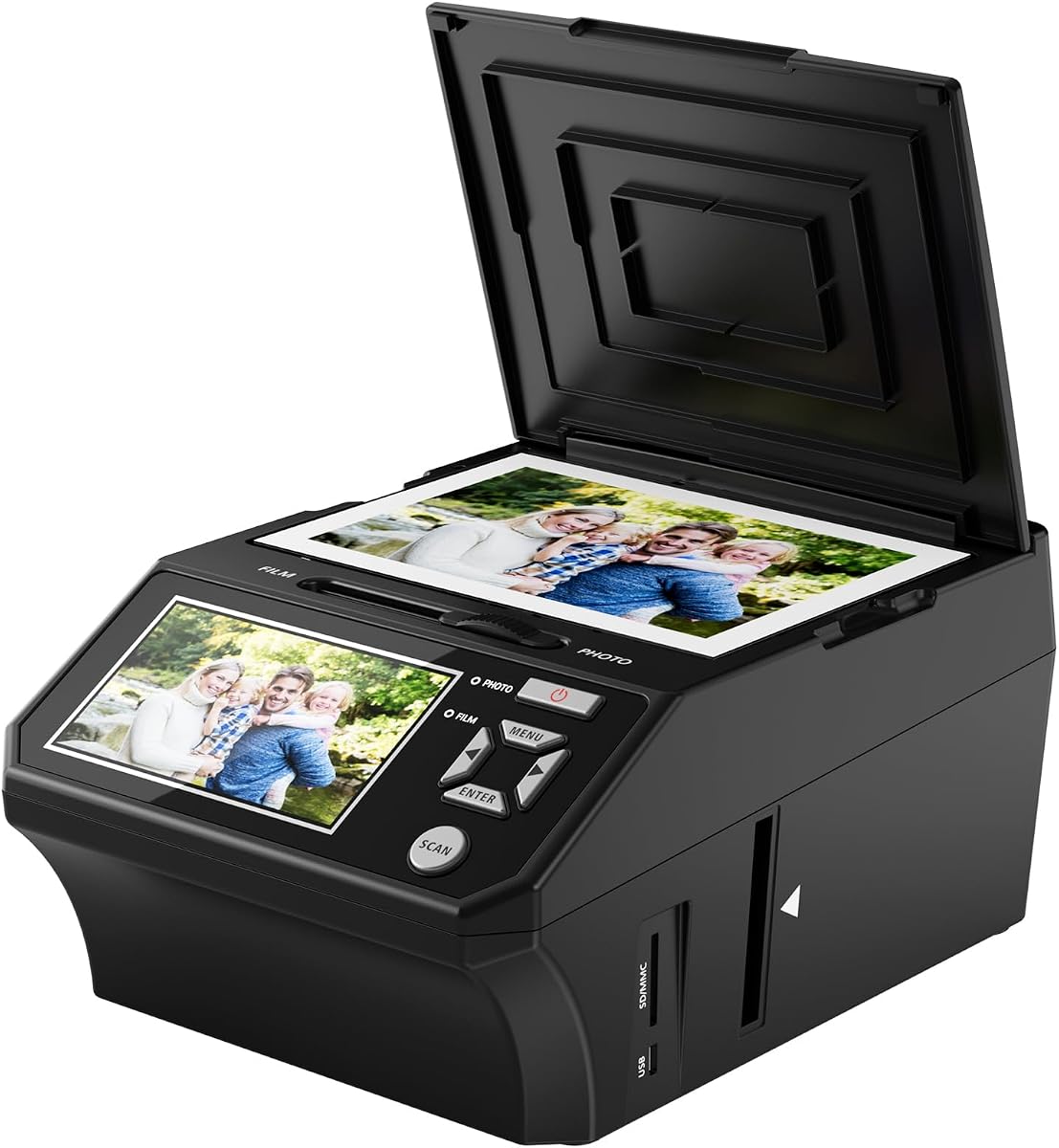
22MP Film & Slide Scanner with 5 LCD LCD
4.3Editor score
Affordable pricing option
5 inch screen preview
Includes HDMI and USB
Compare the top 35mm slide scanner models for digitizing old photos easily. Find the best device for your budget and film formats.
Preserving family memories is easier than ever with modern digitization tools. A 35mm slide scanner converts old film into digital files, ensuring your photos survive for generations. These devices offer convenience, speed, and high-quality results without needing a computer.
We compared ten leading models based on resolution, screen size, ease of use, and compatibility. Our analysis covers standalone units with built-in displays and versatile options supporting multiple film types. Each product was evaluated for performance, value, and real-world usability scenarios.
This guide highlights top picks for every user need, from budget-friendly options to premium features. Each entry details specifications, pros, and cons to help you decide confidently. Prices and availability may change, so check current listings before purchasing.
4.3Editor score

4.3Editor score

5.0Editor score
This side-by-side comparison highlights key specifications across all ten products. Evaluate screen sizes, resolution, and included accessories to find the right fit for your archival needs.






The KODAK Slide N Scan stands out as a top choice for digitizing old memories. With a 4.3 rating, users appreciate its 22MP resolution and 5-inch LCD display. This device makes saving old photos easy without needing a computer.
We may earn a commission when you buy through this link, at no additional cost to you.
Its standout feature is the convenient loading tray system. You can feed film strips or slides quickly and scan them with a single touch. The display lets you preview images instantly, ensuring you capture what you need before saving to the SD card.
While highly effective, it requires you to buy an SD card separately. Also, the screen is not touch-enabled, relying on physical buttons for navigation. These trade-offs are acceptable given the reliable performance and broad film format support.
This scanner is perfect for families looking to preserve photos quickly. If you want a balance of quality and ease of use, this model delivers. It is a reliable tool for anyone wanting to modernize their photo collection.
The tray system allows continuous loading, making batch scanning much faster than older models.
Handles 135, 110, 126, and 50mm slides, ensuring compatibility with various collections.
We may earn a commission when you buy through this link, at no additional cost to you.
The Magnasonic All-in-One is a versatile scanner supporting Super 8 film. With a 4.3 rating, it offers a 24MP resolution for crisp digital images. It allows users to view and save photos directly on the device.
We may earn a commission when you buy through this link, at no additional cost to you.
Its ability to handle Super 8 film is a unique advantage. Most scanners skip this format, but this one includes the necessary adapter. The large display helps you check scans before saving to the SD card, ensuring quality results.
However, it does not come with an SD card, so you need to purchase one separately. Also, editing options are basic, lacking advanced software tools. These limitations are minor considering the high resolution and format variety.
Choose this if you have Super 8 footage to preserve. It provides a standalone solution that avoids computer setup. It is ideal for those who want high-quality digitization with minimal fuss.
The included adapter lets you scan motion picture film frames, preserving home movies.
Supports SD cards up to 128GB, giving you plenty of space for large collections.
We may earn a commission when you buy through this link, at no additional cost to you.
The KODAK Slide N Scan Max improves on the original with a smoother feeding tray. It has a 4.2 rating and supports 135, 110, and 126 formats easily. Users like the direct SD saving feature for portability.
We may earn a commission when you buy through this link, at no additional cost to you.
The main benefit is the efficient tray design, which reduces manual adjustments. This makes scanning long rolls of film less tedious. The one-touch editing lets you adjust brightness and color without menus, keeping the process simple.
On the downside, color accuracy can be average compared to pricier models. Also, you must buy an SD card separately to save your files. These drawbacks are acceptable for a device focused on simplicity and speed.
This scanner suits those prioritizing speed and ease. If you want to digitize quickly without a computer, it fits well. It is a practical choice for casual users with mixed film formats.
The tray moves smoothly, allowing you to scan multiple slides without constant repositioning.
Saving directly to SD card means you can scan anywhere without needing a laptop.
We may earn a commission when you buy through this link, at no additional cost to you.
This scanner is unique because it scans printed photos alongside slides. With a 4.4 rating, it features a 5-inch HD screen for clear previews. It also comes with an SD card and a 3-year warranty.
We may earn a commission when you buy through this link, at no additional cost to you.
The ability to scan 3R, 4R, and 5R photos is a major plus. Most slide scanners only handle film, but this one covers your entire archive. The included SD card means you can start scanning right out of the box.
However, printing editing tools are basic. You cannot adjust complex color profiles or do detailed cropping. The printed photo scanning is limited to specific sizes. These limits are minor given the broad functionality and warranty.
Choose this if you have mixed paper and film photos. It simplifies digitizing by using one device for everything. It is a great option for families with varied memory types.
Convert slides, negatives, and printed photos, reducing the need for multiple devices.
Backed by a 3-year warranty, offering peace of mind for long-term use.
We may earn a commission when you buy through this link, at no additional cost to you.
This model offers great value with a 22MP sensor and 5-inch LCD. It has a 4.3 rating and includes a full accessory kit. The built-in memory ensures you can save photos even without an SD card.
We may earn a commission when you buy through this link, at no additional cost to you.
Its affordability makes it accessible for anyone on a budget. The HDMI cable lets you view scanned photos on a TV for family sharing. This feature adds significant value, making it perfect for casual users.
It lacks some premium editing features and brand recognition. Also, the SD card is not included, though you can use up to 64GB. These trade-offs are acceptable for the price and included accessories.
This is the best pick for budget-conscious buyers. It provides all the essentials for digitizing without extra costs. If you want a cost-effective solution, this is a solid choice.
With 128MB built-in storage, you can scan immediately without buying an SD card.
Includes USB, HDMI, and adapters, so everything needed to get started is included.
We may earn a commission when you buy through this link, at no additional cost to you.
The HP FilmScan offers a large 7-inch touch screen for premium control. It has a 4.0 rating and features a 13MP sensor for detailed captures. The touch display makes editing easy without a computer.
We may earn a commission when you buy through this link, at no additional cost to you.
Its main advantage is the intuitive touch interface. You can crop and adjust photos directly on the screen. The gallery mode turns the device into a digital picture frame, keeping memories on display.
However, it is pricier than other options and has occasional touch sensitivity issues. The sensor resolution is lower than some competitors. These issues are acceptable for users prioritizing a premium interface.
Choose this for a high-end user experience. If you want a modern, touch-based workflow, it is ideal. It suits those who value interface design and ease of editing.
The 7-inch touch screen allows seamless navigation and editing without physical buttons.
Use gallery mode to show off your digitized photos as a digital photo frame.
We may earn a commission when you buy through this link, at no additional cost to you.
This HP model brings USB-C connectivity for modern power options. It has a 4.3 rating and a 5-inch touch screen. The 13MP sensor with 22MP interpolation delivers clear results.
We may earn a commission when you buy through this link, at no additional cost to you.
The USB-C power makes it compatible with modern laptops and chargers. It supports 135, 126, and 110 formats. The touch screen allows easy previewing and saving directly to an SD card.
You may need a specific USB-C adapter for some setups. Also, contrast can be average on very old films. These issues are minor compared to the convenience of USB-C power.
This scanner is perfect for those with USB-C setups. It offers a modern power solution with solid performance. If you want versatility, it is a strong option.
USB-C power means you can use modern chargers, making it more portable.
22MP interpolation enhances image detail for larger digital prints.
We may earn a commission when you buy through this link, at no additional cost to you.
The KODAK SCANZA supports unique retro formats like 8mm and Super 8. It has a 4.2 rating and a bright 3.5-inch display. Multiple adapters ensure you can scan various film types.
We may earn a commission when you buy through this link, at no additional cost to you.
Its 8mm compatibility sets it apart from standard scanners. The bright screen with adjustable brightness makes viewing easier in any light. The included cleaning brush helps avoid dust marks on scans.
However, the screen is smaller than others in this list. It is not a touch screen, relying on buttons for control. These limitations are acceptable given the unique film format support.
Choose this if you have 8mm films. It is rare to find a scanner that handles such formats. It is a niche but valuable tool for collectors.
The only scanner in this list supporting 8mm film, ideal for vintage collections.
Tilt screen allows better viewing angles, reducing glare during operation.
We may earn a commission when you buy through this link, at no additional cost to you.
This scanner is small and portable, ideal for limited spaces. It has a 3.9 rating and features a 2.4-inch screen. The batch scanning option lets you scan 135 film quickly.
We may earn a commission when you buy through this link, at no additional cost to you.
Its compact size makes it easy to store and transport. It supports 128GB SD cards for ample storage. The plug-and-play design ensures no drivers are required for setup.
The small screen can make editing difficult. Also, resolution is lower than premium models. These trade-offs are acceptable for portability and cost.
Choose this if space and budget are priorities. It is a basic but functional tool for casual scanning. Perfect for travelers or small offices.
The small footprint saves desk space, making it great for small workspaces.
Scan multiple frames of 135 film quickly to save time during digitization.
We may earn a commission when you buy through this link, at no additional cost to you.
The ClearScan T7 has a perfect 5.0 rating for its user-friendly design. It features a 7-inch touch screen and 24MP output. The included 16GB SD card ensures you can scan immediately.
We may earn a commission when you buy through this link, at no additional cost to you.
Its touch interface is intuitive for beginners and families. You can adjust, scan, and save with simple gestures. The high resolution preserves details well for printing or sharing.
Documentation may be limited, and the price is higher. However, the ease of use compensates for these minor issues. The perfect rating highlights its reliability.
This is the top pick for families needing simplicity. It combines high quality with ease of use. If you want a reliable and easy device, choose this.
With a perfect rating, it stands out as the most reliable scanner in the list.
Includes SD card so you can scan and save immediately without extra purchases.
We may earn a commission when you buy through this link, at no additional cost to you.
Selecting the right scanner involves evaluating features that match your collection and goals. Here are key factors to consider when choosing.
Resolution determines how detailed your digital photos will be. Look for models with at least 22MP interpolation for sharp results that can be printed large. Higher resolution helps preserve fine details in old film.
Prioritize scanners with high pixel counts for best quality.
A built-in screen allows you to preview scans without a computer. Larger screens like 7 inches make editing easier. Touch screens offer more intuitive control than physical buttons.
Choose larger or touch screens for better user experience.
Ensure the scanner supports your specific film types. Common formats include 135, 110, 126, and 50mm slides. Some models also handle Super 8 or 8mm, which is useful for vintage collections.
Check supported formats before purchasing.
Most scanners save to SD cards. Verify the maximum capacity supported, like 128GB. Some devices have built-in memory, which is useful if you don't have an SD card.
Ensure sufficient storage capacity for your needs.
Look for one-touch scanning and simple menus. Models that don't require software installation save time. Tray design affects loading speed, so quick-load trays are preferred.
Prioritize intuitive interfaces and quick loading.
Options like USB, HDMI, and USB-C help transfer or view photos. HDMI lets you view on a TV. USB-C is modern and versatile for power and data.
Consider connectivity options that fit your workflow.
Built-in tools for brightness and color adjustment are helpful. Advanced models offer cropping and red-eye removal. On-device editing avoids needing a computer.
Check for necessary editing tools on device.
A warranty protects your investment. Look for 1 to 3-year coverage. Reliable customer support is important if issues arise.
Choose models with solid warranty coverage.
To start, insert the correct adapter for your film type into the scanner tray. Slide your film into the tray, ensuring it is flat and aligned with the guides. Press the power button to turn on the device.
Adjust brightness or color using the on-screen menu before scanning. Place the scanner on a stable surface and press the scan button. The image will appear on the screen and save to the SD card.
For maintenance, clean the light box with the included brush to remove dust. Store the device in a dry place away from direct sunlight. Avoid touching the sensor area with fingers to prevent marks.
Most modern scanners are standalone devices that do not need a computer. They save directly to SD cards, allowing you to scan anywhere. Only if you need advanced editing software would you connect to a PC.
They typically save images as JPEG files, which are widely compatible. This format ensures easy sharing and viewing on most devices. Some models may offer other formats, but JPEG is standard.
Yes, most models support both slides and negatives. They use a light box that works for both positive and negative films. Ensure the scanner you pick lists both formats in specifications.
Scanning usually takes a few seconds per slide. Advanced models can scan in under 5 seconds. Batch scanning features allow continuous feeding for faster results.
Basic models do not fix scratches automatically. You may need software for digital restoration. However, some units offer brightness and color adjustments to improve appearance.
Check the scanner's supported capacity. Many support up to 128GB or 32GB. For large collections, a larger card is better to avoid running out of space.
Yes, models with HDMI output allow this. Connect the scanner to your TV to show slideshows. This is perfect for family viewing sessions.
Use the included brush to clean dust from the light box. Avoid using liquids directly on the device. Keep it in a dry, dust-free environment when not in use.
Choosing the right scanner depends on your specific needs and budget. Our top picks range from affordable options to premium touch interfaces. Each model offers unique features to help you digitize your memories.
Prioritize features like screen size and format support based on your collection. A device that is easy to use ensures you will use it regularly. Consider storage options and connectivity for convenience.
Remember to check current prices and availability before purchasing. Models may vary in stock or pricing due to demand. Investing in the right scanner preserves your memories for years to come.