10 Best LCD Controller Board for Laptop Screen (November 2026) Expert Guide
Written by Jordan · Updated November 2026
Finding the right LCD Controller Board for Laptop Screen is crucial for successful DIY repairs or custom monitor projects. These boards convert video signals into formats your panel understands, ensuring clear display output without glitches or flickering issues during use.
We compared ten highly rated models based on compatibility, interface types, power requirements, and user feedback. Each product was evaluated for stability, ease of installation, and support for common laptop resolutions to help you make an informed choice.
Each pick shows key features, compatible models, and what makes it stand out in its category. Prices and availability change frequently, so verify current details on the product page before purchasing to ensure you get the best value today.
Top 3 Picks for Best LCD Controller Board for Laptop Screen
Best Budget
VSDISPLAY H/D VGA DVI LVDs Controller Board 40Pin for 15.6" 1366×768 LP156WH2 LP156WH3 LP156WH4 TL B156XW02 N156B6-L0b LCD Screen
As an Amazon Associate we earn from qualifying purchases.
Top 10 Best LCD Controller Board for Laptop Screen in 2026 Compared
The following table provides a side-by-side overview of all ten products reviewed in this guide. Use it to quickly compare key specs like interface type, resolution support, and power needs to find the best match for your specific panel.
H/D VGA DVI Audio LVDs Controller Board 30 pin for 17" 19" 1280×1024
1280×1024 resolution support
VGA DVI video input
12V 3A power input
LVDS signal output type
This board is a top choice for DIYers working with 17 or 19 inch panels. It holds a 4.6 rating from users who praise its reliability and clear video output. The design focuses on stable signal transmission without complex setup steps.
Pros
High user satisfaction rating
Strong signal stability
Clear LED status indicators
Supports larger screens
Cons
Requires separate power adapter
Limited to LVDS panels
We may earn a commission when you buy through this link, at no additional cost to you.
Its main strengths include robust compatibility with specific LVDS models like M170EG01 and M170EN01. The board accepts VGA and DVI inputs making it versatile for connecting older devices. It also includes a speaker connector for simple audio integration.
Trade-offs include the need for a dedicated 12V 3A adapter which is not included. Some users may find the cable management slightly tricky without proper insulation. However these are common in this category and do not hinder performance.
This board is ideal for anyone repairing gaming screens or building a small monitor kit. If you need stable 1280×1024 output with minimal fuss this is a trusted pick. Verify your panel model before ordering to ensure perfect fit.
Stable Signal for Gaming and Work
The board processes signals smoothly to prevent flickering during extended use which is critical for gaming setups or office displays requiring consistent clarity.
Easy Status Verification
LED lights on the board provide immediate feedback on power and signal status simplifying troubleshooting during initial setup or daily operation.
VSDISPLAY H/D VGA DVI LVDs Controller Board 40Pin for 15.6"
1366×768 resolution support
40 Pin LVDS interface
VGA DVI video input
12V 2A power input
This board is an affordable option for 15.6 inch screens with 1366×768 resolution. It carries a 4.4 rating and offers solid performance for basic DIY projects. Users appreciate its simplicity and plug and play capabilities.
Pros
Cost effective price point
Wide model compatibility
Clear LED indicators
Speaker connector included
Cons
Adapter not included in kit
Limited to specific pin counts
We may earn a commission when you buy through this link, at no additional cost to you.
Its key strengths lie in supporting common models like LP156WH2 and B156XW02. The 40 pin LVDS interface matches many older laptop panels perfectly. It also supports audio output which adds value for multimedia setups.
The main trade-off is the lack of an included power adapter requiring you to source one separately. Also it only works with 40 pin interfaces which limits compatibility with newer eDP screens. These constraints keep costs low.
If you are on a tight budget and have a compatible 15.6 inch panel this board delivers good value. It is perfect for secondary monitors or quick repairs. Always check your pin count before purchasing to avoid returns.
Affordable Upgrade for Old Screens
This board gives new life to older laptop screens at a fraction of the cost of buying a new display making it great for budget-conscious builders.
Audio Output Convenience
The built-in speaker connector allows direct audio wiring without extra adapters simplifying your setup for media playback or system sounds.
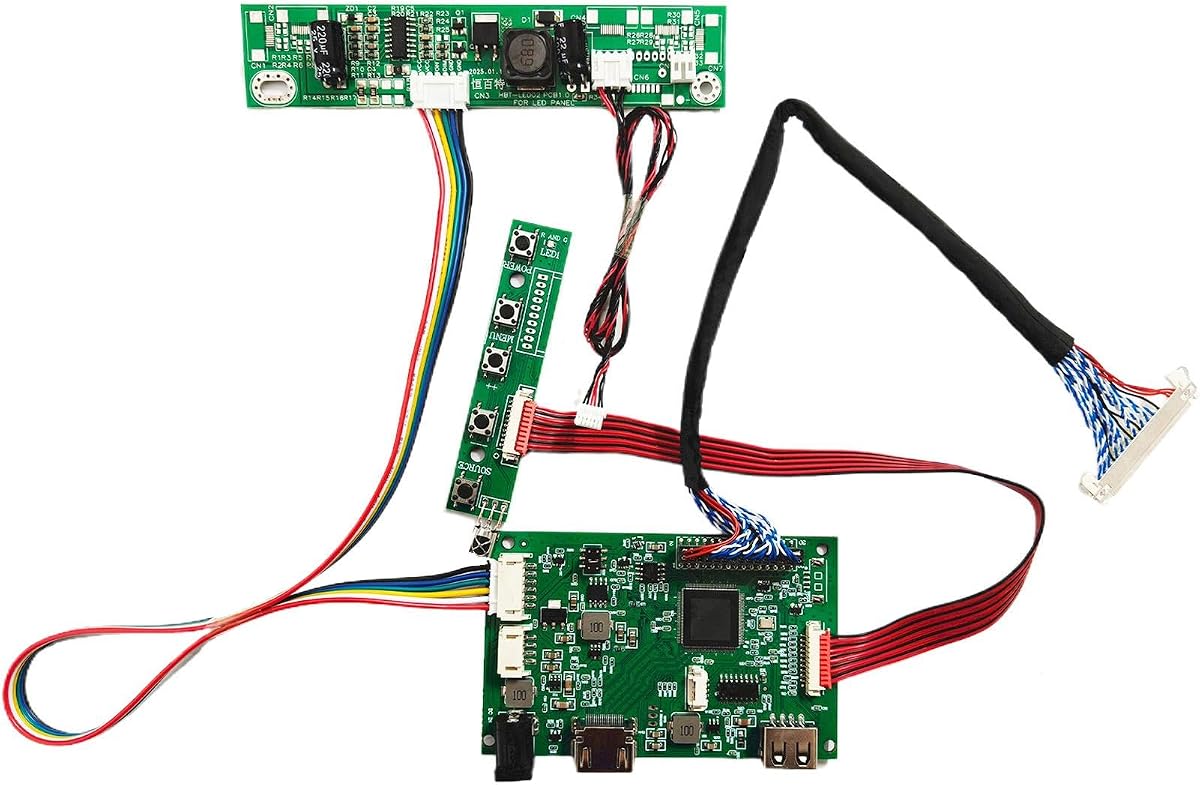
This board stands out for supporting 1920×1080 resolution across many screen sizes from 11.6 to 17.3 inches. It has a 4.0 rating and is known for high clarity. The eDP interface ensures modern laptop panels work well.
Pros
Full HD resolution support
Wide size compatibility
Plug and play setup
Multiple panel models supported
Cons
Power adapter not included
Requires careful cable alignment
We may earn a commission when you buy through this link, at no additional cost to you.
Strengths include compatibility with models like B156HAN01.1 and N156HGE-EA1. It requires no driver installation making it accessible for casual users. The pre-connected signal cable reduces setup complexity significantly.
A trade-off is the need to manually align Pin 1 correctly which can be tricky if not careful. Also like most boards it lacks a power adapter. These issues are manageable with clear instructions provided.
Buy this if you need high resolution output for a laptop repair or custom monitor. It works well for creative work requiring sharp images. Verify your model number to ensure full compatibility and best results.
High Definition Visual Experience
Supporting full HD resolution this board ensures crisp text and vibrant colors which is essential for design work or media consumption on custom screens.
Driver-Free Convenience
The board operates immediately upon connection without needing software drivers saving time and avoiding potential compatibility issues with different systems.
VSDISPLAY VGA DVI Controller Board for 21.5" 23.8" 1920×1080
1920×1080 resolution support
30 Pin LVDS interface
12V 3A power input
Inverter board included
This board is designed for larger 21.5 and 23.8 inch panels maintaining full HD clarity. It has a 4.2 rating and offers a complete kit including an inverter. Users like it for home theater or office setups.
Pros
Supports large screen sizes
Inverter included in kit
VGA DVI inputs
Clear model list
Cons
Power adapter not included
Specific model restrictions apply
We may earn a commission when you buy through this link, at no additional cost to you.
Key strengths are its support for big screens like T215HVN01.0 and LM238WF1. The inclusion of an inverter board adds value compared to single board kits. It simplifies the installation process for bigger displays.
However it does not work with LM215WF3-SLA1 which is an important limit. You also need to buy a separate power adapter. These constraints are typical for such specialized kits.
Ideal for anyone looking to build a large monitor from a salvaged screen. It handles video signals well and provides good image quality. Check your model against the list before buying to ensure it fits.
Complete Kit for Big Screens
The inclusion of an inverter board means you get all necessary components for bigger panels in one package reducing the need for extra purchases.
Reliable Large Format Display
This board ensures stable signal delivery for 23 inch panels which is critical for maintaining brightness and avoiding screen issues during daily use.
H/D Controller Driver Board for 11.6'' 13.3'' 14'' 15.6'' 1920×1080
1920×1080 resolution support
30 Pin eDP interface
Pre-connected signal cable
12V 2A power input
This board covers many sizes from 11.6 to 17.3 inches with 1920×1080 resolution. It has a 4.1 rating and is praised for its ready to use cable setup. Great for quick replacements or projects.
Pros
Wide range of sizes
Pre-connected cable ready
Clear model compatibility
High resolution output
Cons
Power adapter not included
Limited to eDP only
We may earn a commission when you buy through this link, at no additional cost to you.
Strengths include support for models like B156HAN01.1 and N133HSE-EA1. The pre-connected signal cable saves time and reduces connection errors. It ensures high quality video output consistently.
You must use an eDP interface which limits older LVDS panels. Also the power adapter is separate requiring extra sourcing. These are standard limitations for this type of board.
Buy this for modern laptop screen repairs needing sharp visuals. The easy setup makes it a good choice for beginners. Verify your screen interface type before ordering to ensure it works.
Streamlined Setup with Pre-connected Cable
The signal cable comes attached to the board which reduces connection time and minimizes the risk of pin alignment mistakes during assembly.
Versatile Size Compatibility
Supporting multiple inch ranges this board adapts to different laptop chassis sizes providing flexibility for various repair and build scenarios.
Taidacent Universal LVDS Controller Board 10-65 Inch LCD Screen HDMI DVI VGA to LVDS
Multi size support 10 to 65 inch
HDMI DVI VGA inputs
NT68676 chipset
Multi language OSD menu
This universal board supports screens from 10 to 65 inches making it very versatile. It has a 4.0 rating and includes HDMI inputs. Users appreciate the flexibility for different projects.
Pros
Extremely wide size range
HDMI support added
OSD languages varied
Simple interface setup
Cons
No specific model list
Requires separate power supply
We may earn a commission when you buy through this link, at no additional cost to you.
Its main strength is compatibility across massive size ranges and input types. You can connect HDMI DVI and VGA devices easily. The NT68676 chipset ensures stable processing for various panels.
Trade-offs include less specific model lists requiring users to verify compatibility manually. Also the power adapter is sold separately. These are typical for universal kits.
Ideal for custom displays or unusual screen sizes. It provides the flexibility needed for diverse projects. Always check interface pins and resolution before purchasing to avoid mismatch issues.
Universal Flexibility for Any Size
Supporting screens from small tablets to large monitors this board allows you to use a single solution for many different display projects and repairs.
Modern Input Options
Adding HDMI inputs allows connection to modern devices like gaming consoles or computers without needing extra adapters increasing overall usability.
VSDISPLAY H/D USB LCD Controller Board for 21.5'' 23.8''1920×1080
1920×1080 resolution support
HDMI USB inputs
Image rotation feature
12V 2A power input
This board stands out with a perfect 5.0 rating for 21.5 to 23.8 inch Full HD panels. It supports video playback via USB which is unique. Users like it for media centers.
Pros
High perfect rating
Video playback via USB
Image rotation support
Audio output included
Cons
Power adapter not included
Specific model exclusions
We may earn a commission when you buy through this link, at no additional cost to you.
Its strengths include image rotation and strong video handling for media. The HDMI and USB options add versatility for connecting different devices. It provides clear bright output consistently.
You must check model compatibility carefully as some variants like LM215WF3-SLA1 are excluded. Power adapter is separate too. These are minor constraints given the features.
Buy this for a media display or smart monitor setup. The USB playback and rotation features make it special. Check your screen model before purchase to ensure full functionality.
Media Playback Convenience
Direct USB video playback means you can watch files without a PC which is perfect for digital signage or entertainment displays in homes.
Flexible Display Orientation
The ability to rotate images 180 degrees lets you adapt to different mounting setups without needing a new board or software workaround.
15.6" Compatible For LP156WH4 LTN156AT17 B156XW02 LP156WH2 1366X768 LCD LED Screen Controller Board Driver HDMI+VGA Monitor LVDS 40Pins
1366×768 resolution support
40 Pin LVDS interface
HDMI VGA inputs
Adjustable image parameters
This board fits 15.6 inch screens with 1366×768 resolution and HDMI inputs. It focuses on stable signal transmission. Users find it reliable for quick repairs without complex setup.
Pros
Modern HDMI support
Adjustable brightness contrast
Good signal stability
Multiple model matches
Cons
No rating data available
Limited to specific models
We may earn a commission when you buy through this link, at no additional cost to you.
Its key strengths include HDMI support which simplifies modern connections. Adjustable parameters let you tweak brightness and contrast for optimal visuals. It handles video signals smoothly.
The trade-off is limited model compatibility requiring exact matches like LP156WH4. Ratings are currently unavailable which adds uncertainty. These are manageable if you verify model numbers first.
Ideal for repairing specific laptop screens needing HDMI. The image adjustments help achieve a great view. Double check your panel model before purchasing to ensure correct fit.
HDMI Connectivity for Modern Devices
With HDMI inputs you can connect laptops and consoles directly without extra adapters making your screen instantly usable for modern media.
Customizable Image Settings
Adjustable brightness and contrast parameters let you fine tune the display to match your environment ensuring a comfortable viewing experience.
This board is perfect for 17.3 inch panels with a 5.0 rating. It supports 1920×1080 resolution and HDMI inputs. Users appreciate its stable performance and specific model tuning.
Pros
Perfect rating score
Specific 17.3 inch support
Stable signal processing
Integrated power management
Cons
Limited to specific model range
Power adapter not included
We may earn a commission when you buy through this link, at no additional cost to you.
Strengths include excellent support for B173HW01 and B173HW02 models. The HDMI VGA options provide flexible connectivity. It manages power efficiently to prevent issues during long sessions.
The main trade-off is that it works only for specific 17.3 inch models. You also need to source a power adapter separately. These constraints ensure precise compatibility.
Buy this if you have one of these exact laptop screens. It is a reliable solution for high resolution repairs. Check your model number carefully before purchasing for best results.
Optimized for Specific Models
Being tailored for exact panel models ensures the display parameters match perfectly delivering consistent performance and avoiding calibration issues common in generic boards.
Stable Power Management
The board includes power management features that keep voltage steady preventing flicker and extending the lifespan of your screen during continuous operation.
H/D LCD Controller Board for 11.6" 13.3" 14" 15.6" 1366×768 30 Pin eDP (not for 1920×1080) Screen Panel
1366×768 resolution support
30 Pin eDP interface
12V 2A power input
LED signal indicator
This board covers multiple sizes from 11.6 to 15.6 inches with HD resolution. It has a 4.4 rating and is designed for eDP panels. Users like its straightforward setup and reliable output.
Pros
Wide size compatibility
Pre-connected signal cable
Stable signal quality
Clear power specs
Cons
Not compatible with 1920×1080
Power adapter not included
We may earn a commission when you buy through this link, at no additional cost to you.
Its strengths include pre-connected cables which make installation easier. It works with common models like B156XTN04.1 and N133BGE-E31. The LED indicator helps verify signal status quickly.
A trade-off is that it does not support 1920×1080 panels requiring HD checks. Also the power adapter is separate. These are typical for this category.
Buy this for standard laptop repairs or monitor projects. It handles HD signals well and provides stable performance. Check your resolution and interface type before purchasing to avoid issues.
Easy Installation Process
The pre-connected signal cable reduces wiring complexity and ensures correct pin alignment helping users avoid common setup mistakes during installation.
Clear Signal Verification
An LED status light confirms when the board receives a signal which simplifies troubleshooting during the initial connection and daily use phases.
We may earn a commission when you buy through this link, at no additional cost to you.
Buying Guide – How to Choose the Best LCD Controller Board for Laptop Screen
Selecting the right board depends on your screen's specs and your project goals. These factors will help you choose a compatible reliable option that fits your budget and needs.
Resolution Support
The board must match your screen's native resolution exactly. If your screen is 1920×1080 choose a board explicitly stated for that resolution. Mismatches will cause display issues or no signal at all.
Always verify resolution before purchasing to ensure perfect image clarity.
Interface Type
Check whether your screen uses LVDS or eDP. LVDS boards often have 40 pins while eDP boards may have 30. Using the wrong interface type will prevent connection and damage hardware.
Match the board pin count and interface type to your panel model.
Screen Size Compatibility
Boards are often optimized for specific sizes like 15.6 inch or 17.3 inch. Ensure the board lists your screen's size to avoid performance drops or incorrect scaling issues.
Confirm the size range listed matches your physical panel.
Video Input Options
Consider what devices you need to connect such as HDMI VGA or DVI. Boards vary in input types so choose one that supports your source devices without extra converters.
Pick input types that match your existing devices.
Power Supply Requirements
Boards typically need a 12V DC adapter with specific amperage like 2A or 3A. Ensure you source an adapter with the right port size and current to prevent flickering or boot loops.
Verify voltage and amperage needs before purchasing adapters.
Model Specificity
Many boards list exact compatible models like LP156WH2 or B156HAN01.1. If your panel is not listed contact support to confirm compatibility before ordering to avoid returns.
Cross reference your panel model number with the board list.
Audio Capabilities
Some boards include speaker connectors for direct audio output. If you need sound from the display check for audio support to simplify your setup and save space.
Choose boards with audio connectors if sound is required.
Build Quality and Warranty
Look for boards with high user ratings and solid support policies. A well-protected build prevents short circuits and ensures longevity. Warranty support helps if compatibility issues arise later.
Prioritize brands with positive user feedback and clear support.
How to Use and Care for Your LCD Controller Board for Laptop Screen
Connect the board to your screen using the provided cable and ensure Pin 1 aligns correctly. This prevents damage and ensures signal integrity during operation.
Plug in the correct power adapter before turning on the board. Use a stable power source to avoid voltage drops which can harm the board or screen.
Keep the board in a ventilated area to prevent overheating. Avoid bending cables during handling to maintain internal connections and prolong lifespan.
Frequently Asked Questions
How do I know which controller board fits my screen?
Check your screen model number and compare it with the board compatibility list. Ensure the resolution interface type like LVDS or eDP and pin count match exactly to avoid connection issues.
Do I need a driver for these controller boards?
No most boards work plug and play without drivers. They handle video conversion directly so you can connect and use them immediately after wiring everything correctly.
What power adapter should I use for the board?
Use a 12V DC adapter with at least the specified amperage like 2A or 3A. Ensure the port size matches the board's input to prevent flickering or unstable operation during use.
Why does my screen show No Signal after connecting?
This often means mismatched resolution or pin alignment. Check your screen model against the board list and ensure the cable is connected properly to Pin 1 as marked.
Can I use these boards for any size monitor?
Not all boards support every size. Most are optimized for specific ranges like 15.6 inch or 17.3 inch. Always verify your screen's size and panel model before buying to ensure fit.
Do these boards support HDMI input?
Some models support HDMI inputs while others use VGA or DVI. Check the board specs for video input options to ensure it works with your source devices like computers or consoles.
Final Thoughts on Choosing the Best LCD Controller Board for Laptop Screen
The top picks cover most scenarios from budget repairs to high resolution builds. Choose based on your panel model size and input needs for best results.
Prioritize compatibility and power specs to avoid common issues. Verifying details before ordering saves time and money on returns or adapters.
Prices and availability change so confirm current details on the product page. Regular checks help you secure the best deal for your specific project needs.